
Cinematic Tactical Command Leader — Sora 2 Prompt
Generate a photorealistic, cinematic image of a tactical leader in a gritty command bunker, perfect for intense, dramatic scenes.
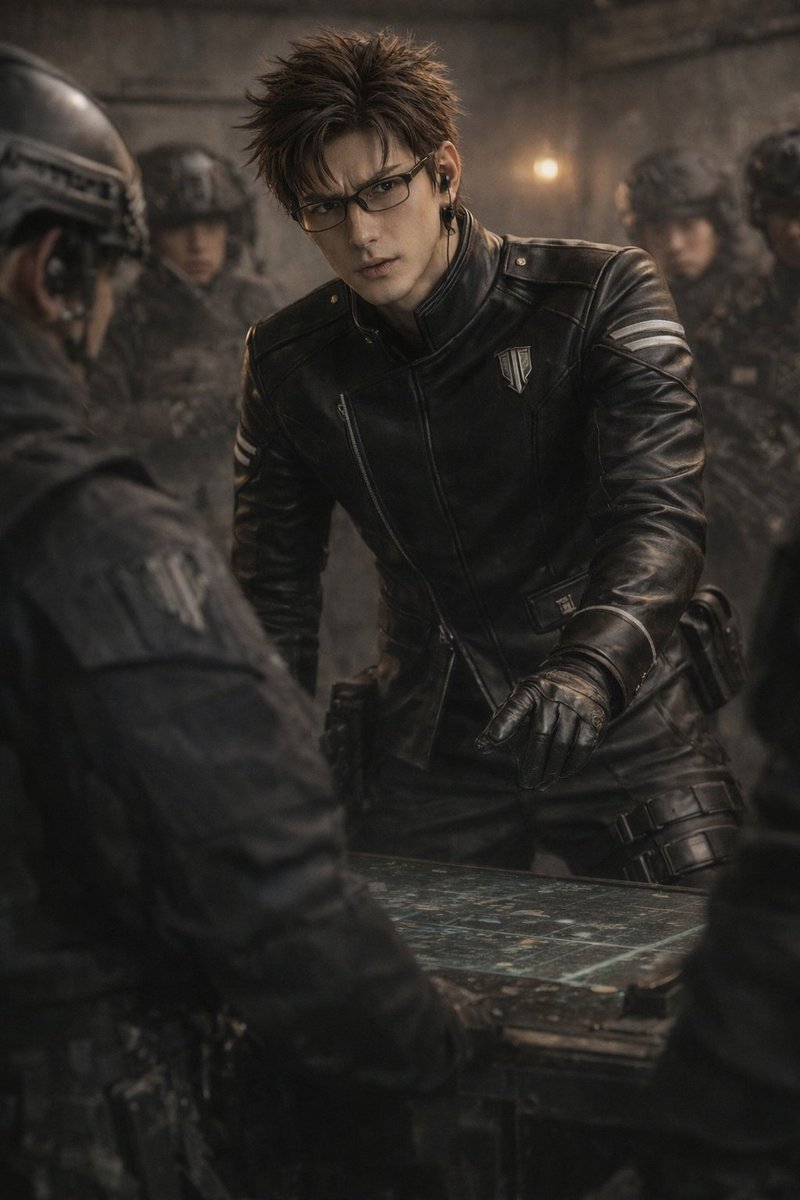
A cinematic, photorealistic shot of a argcharacter appearance: handsome young man with spiky dark brown hair and rectangular glasses, wearing a argoutfit: black leather tactical jacket with a high collar, silver chest badge, and white arm stripes along with black leather gloves and an earpiece. He is argaction: leaning intensely over a glowing tactical map on a table, pointing at it with his right hand. The scene takes place in a argsetting: dimly lit, gritty concrete command bunker. In the blurred background, argbackground characters: several soldiers in full black tactical gear and helmets stand at attention. The shoulder of another person in a black uniform is visible in the foreground left, framing the shot. The image features dark, moody lighting, shallow depth of field, and high-resolution gritty textures.
프롬프트 소개
Generate a photorealistic, cinematic image of a tactical leader in a gritty command bunker, perfect for intense, dramatic scenes. Use it as a 컨셉 아트 starting point for GPT Image 2: keep the visual structure and style constraints intact, then swap in your own subject, brand, or scene.
Common directions include gptimage2api prompts, gptimage2api, and en. Treat these tags as creative cues; the prompt structure and preview image are the more useful guide.
Start by replacing character appearance, outfit, action, and setting, then keep the camera, composition, and material cues in the same order. This makes the output easier to compare across variations.
이 프롬프트 사용법
- Copy the prompt and its variables.
- Select a compatible AI image model (e.g., Sora 2).
- Customize the variables in curly braces for your character, outfit, and setting.
- Generate the image and refine the prompt for desired results.


