Sora2 Hub
Sora2 Hub
  • 프롬프트 라이브러리
  • 가격
  • 쇼케이스
Sora2 Hub
Sora2 Hub
Sora2 Hub

Sora2 Hub

Sora 2, Veo 3.1, Nano Banana Pro로 구동되는 전문 AI 창작 플랫폼입니다. 고급 제어, HD 화질, 워터마크 없는 놀라운 동영상과 스튜디오급 이미지를 제작하세요.

Email:support@sora2hub.org

AI 비디오 생성

  • 텍스트에서 비디오
  • 이미지에서 비디오
  • Veo 3.1
  • Sora 2
  • Kling 3.0
  • Kling 2.6
  • Kling 2.5
  • Runway
  • Wan 2.6
  • Seedance 2.0
  • Hailuo 2.3
  • Grok Imagine
  • HappyHorse-1.0
  • HappyHorse 1.1
  • Kling 3.0 Turbo
  • Volcengine Video-to-Video Lip Sync
  • OmniHuman 1.5
  • Grok Imagine Video 1.5
  • Gemini Omni
  • Wan 2.7 Video
  • Seedance 2.0 Mini

AI 이미지 생성기

  • 텍스트에서 이미지
  • 이미지에서 이미지
  • Nano Banana Pro
  • Nano Banana
  • 4o Image
  • Flux Kontext
  • Z Image
  • Seedream 4.5
  • Seedream 5.0 Lite
  • Nano Banana 2
  • GPT Image 2
  • AI 이미지 업스케일러
  • Seedream 5.0 Pro
  • Nano Banana 2 Lite
  • Qwen Image 2.0

AI 효과

  • AI 나이 필터
  • AI 성별 변환
  • AI 키스
  • AI 허그
  • 지브리 이미지
  • AI 인어 필터
  • AI 바디쉐이크
  • 스마일 필터
  • AI 뚱뚱하게
  • 액션 피규어

제품

  • 기능
  • 쇼케이스
  • 가격

회사

  • 소개
  • 문의

© 2025 • Sora2 Hub ORG 모든 권리 보유.

  • 개인정보 처리방침
  • 서비스 약관
  • 환불 정책
  1. 홈
  2. /
  3. 프롬프트
  4. /
  5. GPT Image 2
  6. /
  7. GPT-Image-2 Speculation Infographic — Cyber-Investigation Board
GPT Image 2AI 프롬프트

GPT-Image-2 Speculation Infographic — Cyber-Investigation Board

Create a hyper-dense, mind-map infographic visualizing rumored AI features, leaks, and comparisons in a dark cyber-board style.
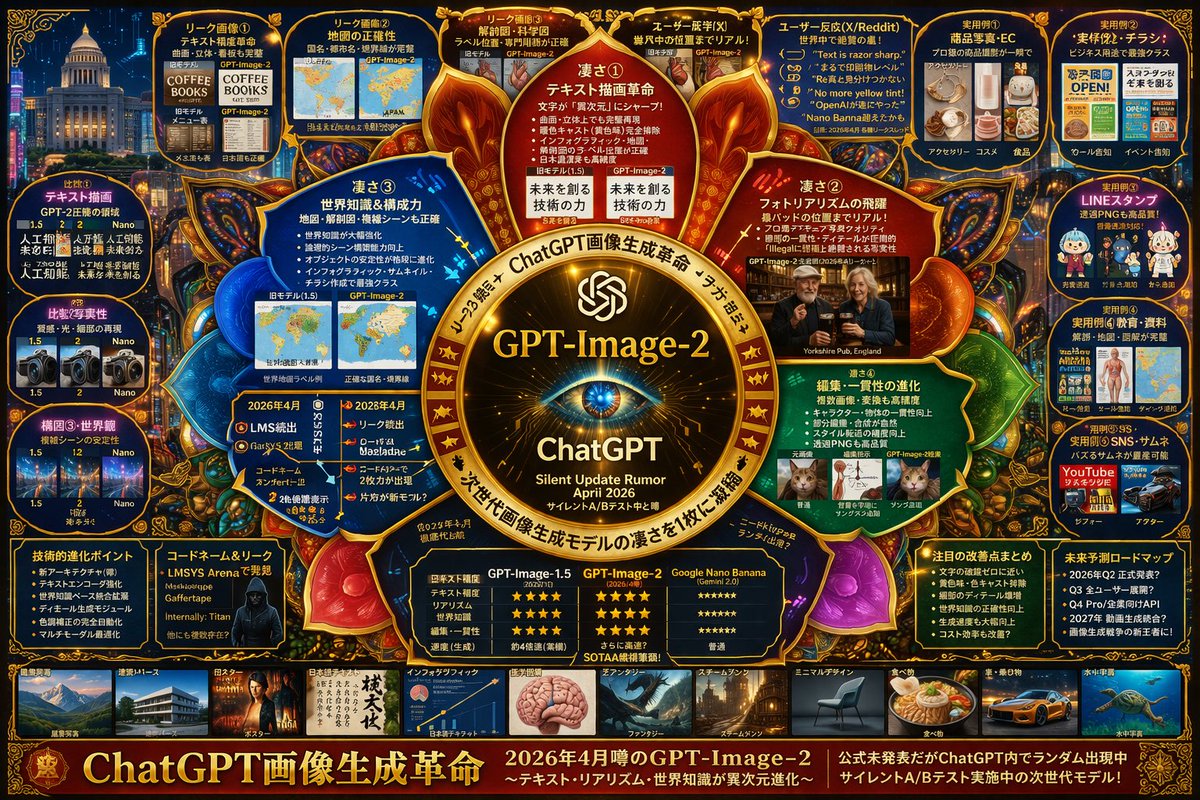
GPT-Image-2 Speculation Infographic — Cyber-Investigation Board
프롬프트 · EN
type
complex speculative tech infographic
style
{argument name="color palette" default="dark blue background with gold, red, and cyan glowing accents"}, highly dense, cyber-investigation board, mind-map layout
centerpiece
description
{argument name="central emblem" default="glowing golden circular emblem with an eye"}
text
item 1
{argument name="main title" default="GPT-Image-2"}
item 2
ChatGPT
item 3
{argument name="subtitle" default="Silent Update Rumor April 2026"}
layout
sections
item 1
title
Inner Nodes
position
surrounding center
count
4
labels
item 1
凄さ①
item 2
凄さ②
item 3
凄さ③
item 4
凄さ④
description
glowing circular text nodes highlighting core strengths
item 2
title
Top Leak Panels
position
top row
count
4
labels
item 1
リーク画像①
item 2
リーク画像②
item 3
リーク画像③
item 4
ユーザー既視(X)
description
before/after image comparisons
item 3
title
User Reactions
position
top right
count
1
labels
item 1
ユーザー反応(X/Reddit)
description
panel containing 5 quote bubbles
item 4
title
Practical Examples
position
far right column
count
5
labels
item 1
実用例①
item 2
実用例②
item 3
実用例③
item 4
実用例④
item 5
実用例⑤
description
use-case image grids including e-commerce, flyers, LINE stamps, education, and thumbnails
item 5
title
Comparisons
position
far left column
count
3
labels
item 1
比較①
item 2
比較②
item 3
構図③・世界観
description
version comparison image pairs
item 6
title
Bottom Data Panels
position
bottom row above gallery
count
5
labels
item 1
技術的進化ポイント
item 2
コードネーム&リーク
item 3
比較表
item 4
注目の改善点まとめ
item 5
未来予測ロードマップ
description
bulleted lists, a hacker portrait, and a 3-column star-rating comparison table
item 7
title
Style Gallery
position
bottom strip
count
10
labels
item 1
建築・パース
item 2
ポスター
item 3
日本語テキスト
item 4
インフォグラフィック
item 5
ファンタジー
item 6
スチームパンク
item 7
ミニマルデザイン
item 8
食べ物
item 9
車・乗り物
item 10
水中宇宙
description
horizontal row of thumbnail images showcasing different generation styles
footer
text
{argument name="footer text" default="ChatGPT画像生成革命"}
position
bottom edge

프롬프트 소개

Create a hyper-dense, mind-map infographic visualizing rumored AI features, leaks, and comparisons in a dark cyber-board style. Use it as a 컨셉 아트 starting point for GPT Image 2: keep the visual structure and style constraints intact, then swap in your own subject, brand, or scene.

This prompt is organized as structured JSON with fields such as type, style, centerpiece, and layout. Keeping that hierarchy helps the model separate the subject, layout, interface elements, and detail constraints.

Start with small changes to subject, scene, camera, and color, then generate a few variations to compare composition and detail without turning the page copy into keyword stuffing.

이 프롬프트 사용법

  1. Copy the JSON prompt from the site.
  2. Select a text-to-image model like DALL-E 3 or Stable Diffusion that handles complex prompts.
  3. Customize the variables (e.g., central emblem, main title) in the JSON to fit your topic.
  4. Paste the modified prompt into your chosen AI image generator.
  5. Generate the image and refine as needed for clarity and detail.
FAQ

s_shigel 斉藤 滋

@prompts→

게시일
2026년 4월 30일
원본 언어
EN
모델
GPT Image 2
카테고리
컨셉 아트
GPT Image 2컨셉 아트gpt-image-2gptimage2api promptsgptimage2apien
조회
1.6K
복사
184
좋아요
88

공유

GPT Image 2의 더 많은 프롬프트

전체 보기
Celebrity Crossover — Sora 2 Prompt

Celebrity Crossover — Sora 2 Prompt

@Conor_D_Dart
Futuristic Google Search Ad — AI Prompt

Futuristic Google Search Ad — AI Prompt

@AiWithTariq
Photorealistic Fashion Magazine Cover — Sora 2 Prompt

Photorealistic Fashion Magazine Cover — Sora 2 Prompt

@aichof21

Sora2Hub 프롬프트로 더 빠르게 제작하세요.

검색 가능한 프롬프트 페이지에서 시작해 적합한 모델 컨텍스트로 바로 생성하세요.

프롬프트 탐색