
Neo-Noir Chinese Crime Poster — Dark Thriller Key Art
Generate a moody, cinematic Chinese crime-thriller poster with noir aesthetics, red calligraphy accents, and gritty urban atmosphere.
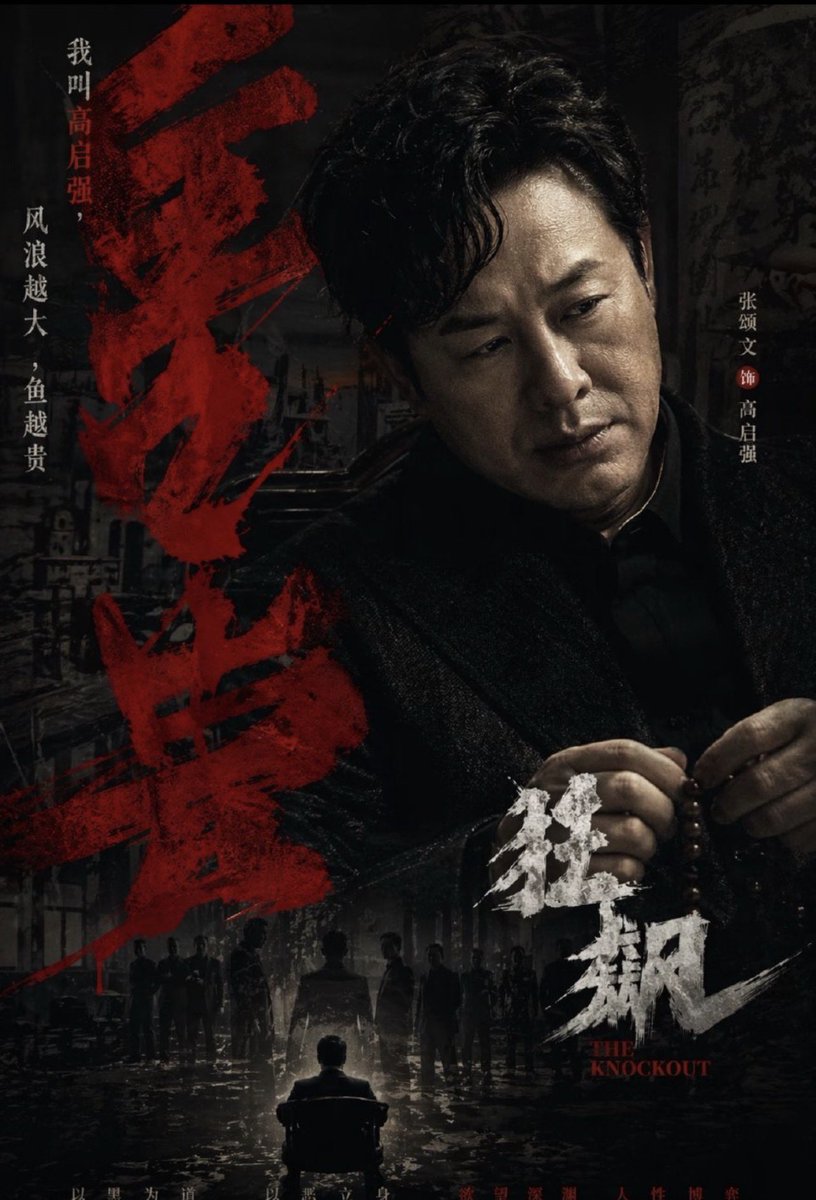
A dark, gritty Chinese crime-thriller movie poster in a vertical one-sheet layout, with a moody neo-noir aesthetic and heavy cinematic contrast. The composition centers on a half-length portrait of a menacing middle-aged East Asian man with wavy black hair, wearing a dark textured overcoat over a black shirt, his face mostly swallowed by shadow, shown from chest up and slightly off-center to the right. His hands are visible in the lower-right area, calmly holding a string of dark wooden prayer beads, suggesting power, danger, and ritual. The background is a dim urban alley or old city street at night, layered with grunge textures, wet pavement reflections, decayed walls, and faint architectural silhouettes. In the lower center, place 1 small back-facing seated figure in a chair under a harsh spotlight, surrounded by 9 standing human silhouettes in the darkness, creating a tense interrogation or underworld confrontation scene. Use an almost monochrome palette of black, charcoal, and dirty gray, with deep blood-red accents and distressed white typography. On the left side, add 1 huge vertical column of expressive red Chinese brush-calligraphy title text, painted with rough splashes and dry-brush texture, dominating nearly the full height of the poster. Along the far left edge, add 2 vertical lines of smaller Chinese text in white and red: "我叫高启强," and "风浪越大,鱼越贵". On the right side, add 1 vertical cast credit line in white Chinese text with a red circular separator: "张颂文 饰 高启强". In the lower-right quadrant, add 1 bold white brushstroke Chinese subtitle/title mark reading "狂飙", with the small English subtitle "THE KNOCKOUT" in red serif capitals beneath it. Add tiny faint Chinese release or tagline text along the bottom edge. The overall feeling should be oppressive, violent, prestigious, and highly designed, like a premium streaming-platform crime drama key art poster, with layered depth, dramatic shadows, textured smoke and grime, and realistic photographic detail.
프롬프트 소개
Generate a moody, cinematic Chinese crime-thriller poster with noir aesthetics, red calligraphy accents, and gritty urban atmosphere. Use it as a 컨셉 아트 starting point for GPT Image 2: keep the visual structure and style constraints intact, then swap in your own subject, brand, or scene.
Common directions include gptimage2api prompts, gptimage2api, and ja. Treat these tags as creative cues; the prompt structure and preview image are the more useful guide.
Start with small changes to subject, scene, camera, and color, then generate a few variations to compare composition and detail without turning the page copy into keyword stuffing.
이 프롬프트 사용법
- Copy the entire prompt text above.
- Paste it into your preferred AI image generation model (e.g., Sora 2, Midjourney).
- Customize elements like the character's appearance, text, or background details to match your vision.
- Adjust style parameters or aspect ratio for a vertical one-sheet format.
- Generate and iterate on the output until you achieve the desired cinematic mood.


