
GPT Image 2AI 프롬프트
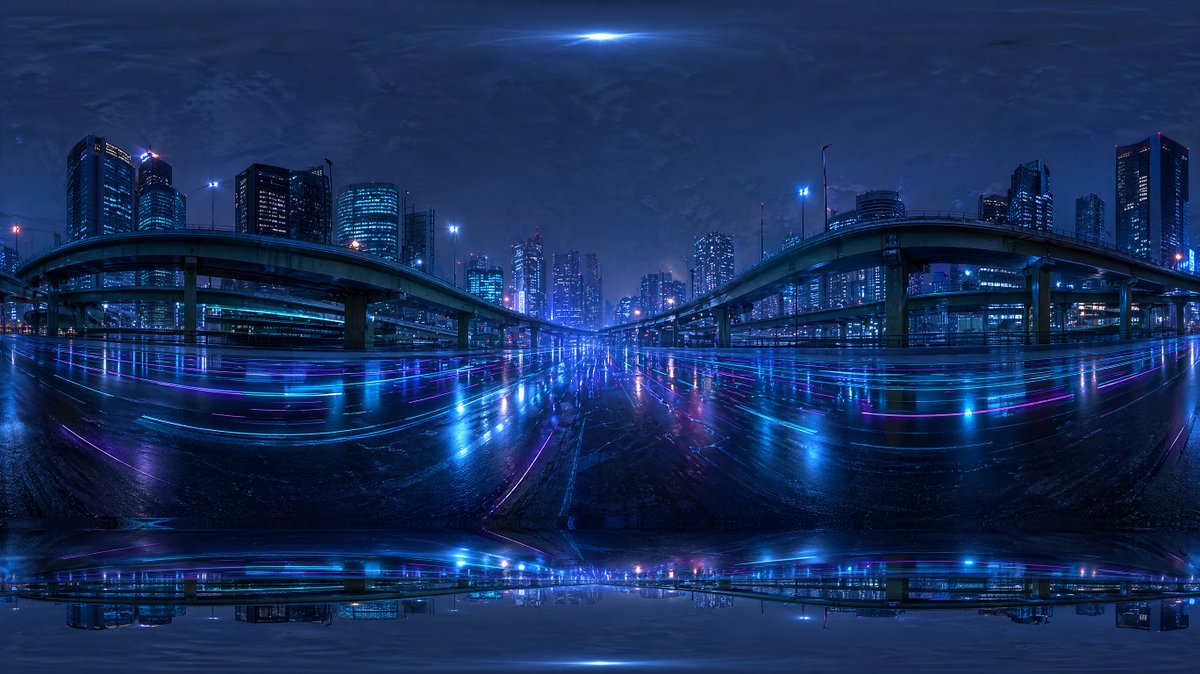
Cyberpunk Rain-Soaked Highway 360° HDRI — Sora 2 Prompt
Generates a 360° HDRI of a rain-soaked cyberpunk highway at night with neon reflections, ideal for 3D environments and lighting.
프롬프트 · EN
创建一张无缝的 360 度等距柱状投影 HDRI 环境贴图,展现未来主义城市夜间高速公路的景象,视角位于密集现代城市高架桥下宽阔湿润的道路中央。采用全景环绕构图,顶部和底部边缘带有强烈的鱼眼式等距柱状畸变,专为 Blender 世界背景设计。场景应包含 2 条大型弯曲高架匝道,左右各一,向中心拱起,并有多个支撑柱和向远处延伸的多层立交桥。道路四周环绕着灯火通明的写字楼和公寓楼天际线,窗户呈现冷蓝色和青色,并点缀少量洋红色和紫色装饰灯。路面应具有光泽且被雨水浸湿,反射出长条状的霓虹蓝、紫和粉色城市灯光。在路面上添加微妙的光轨和发光反射,营造出赛博朋克氛围。天空应为深沉、多云且富有质感的夜空,天顶处有微弱亮光,远处的建筑物周围环绕着柔和的雾气。整体色调以深靛蓝、电光蓝、青色和紫色为主。画面应具有电影感、情绪化、超高细节、照片级真实感,并具备逼真的城市照明和湿润表面的镜像反射,适合作为 HDRI 背景使用。包含轻微的全景接缝伪影和极点附近的拉伸畸变,使其呈现出 AI 生成但可用的环境贴图质感。
프롬프트 소개
Generates a 360° HDRI of a rain-soaked cyberpunk highway at night with neon reflections, ideal for 3D environments and lighting. Use it as a 컨셉 아트 starting point for GPT Image 2: keep the visual structure and style constraints intact, then swap in your own subject, brand, or scene.
Start with small changes to subject, scene, camera, and color, then generate a few variations to compare composition and detail without turning the page copy into keyword stuffing.
이 프롬프트 사용법
- Copy the prompt text above.
- Paste into an AI 360° HDRI generator (e.g., Sora 2, Blockade Labs Skybox).
- Set aspect ratio to 2:1 for equirectangular output.
- Generate and download the HDRI.
- Import into Blender as a World Environment texture for realistic lighting.


