
GPT Image 2AI 프롬프트
iPhone Photo: Woman Writing with Custom Logo — Sora 2
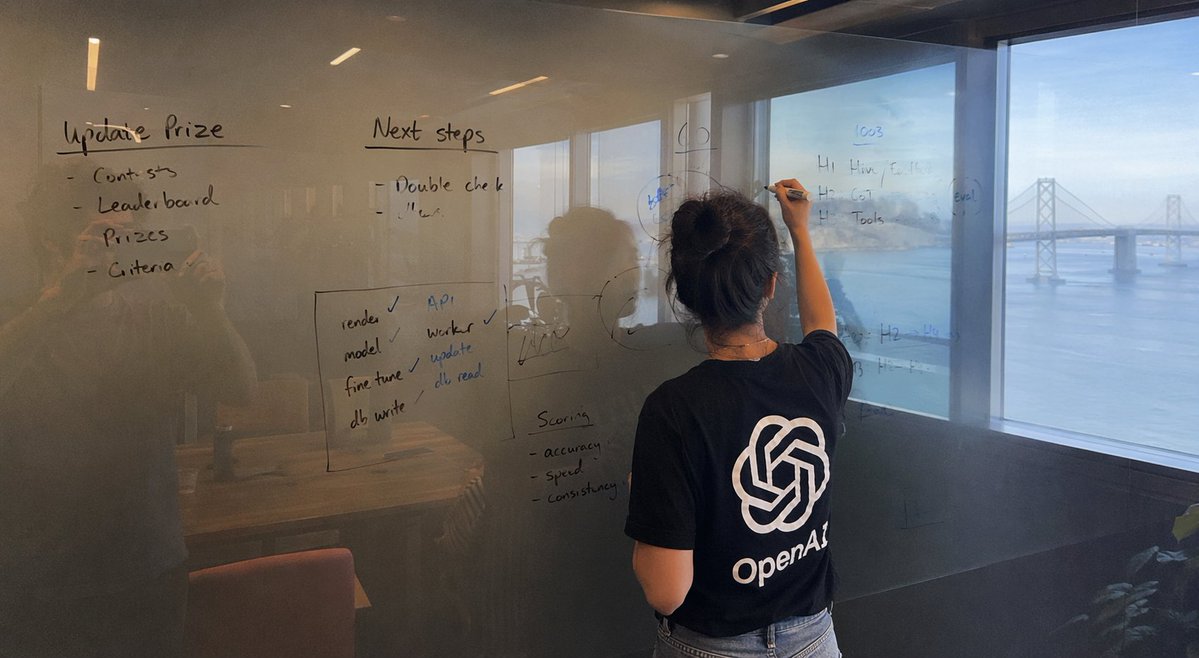
Generate iPhone-style photos of a woman writing by the Bay Bridge, with a customizable logo tee and lifelike reflections. Ideal for branding and ads.
프롬프트 · EN
一张由 iPhone 拍摄的宽幅照片,画面主体为一块玻璃项目,背景是 arglocation: 一个可以俯瞰海湾大桥的房间。视野中展示了 argsubject action: 一名正在书写的女性,她身穿一件印有醒目 arglogo: OpenAl 标志的 T 恤。字迹看起来自然且略显凌乱,我们还可以看到摄影师的倒影。
프롬프트 소개
Generate iPhone-style photos of a woman writing by the Bay Bridge, with a customizable logo tee and lifelike reflections. Ideal for branding and ads. Use it as a 컨셉 아트 starting point for GPT Image 2: keep the visual structure and style constraints intact, then swap in your own subject, brand, or scene.
Start by replacing location, subject action, and logo, then keep the camera, composition, and material cues in the same order. This makes the output easier to compare across variations.
이 프롬프트 사용법
- Copy the provided prompt template.
- Open Sora 2 (or another AI image tool with photorealistic capabilities).
- Modify the placeholders: set your desired location, subject action, and logo.
- Paste the full prompt and generate the image.
- If needed, tweak the prompt details or reroll to refine reflections and lighting.


