
Sora2 Hub
Sora2 Hub
  • 프롬프트 라이브러리
  • 가격
  • 쇼케이스
Sora2 Hub
Sora2 Hub
Sora2 Hub

Sora2 Hub

Sora 2, Veo 3.1, Nano Banana Pro로 구동되는 전문 AI 창작 플랫폼입니다. 고급 제어, HD 화질, 워터마크 없는 놀라운 동영상과 스튜디오급 이미지를 제작하세요.

Email:support@sora2hub.org

AI 비디오 생성

  • 텍스트에서 비디오
  • 이미지에서 비디오
  • Veo 3.1
  • Sora 2
  • Kling 3.0
  • Kling 2.6
  • Kling 2.5
  • Runway
  • Wan 2.6
  • Seedance 2.0
  • Hailuo 2.3
  • Grok Imagine
  • HappyHorse-1.0

AI 이미지 생성기

  • 텍스트에서 이미지
  • 이미지에서 이미지
  • Nano Banana Pro
  • Nano Banana
  • 4o Image
  • Flux Kontext
  • Z Image
  • Seedream 4.5
  • Seedream 5.0 Lite
  • Nano Banana 2
  • GPT Image 2
  • AI 이미지 업스케일러

AI 효과

  • AI 나이 필터
  • AI 성별 변환
  • AI 키스
  • AI 허그
  • 지브리 이미지
  • AI 인어 필터
  • AI 바디쉐이크
  • 스마일 필터
  • AI 뚱뚱하게
  • 액션 피규어

제품

  • 기능
  • 쇼케이스
  • 가격

회사

  • 소개
  • 문의

© 2025 • Sora2 Hub ORG 모든 권리 보유.

  • 개인정보 처리방침
  • 서비스 약관
  • 환불 정책
  1. 홈
  2. /
  3. 프롬프트
  4. /
  5. GPT Image 2
  6. /
  7. Japanese ChatGPT Workflow Infographic Prompt
GPT Image 2AI 프롬프트

Japanese ChatGPT Workflow Infographic Prompt

Generates a colorful, detailed Japanese social-media infographic poster explaining a six-step conversational workflow for creating character images and videos with ChatGPT.
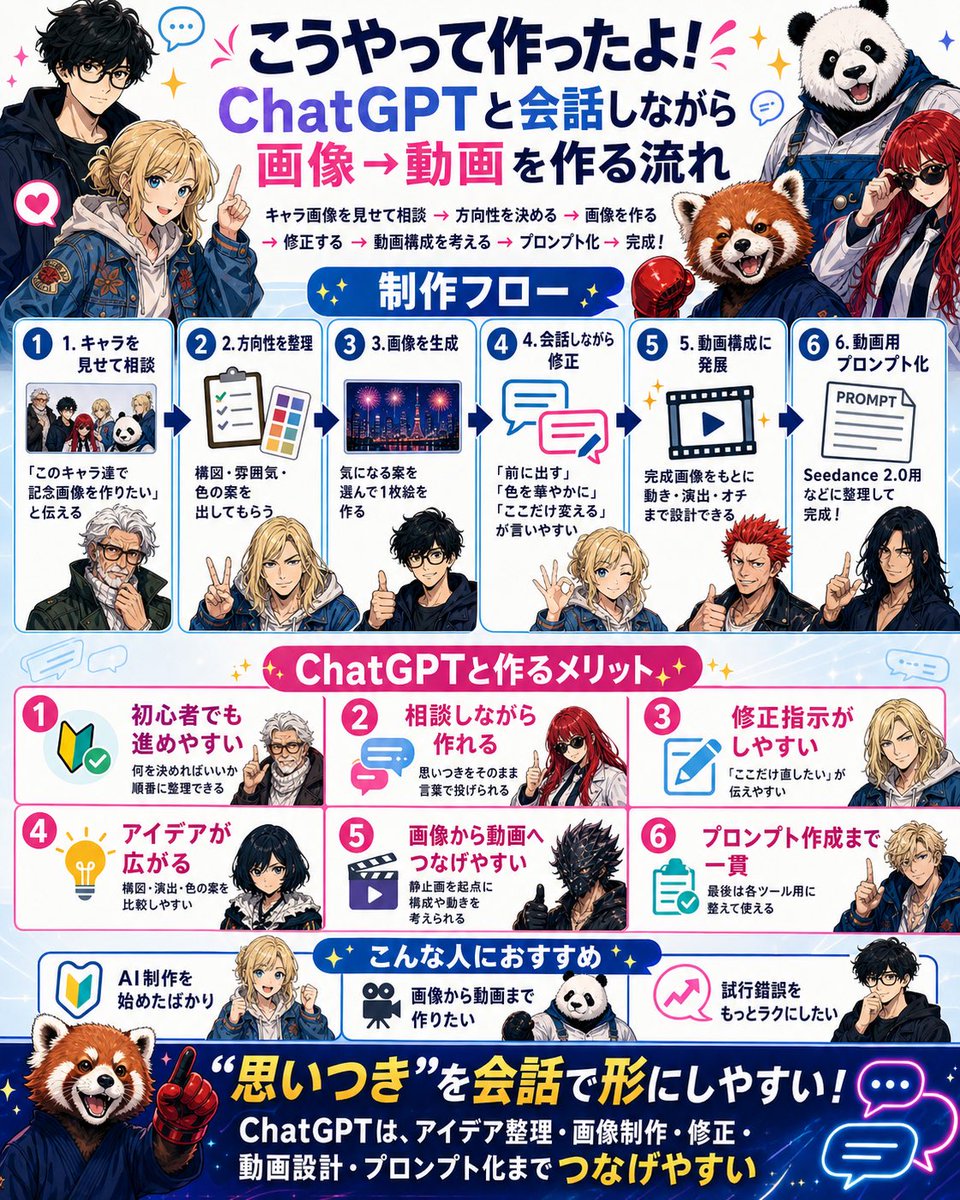
Japanese ChatGPT Workflow Infographic Prompt
프롬프트 · EN
type
bright Japanese social-media infographic poster
format
single square poster, 4:5-ish dense layout, white and pale blue background with blue panel borders, pink accents, yellow sparkles, speech bubbles, arrows, rounded cards, sticker-like anime characters and mascot animals
language
Japanese visible text
headline
position
top center
text
{argument name="headline text" default="こうやって作ったよ! ChatGPTと会話しながら 画像→動画を作る流れ"}
style
large bold Japanese lettering, dark navy and purple for ChatGPT, hot pink for 画像→動画, celebratory marks
top_characters
count
4
descriptions
item 1
left: tall black-haired anime man in dark jacket, face intentionally blurred
item 2
left-center: blond anime young man in blue embroidered jacket pointing upward, face intentionally blurred
item 3
right: smiling panda mascot wearing blue work overalls
item 4
right-lower: red panda mascot in blue hoodie next to a red-haired woman in sunglasses
intro_line
text
キャラ画像を見せて相談 → 方向性を決める → 画像を作る → 修正する → 動画構成を考える → プロンプト化 → 完成!
style
small bold text under headline with pink arrow separators
layout
sections
item 1
title
制作フロー
position
upper middle
count
6
style
six numbered blue-bordered cards connected by dark blue arrows
cards
item 1
number
1
title
1. キャラを見せて相談
visual
small group thumbnail of four characters and panda, plus lower anime man portrait
body
『このキャラ達で記念画像を作りたい』と伝える
item 2
number
2
title
2.方向性を整理
visual
clipboard checklist and color palette, blond character making peace sign
body
構図・雰囲気・色の案を出してもらう
item 3
number
3
title
3.画像を生成
visual
night city fireworks image thumbnail, black-haired man giving thumbs up
body
気になる案を選んで1枚絵を作る
item 4
number
4
title
4.会話しながら修正
visual
two overlapping chat bubbles, blond character making OK sign
body
『前に出す』『色を華やかに』『ここだけ変える』が言いやすい
item 5
number
5
title
5. 動画構成に発展
visual
film frame with play button, red-haired spiky anime man
body
完成画像をもとに動き・演出・オチまで設計できる
item 6
number
6
title
6. 動画用プロンプト化
visual
paper labeled PROMPT, dark-haired woman pointing
body
Seedance 2.0用などに整理して完成!
item 2
title
ChatGPTと作るメリット
position
middle
count
6
style
six pink-numbered benefit cards in two rows, white cards with pink borders and icons
cards
item 1
number
1
title
初心者でも進めやすい
icon
beginner mark with check
body
何を決めればいいか順番に整理できる
character
white-haired anime man face blurred
item 2
number
2
title
相談しながら作れる
icon
pink chat arrows
body
思いつきをそのまま言葉で投げられる
character
red-haired woman with sunglasses
item 3
number
3
title
修正指示がしやすい
icon
blue pencil edit icon
body
『ここだけ直したい』が伝えやすい
character
blond character face blurred
item 4
number
4
title
アイデアが広がる
icon
yellow lightbulb
body
構図・演出・色の案を比較しやすい
character
dark-haired woman face blurred
item 5
number
5
title
画像から動画へつなげやすい
icon
movie clapper/play icon
body
静止画を起点に構成や動きを考えられる
character
black spiky armored creature giving thumbs up
item 6
number
6
title
プロンプト作成まで一貫
icon
clipboard checklist
body
最後は各ツール用に整えて使える
character
blond character pointing
item 3
title
こんな人におすすめ
position
lower middle
count
3
style
three recommendation cards with blue borders and icons
cards
item 1
title
AI制作を始めたばかり
icon
beginner mark
character
red panda mascot
item 2
title
画像から動画まで作りたい
icon
movie camera
character
panda mascot
item 3
title
試行錯誤をもっとラクにしたい
icon
pink rising arrow
character
black-haired glasses anime man
footer
position
bottom
background
deep navy starry gradient banner
main_quote
{argument name="footer quote" default="“思いつき”を会話で形にしやすい!"}
subtext
ChatGPTは、アイデア整理・画像制作・修正・動画設計・プロンプト化まで つなげやすい
visuals
large red panda mascot on left pointing upward with red glove, neon blue and pink chat bubble icons on right, yellow sparkles
style
illustration
polished anime and mascot collage, YouTube thumbnail energy, crisp vector-infographic UI, glossy icons, expressive characters, intentional blurred rectangular face areas on several human characters
colors
white, sky blue, deep navy, hot pink, purple, yellow sparkle accents
typography
bold rounded Japanese display fonts, high contrast, dense but readable, numbered circles
customization
main tool
{argument name="main tool name" default="ChatGPT"}
video tool
{argument name="video tool name" default="Seedance 2.0"}
background tone
{argument name="background tone" default="bright blue and pink celebratory tech infographic"}

프롬프트 소개

Generates a colorful, detailed Japanese social-media infographic poster explaining a six-step conversational workflow for creating character images and videos with ChatGPT. Use it as a 컨셉 아트 starting point for GPT Image 2: keep the visual structure and style constraints intact, then swap in your own subject, brand, or scene.

This prompt is organized as structured JSON with fields such as type, format, language, headline, top characters, intro line, and layout. Keeping that hierarchy helps the model separate the subject, layout, interface elements, and detail constraints.

Start with small changes to subject, scene, camera, and color, then generate a few variations to compare composition and detail without turning the page copy into keyword stuffing.

이 프롬프트 사용법

  1. Copy the entire prompt JSON object.
  2. Paste it into your preferred AI image generator that supports detailed JSON prompts.
  3. Tweak the {argument name="headline text"} default value to customize the headline text.
  4. Adjust character descriptions or section details to fit your specific project or characters.
  5. Generate the image, specifying a square (1:1 or 4:5) aspect ratio for the best layout result.

FAQ

角煮星丸

@_3912657840→

게시일
2026년 5월 15일
원본 언어
EN
모델
GPT Image 2
카테고리
컨셉 아트
GPT Image 2컨셉 아트gpt-image-2twitter
조회
1.2K
복사
150
좋아요
83

공유

GPT Image 2의 더 많은 프롬프트

전체 보기
Anime Schoolgirls Sharing Transparent Umbrella — Sora 2 Prompt

Anime Schoolgirls Sharing Transparent Umbrella — Sora 2 Prompt

@yB7CqdfoDmrbhgD
Ultra-Realistic 3D Exploded View Prompt: Sony BRAVIA 8K TV

Ultra-Realistic 3D Exploded View Prompt: Sony BRAVIA 8K TV

@Ankit_patel211
Shenzhen Golden Hour City Prompt: Futuristic Heritage Poster

Shenzhen Golden Hour City Prompt: Futuristic Heritage Poster

@ivanalog_com

Sora2Hub 프롬프트로 더 빠르게 제작하세요.

검색 가능한 프롬프트 페이지에서 시작해 적합한 모델 컨텍스트로 바로 생성하세요.

프롬프트 탐색

