
Minimalist Japanese Legal Slide — Sora 2 Prompt
Generates a high-contrast Japanese presentation cover with bold black typography, vivid yellow accents, and clean editorial layout for professional legal documents.
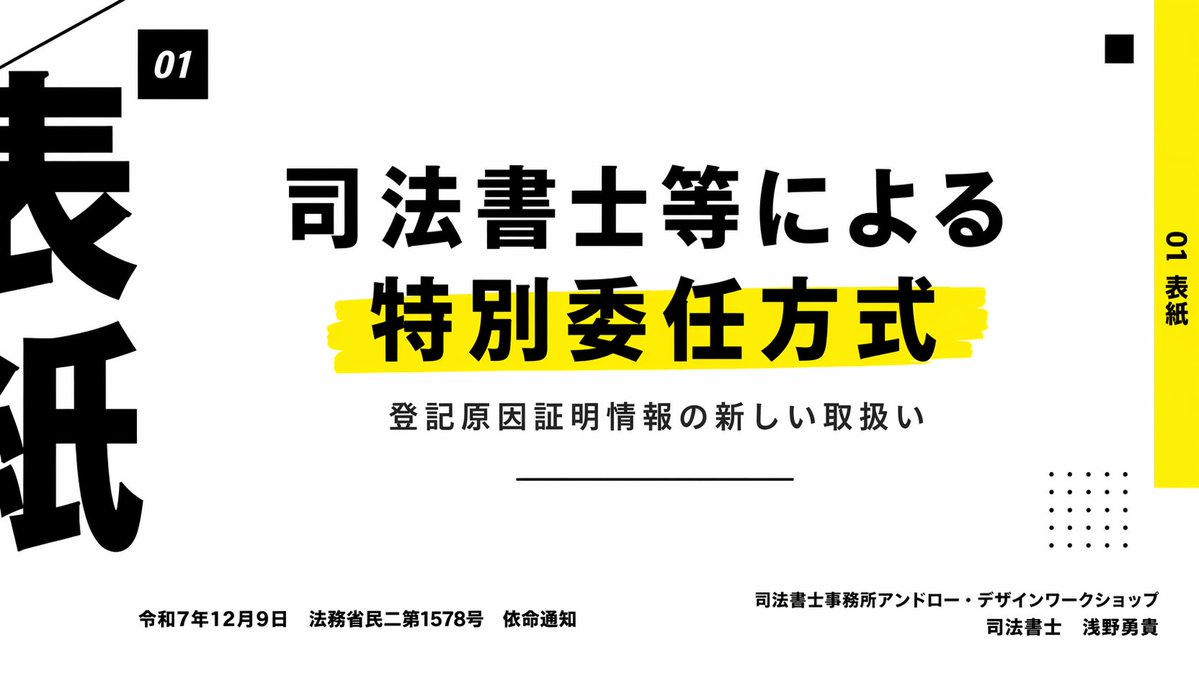
Create a clean, modern Japanese presentation cover slide in a minimalist editorial style, landscape 16:9. Use a very light gray background with bold black typography and vivid yellow accent bars. The layout is asymmetrical and high contrast, with lots of negative space. Place a small black square near the upper left containing the white text "01" in italic bold sans serif. Across the center, set a large Japanese title in heavy black type on 2 lines: "司法書士等による" on the first line and "特別委任方式" on the second line, with the second line much larger and sitting on a rough hand-painted yellow highlight stroke. Below it, add a smaller Japanese subtitle in black: "登記原因証明情報の新しい取扱い". Under the subtitle, place a thin horizontal black line centered. Along the far right edge, add a tall vertical yellow sidebar with black vertical text reading "01 表紙". Near the top right, place 1 small black square as a decorative element. In the lower right quadrant, place a decorative 5 by 5 dotted grid made of 25 small black dots. On the far left edge, crop in oversized black Japanese characters so they are only partially visible, creating a strong graphic border effect. At the bottom left, place a single line of small black Japanese text: "令和7年12月9日 法務省民二第1578号 依命通知". At the bottom right, place 2 lines of small black Japanese text, right aligned: first line "司法書士事務所アンドロー・デザインワークショップ", second line "司法書士 浅野勇貴". Add a thin diagonal black line entering from the top left corner as another graphic accent. Overall feel: premium business presentation, legal seminar title slide, Swiss-inspired grid composition, bold Japanese typography, sharp and print-like.
프롬프트 소개
Generates a high-contrast Japanese presentation cover with bold black typography, vivid yellow accents, and clean editorial layout for professional legal documents. Use it as a 컨셉 아트 starting point for GPT Image 2: keep the visual structure and style constraints intact, then swap in your own subject, brand, or scene.
Common directions include gptimage2api prompts, gptimage2api, and ko. Treat these tags as creative cues; the prompt structure and preview image are the more useful guide.
Start with small changes to subject, scene, camera, and color, then generate a few variations to compare composition and detail without turning the page copy into keyword stuffing.
이 프롬프트 사용법
- Copy the full prompt text below.
- Select your preferred AI image model (e.g., Sora 2, DALL·E 3).
- Adjust variables like title text, date, or accent colors if needed.
- Generate and review; iterate for best results.
- Use for presentation covers, legal briefs, or editorial design projects.


