
GPT Image 2AI 프롬프트

Japanese LP Psychology Infographic — 8-Step Conversion Guide

Generate a clean, 3-column Japanese marketing infographic mapping 8 user psychology stages to high-converting landing page structure in a professional blue-green palette.
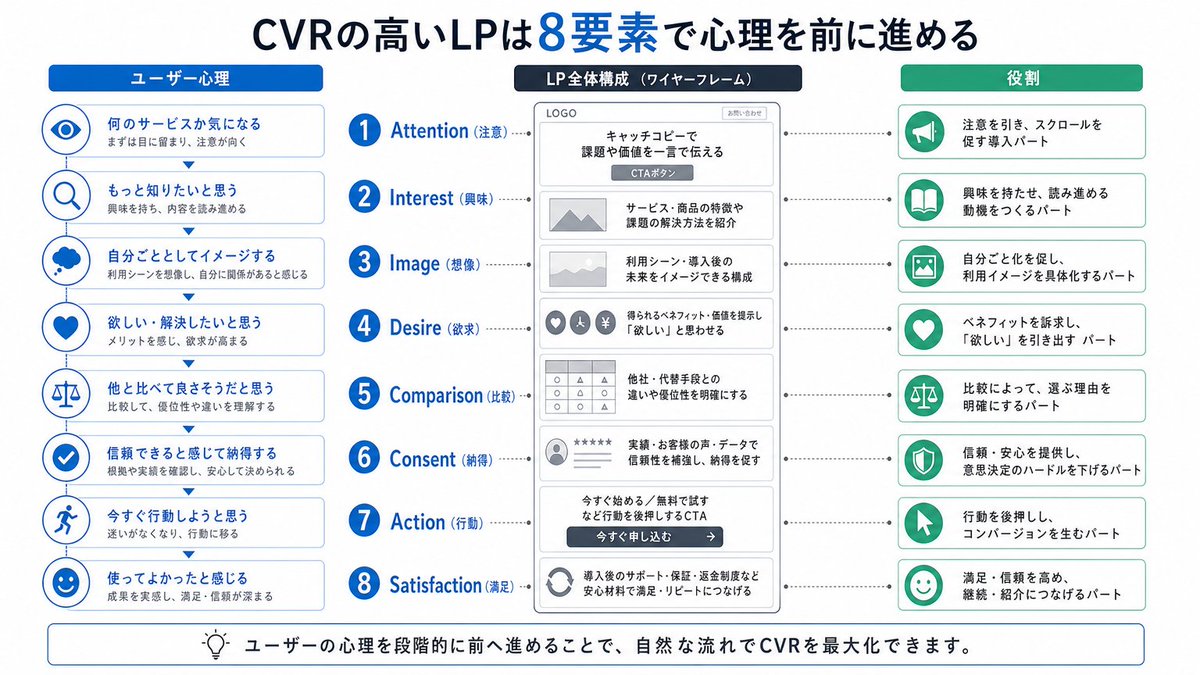
Japanese LP Psychology Infographic — 8-Step Conversion Guide
프롬프트 · EN
type
Japanese marketing infographic
topic
high-converting landing page structure guided by user psychology
style
look
clean flat business infographic
palette
primary
blue
secondary
green
neutral
white and light gray
accent
dark navy headline with one highlighted blue numeral
background
plain white
lines
thin gray connectors and borders
icons
simple circular line icons in blue and green
aspect_ratio
16:9 landscape
headline
text
CVRの高いLPは{argument name="number of elements" default="8"}要素で心理を前に進める
position
top center
emphasis
the numeral is large and bright blue
layout
columns
3
sections
item 1
title
ユーザー心理
position
left column
count
8
items
item 1
index
1
icon
eye
label
何のサービスか気になる
subtext
まずは目に留まり、注意が向く
item 2
index
2
icon
magnifying glass
label
もっと知りたいと思う
subtext
興味を持ち、内容を読み進める
item 3
index
3
icon
thought cloud
label
自分ごととしてイメージする
subtext
利用シーンを想像し、自分に関係があると感じる
item 4
index
4
icon
heart
label
欲しい・解決したいと思う
subtext
メリットを感じ、欲求が高まる
item 5
index
5
icon
balance scale
label
他と比べて良さそうだと思う
subtext
比較して、優位性や違いを理解する
item 6
index
6
icon
check mark badge
label
信頼できると感じて納得する
subtext
根拠や実績を確認し、安心して決められる
item 7
index
7
icon
running person
label
今すぐ行動しようと思う
subtext
迷いがなくなり、行動に移る
item 8
index
8
icon
smiling face
label
使ってよかったと感じる
subtext
成果を実感し、満足・信頼が深まる
item 2
title
LP全体構成(ワイヤーフレーム)
position
center column
count
8
items
item 1
index
1
label
Attention(注意)
wireframe
logo at top, main hero block with headline and CTA button
text
キャッチコピーで課題や価値を一言で伝える
item 2
index
2
label
Interest(興味)
wireframe
image placeholder and text block
text
サービス・商品の特徴や課題の解決方法を紹介
item 3
index
3
label
Image(想像)
wireframe
wide image placeholder
text
利用シーン・導入後の未来をイメージできる構成
item 4
index
4
label
Desire(欲求)
wireframe
three small circular icons and text
text
得られるベネフィット/価値を提示し『欲しい』と思わせる
item 5
index
5
label
Comparison(比較)
wireframe
comparison table grid
text
他社・代替手段との違いや優位性を明確にする
item 6
index
6
label
Consent(納得)
wireframe
star rating, avatar, testimonial lines
text
実績・お客様の声・データで信頼性を補強し、納得を促す
item 7
index
7
label
Action(行動)
wireframe
large CTA area with dark button
text
今すぐ始める/無料で試すなど行動を後押しするCTA
item 8
index
8
label
Satisfaction(満足)
wireframe
circular arrow support icon and text
text
導入後のサポート・保証・返金制度など安心材料で満足・リピートにつなげる
extra_labels
item 1
LOGO
item 2
CTAボタン
item 3
今すぐ申し込む
item 3
title
役割
position
right column
count
8
items
item 1
index
1
icon
megaphone
text
注意を引き、スクロールを促す導入パート
item 2
index
2
icon
open book
text
興味を持たせ、読み進める動機をつくるパート
item 3
index
3
icon
picture frame
text
自分ごと化を促し、利用イメージを具体化するパート
item 4
index
4
icon
heart
text
ベネフィットを訴求し、『欲しい』を引き出すパート
item 5
index
5
icon
balance scale
text
比較によって、選ぶ理由を明確にするパート
item 6
index
6
icon
shield
text
信頼・安心を提供し、意思決定のハードルを下げるパート
item 7
index
7
icon
cursor arrow
text
行動を後押しし、コンバージョンを生むパート
item 8
index
8
icon
smile face
text
満足・信頼を高め、継続・紹介につなげるパート
connectors
dotted horizontal guide lines connect each of the 8 center stages to matching items in the left and right columns; small downward arrows connect stacked cards in the left column
footer
style
rounded rectangular note bar with light background and thin blue outline
icon
light bulb
text
ユーザーの心理を段階的に前へ進めることで、自然な流れでCVRを最大化できます。
composition
top headline, three evenly spaced vertical columns beneath it, eight aligned horizontal rows across the page, symmetrical educational slide design for a landing page optimization manual
quality
sharp vector text, presentation-slide clarity, polished corporate training material

프롬프트 소개

Generate a clean, 3-column Japanese marketing infographic mapping 8 user psychology stages to high-converting landing page structure in a professional blue-green palette. Use it as a 컨셉 아트 starting point for GPT Image 2: keep the visual structure and style constraints intact, then swap in your own subject, brand, or scene.

This prompt is organized as structured JSON with fields such as type, topic, style, headline, layout, footer, and composition. Keeping that hierarchy helps the model separate the subject, layout, interface elements, and detail constraints.

Start with small changes to subject, scene, camera, and color, then generate a few variations to compare composition and detail without turning the page copy into keyword stuffing.

이 프롬프트 사용법

  1. Copy the full prompt JSON and paste it into your preferred AI image generator (e.g., Sora 2, Midjourney, or DALL·E).
  2. Adjust the number of elements argument if you want fewer or more than 8 psychology steps.
  3. Tweak color values in the palette object to match your brand guidelines if needed.
  4. Optionally modify item labels or icons to reflect your specific product or service.
  5. Generate the image and upscale to 16:9 landscape for slide decks or marketing manuals.

FAQ

GPT Image 2의 더 많은 프롬프트

전체 보기

Sora2Hub 프롬프트로 더 빠르게 제작하세요.

검색 가능한 프롬프트 페이지에서 시작해 적합한 모델 컨텍스트로 바로 생성하세요.

프롬프트 탐색

