
GPT Image 2AI 프롬프트
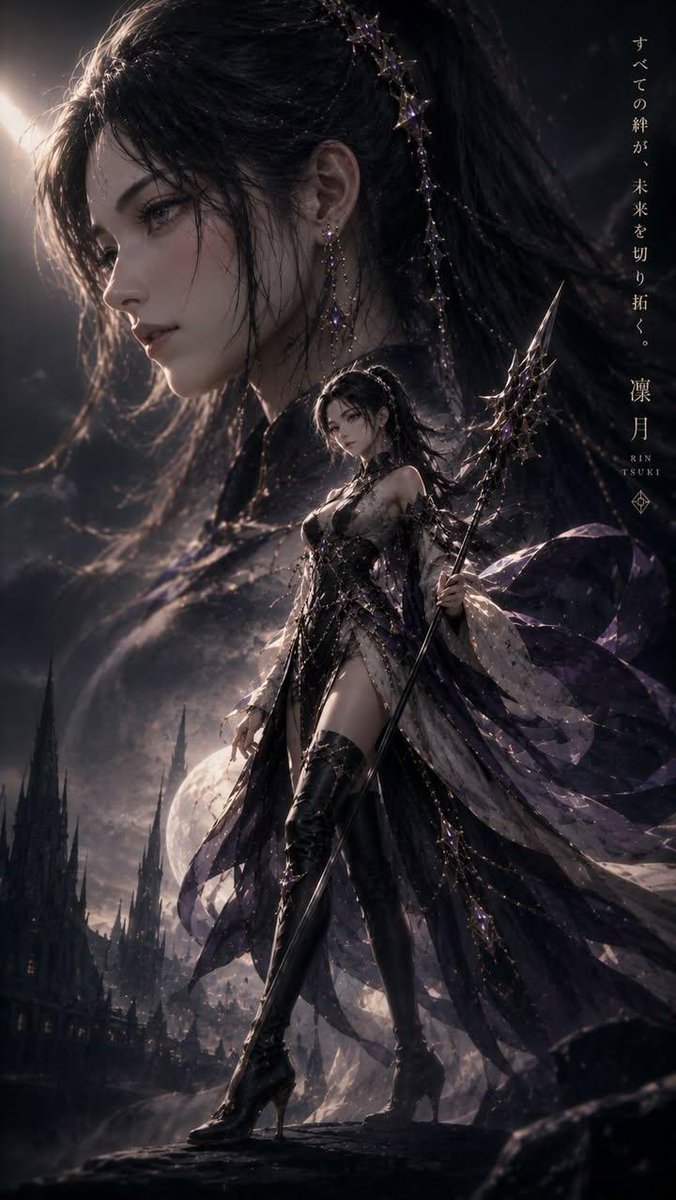
Cinematic Kodak Film Character Poster — Sora 2 Prompt
Generate a photo-realistic 9:16 movie character poster with Kodak film grain, shallow depth of field, and dramatic side-profile composition.
1 / 2
프롬프트 · EN
采用电影级画质、Kodak 胶片风格、略微降低饱和度、高动态范围以及逼真的对比度。 镜头:arglens: 85mm 镜头,argaperture: f/1.8 光圈,浅景深,RAW 格式照片级真实感,细节丰富。 生成一张以 argcharacter name: 角色名称 为主角的电影角色海报。 这既是一张角色海报,也是其故事的缩影。 角色面部的大型优雅侧影占据画面的一半,带有透视感和动感,营造出略微广角镜头的视觉效果。 角色的外观和服装与原始角色设计相符。 皮肤毛孔清晰。解剖结构正确。手指自然放松。不戴手套。 面部和服装特征也应根据原始设计进行调整,包括手中持有的武器,以及与角色设计一致的表情和姿势,生成 9:16 的海报图像。
프롬프트 소개
Generate a photo-realistic 9:16 movie character poster with Kodak film grain, shallow depth of field, and dramatic side-profile composition. Use it as a 컨셉 아트 starting point for GPT Image 2: keep the visual structure and style constraints intact, then swap in your own subject, brand, or scene.
Start by replacing lens, aperture, and character name, then keep the camera, composition, and material cues in the same order. This makes the output easier to compare across variations.
이 프롬프트 사용법
- Copy the prompt text and paste it into your preferred AI image generator.
- Select a model that supports high-resolution, photorealistic outputs (e.g., Sora 2, Midjourney, or DALL·E).
- Customize the bracketed variables: set the lens, aperture, and character name to match your vision.
- Adjust the aspect ratio setting to 9:16 for a vertical poster format.
- Generate the image and iterate by tweaking lighting or expressions until you achieve the desired cinematic look.


