
Sora2 Hub
Sora2 Hub
  • 프롬프트 라이브러리
  • 가격
  • 쇼케이스
Sora2 Hub
Sora2 Hub
Sora2 Hub

Sora2 Hub

Sora 2, Veo 3.1, Nano Banana Pro로 구동되는 전문 AI 창작 플랫폼입니다. 고급 제어, HD 화질, 워터마크 없는 놀라운 동영상과 스튜디오급 이미지를 제작하세요.

Email:support@sora2hub.org

AI 비디오 생성

  • 텍스트에서 비디오
  • 이미지에서 비디오
  • Veo 3.1
  • Sora 2
  • Kling 3.0
  • Kling 2.6
  • Kling 2.5
  • Runway
  • Wan 2.6
  • Seedance 2.0
  • Hailuo 2.3
  • Grok Imagine
  • HappyHorse-1.0

AI 이미지 생성기

  • 텍스트에서 이미지
  • 이미지에서 이미지
  • Nano Banana Pro
  • Nano Banana
  • 4o Image
  • Flux Kontext
  • Z Image
  • Seedream 4.5
  • Seedream 5.0 Lite
  • Nano Banana 2
  • GPT Image 2
  • AI 이미지 업스케일러

AI 효과

  • AI 나이 필터
  • AI 성별 변환
  • AI 키스
  • AI 허그
  • 지브리 이미지
  • AI 인어 필터
  • AI 바디쉐이크
  • 스마일 필터
  • AI 뚱뚱하게
  • 액션 피규어

제품

  • 기능
  • 쇼케이스
  • 가격

회사

  • 소개
  • 문의

© 2025 • Sora2 Hub ORG 모든 권리 보유.

  • 개인정보 처리방침
  • 서비스 약관
  • 환불 정책
  1. 홈
  2. /
  3. 프롬프트
  4. /
  5. GPT Image 2
  6. /
  7. Manhwa Style Boss Portrait — Anime Sora 2 Prompt
GPT Image 2AI 프롬프트

Manhwa Style Boss Portrait — Anime Sora 2 Prompt

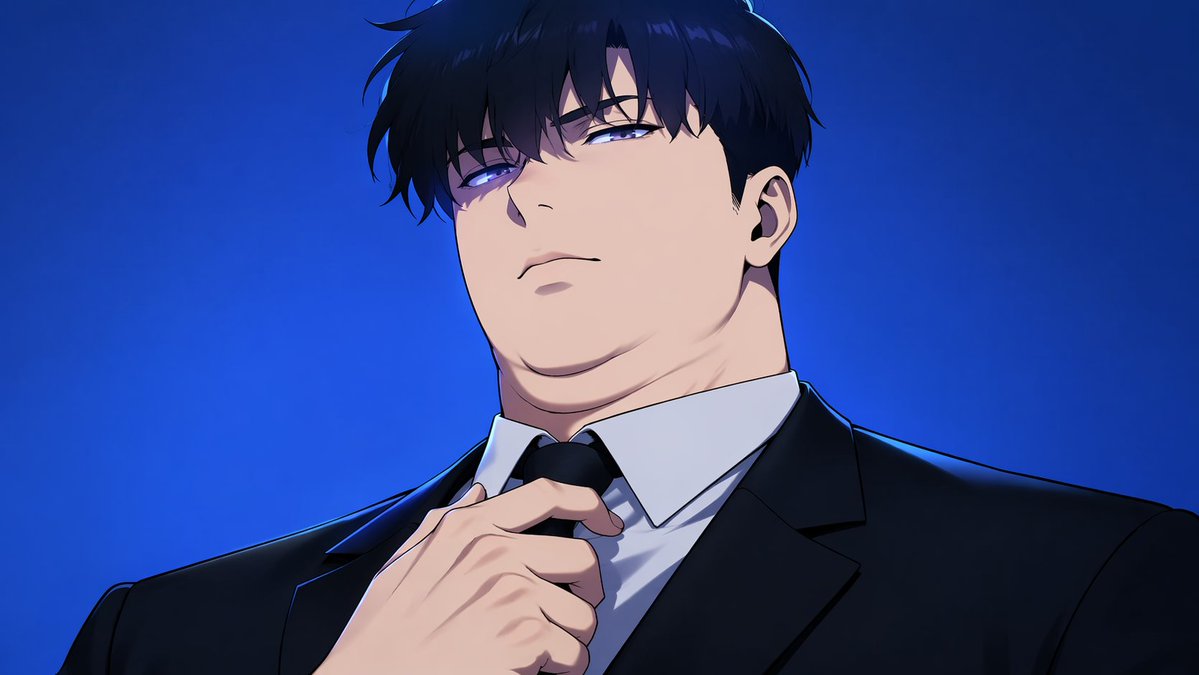
Create a dramatic anime manhwa-style portrait of a powerful, intense businessman adjusting his tie with customizable hair, eyes, and background colors.
Manhwa Style Boss Portrait — Anime Sora 2 Prompt
프롬프트 · EN
An anime manhwa style illustration of a heavily built, chubby man with a thick neck and a double chin, looking down at the viewer with an intense, arrogant expression. He has messy arghair color: black hair and glowing argeye color: piercing blue eyes. He is wearing a crisp white dress shirt under a argsuit color: black suit jacket, and his right hand is reaching up to adjust his black tie. The lighting is dramatic with sharp shadows, set against a solid argbackground color: vibrant blue gradient background.

프롬프트 소개

Create a dramatic anime manhwa-style portrait of a powerful, intense businessman adjusting his tie with customizable hair, eyes, and background colors. Use it as a 컨셉 아트 starting point for GPT Image 2: keep the visual structure and style constraints intact, then swap in your own subject, brand, or scene.

Common directions include gptimage2api prompts, gptimage2api, and en. Treat these tags as creative cues; the prompt structure and preview image are the more useful guide.

Start by replacing hair color, eye color, suit color, and background color, then keep the camera, composition, and material cues in the same order. This makes the output easier to compare across variations.

이 프롬프트 사용법

  1. Copy the full prompt text from the page.
  2. Paste it into your preferred AI image generator (e.g., Sora, Midjourney, DALL·E).
  3. Customize the bracketed variables like hair color, eye color, suit color, and background to match your vision.
  4. Generate the image and review the output.
  5. Refine by adjusting variables or adding style keywords for a more polished result.

FAQ

Mirochill

@prompts→

게시일
2026년 4월 30일
원본 언어
EN
모델
GPT Image 2
카테고리
컨셉 아트
GPT Image 2컨셉 아트gpt-image-2gptimage2api promptsgptimage2apien
조회
1.2K
복사
177
좋아요
30

공유

GPT Image 2의 더 많은 프롬프트

전체 보기
Japanese Cinematic Poster Prompt — 4-Panel Agency Ad

Japanese Cinematic Poster Prompt — 4-Panel Agency Ad

@kantamizutamari
Shenzhen Golden Hour City Prompt: Futuristic Heritage Poster

Shenzhen Golden Hour City Prompt: Futuristic Heritage Poster

@ivanalog_com
Minimalist Mother's Day Wallpaper — Sora 2 Prompt with Calligraphy & Carnations

Minimalist Mother's Day Wallpaper — Sora 2 Prompt with Calligraphy & Carnations

@EdimakorJP

Sora2Hub 프롬프트로 더 빠르게 제작하세요.

검색 가능한 프롬프트 페이지에서 시작해 적합한 모델 컨텍스트로 바로 생성하세요.

프롬프트 탐색

