
GPT Image 2AI 프롬프트
Professional Interior Design Mood Board Generator — Sora 2 Prompt
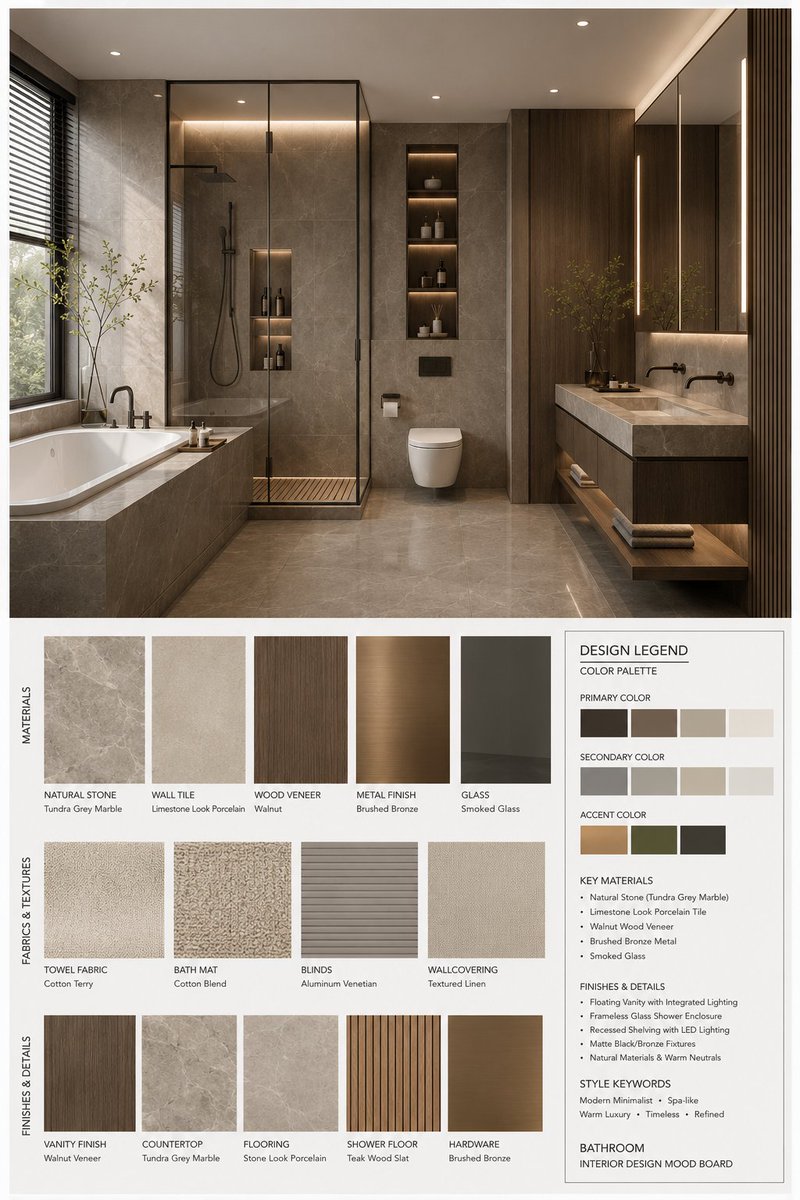
Create stunning, proposal-ready mood boards with photorealistic 3D renders, curated material samples, and a detailed color scheme info panel in a clean 3:4 layout.
1 / 3
프롬프트 · EN
你是一位专业的室内设计 Mood Board 创作者。基于提供的 argspace type: bedroom 设计照片,生成一张高端的 3:4 竖版 Mood Board。整体视觉效果应参考专业设计提案,展示 argstyle name: Modern Mid-century 的美学特征,营造 [Mood Keywords] 的氛围,并符合 [Branding Tone] 的设计表达。
空间类型:argspace type: bedroom
布局要求:
上部:一张高分辨率、照片级的 argspace type: bedroom 室内渲染图。它必须在结构、家具、材料、色彩和灯光上与用户的照片保持一致,但需针对专业提案进行优化。重点关注:[Key Furniture Elements]、[Material Keywords]、[Color Palette]、[Lighting Style]。
下部:展示严格对应上方设计的材料和家具样本,包括:材料样本、织物样本、色卡、饰面样本,以及相关的木材/石材/金属/玻璃/皮革样本。所有内容必须反映方案的核心材料和色彩逻辑。
右下角:一个设计说明 / 配色方案信息框,显示:主色、辅色、点缀色、核心材料、饰面描述和风格关键词。
风格与输出:
专业公司级布局;极简、干净、克制且有序;清晰的视觉层级和留白控制;材料/颜色标签清晰且现代;整体氛围与 argstyle name: Modern Mid-century 相符;渲染质量:4K 超高清,超精细,照片级渲染。3:4 竖版构图。
标签要求:
每个样本必须有一个清晰的标签,按 [Label Language] 的材料/颜色/饰面名称组织,风格简洁、专业且对齐整齐。
프롬프트 소개
Create stunning, proposal-ready mood boards with photorealistic 3D renders, curated material samples, and a detailed color scheme info panel in a clean 3:4 layout. Use it as a 컨셉 아트 starting point for GPT Image 2: keep the visual structure and style constraints intact, then swap in your own subject, brand, or scene.
Start by replacing space type and style name, then keep the camera, composition, and material cues in the same order. This makes the output easier to compare across variations.
이 프롬프트 사용법
- Copy the entire prompt and paste it into your preferred AI image generation tool.
- Replace the placeholder variables like
{space type}(e.g., living room, kitchen) and{style name}(e.g., Scandinavian, Japandi) with your desired design specifications. - Fill in the bracketed keywords such as
[Mood Keywords],[Key Furniture Elements],[Material Keywords],[Color Palette],[Lighting Style], and[Label Language]with details from your design brief. - Generate the image. The AI will produce a vertical 3:4 mood board featuring a high-resolution render on top and corresponding material, fabric, and finish samples below.
- Review the output and adjust your keywords for finer control over the materials, color harmony, and overall aesthetic to match your client's vision.


