
Sora2 Hub
Sora2 Hub
  • 프롬프트 라이브러리
  • 가격
  • 쇼케이스
Sora2 Hub
Sora2 Hub
Sora2 Hub

Sora2 Hub

Sora 2, Veo 3.1, Nano Banana Pro로 구동되는 전문 AI 창작 플랫폼입니다. 고급 제어, HD 화질, 워터마크 없는 놀라운 동영상과 스튜디오급 이미지를 제작하세요.

Email:support@sora2hub.org

AI 비디오 생성

  • 텍스트에서 비디오
  • 이미지에서 비디오
  • Veo 3.1
  • Sora 2
  • Kling 3.0
  • Kling 2.6
  • Kling 2.5
  • Runway
  • Wan 2.6
  • Seedance 2.0
  • Hailuo 2.3
  • Grok Imagine
  • HappyHorse-1.0

AI 이미지 생성기

  • 텍스트에서 이미지
  • 이미지에서 이미지
  • Nano Banana Pro
  • Nano Banana
  • 4o Image
  • Flux Kontext
  • Z Image
  • Seedream 4.5
  • Seedream 5.0 Lite
  • Nano Banana 2
  • GPT Image 2
  • AI 이미지 업스케일러

AI 효과

  • AI 나이 필터
  • AI 성별 변환
  • AI 키스
  • AI 허그
  • 지브리 이미지
  • AI 인어 필터
  • AI 바디쉐이크
  • 스마일 필터
  • AI 뚱뚱하게
  • 액션 피규어

제품

  • 기능
  • 쇼케이스
  • 가격

회사

  • 소개
  • 문의

© 2025 • Sora2 Hub ORG 모든 권리 보유.

  • 개인정보 처리방침
  • 서비스 약관
  • 환불 정책
  1. 홈
  2. /
  3. 프롬프트
  4. /
  5. GPT Image 2
  6. /
  7. Character Sheet: Multi-View Concept Art — Sora 2 Prompt
GPT Image 2AI 프롬프트

Character Sheet: Multi-View Concept Art — Sora 2 Prompt

Produce a professional character sheet with front, side, & back views, expression variations, exploded outfit details, color palette, and worldbuilding note in high-res concept art.
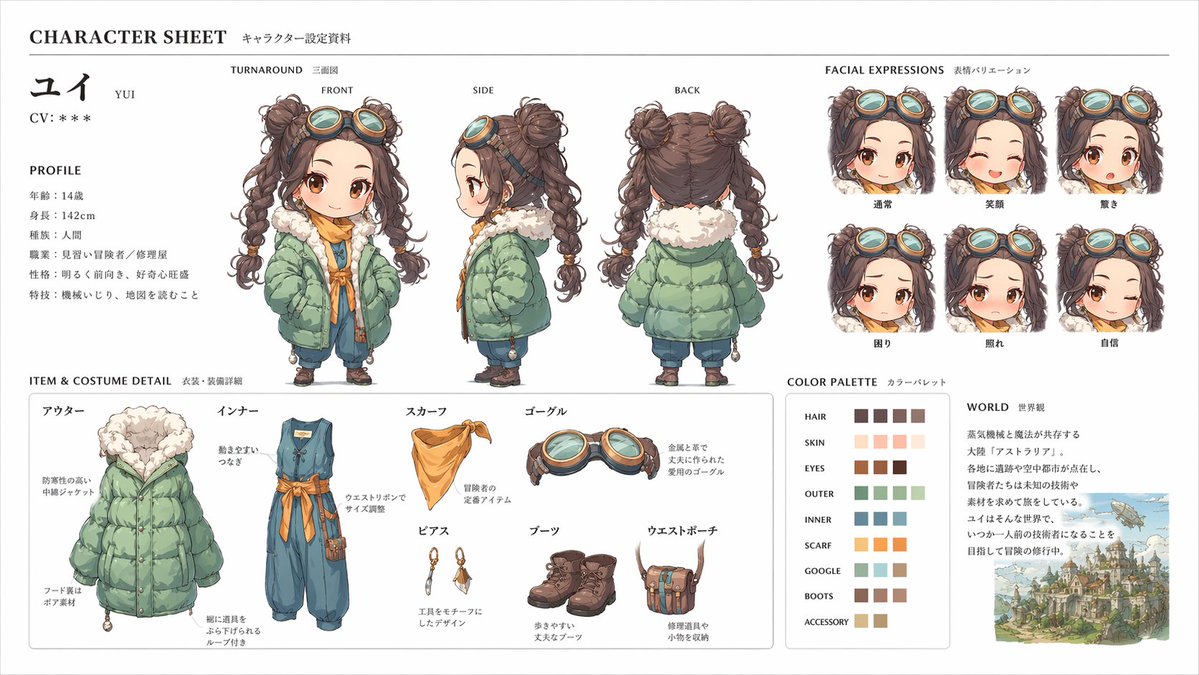
Character Sheet: Multi-View Concept Art — Sora 2 Prompt
프롬프트 · EN
Create a professional character sheet based on this character and background, similar to an official setting guide. Include front, side, and back views, expression variations, exploded outfit or equipment details, a color palette, and a short worldbuilding note. Keep the whole composition organized on a clean white background with a diagram-like layout and high-resolution concept art quality.

프롬프트 소개

Produce a professional character sheet with front, side, & back views, expression variations, exploded outfit details, color palette, and worldbuilding note in high-res concept art. Use it as a 컨셉 아트 starting point for GPT Image 2: keep the visual structure and style constraints intact, then swap in your own subject, brand, or scene.

Common directions include character design, intermediate, character sheet, and concept art. Treat these tags as creative cues; the prompt structure and preview image are the more useful guide.

Start with small changes to subject, scene, camera, and color, then generate a few variations to compare composition and detail without turning the page copy into keyword stuffing.

이 프롬프트 사용법

  1. Copy the entire prompt text.
  2. Replace [CHARACTER DESCRIPTION] with your own character’s details and background.
  3. Choose an AI image generation model (e.g., Midjourney, DALL·E 3, Stable Diffusion).
  4. Paste the modified prompt into your chosen platform and generate.
  5. Review the output; adjust your character description or style tags as needed for best results.

FAQ

Toshi_nyaruo_AI

@Toshi_nyaruo_AI

게시일
2026년 4월 25일
원본 언어
EN
모델
GPT Image 2
카테고리
컨셉 아트
GPT Image 2컨셉 아트gpt-image-2character designintermediatecharacter sheetconcept art
조회
755
복사
109
좋아요
56

공유

GPT Image 2의 더 많은 프롬프트

전체 보기
Minimalist Japanese Electric Nail Clipper Product Landing Page — Sora 2 Prompt

Minimalist Japanese Electric Nail Clipper Product Landing Page — Sora 2 Prompt

@eisho_m
Anime Mahjong Win Scene with Yakuza Score UI — Sora 2 Prompt

Anime Mahjong Win Scene with Yakuza Score UI — Sora 2 Prompt

@AI_Ossan
Dark Anime Devil Girl Mario Kart Poster — Sora 2 Prompt

Dark Anime Devil Girl Mario Kart Poster — Sora 2 Prompt

@opener_ai

Sora2Hub 프롬프트로 더 빠르게 제작하세요.

검색 가능한 프롬프트 페이지에서 시작해 적합한 모델 컨텍스트로 바로 생성하세요.

프롬프트 탐색

