
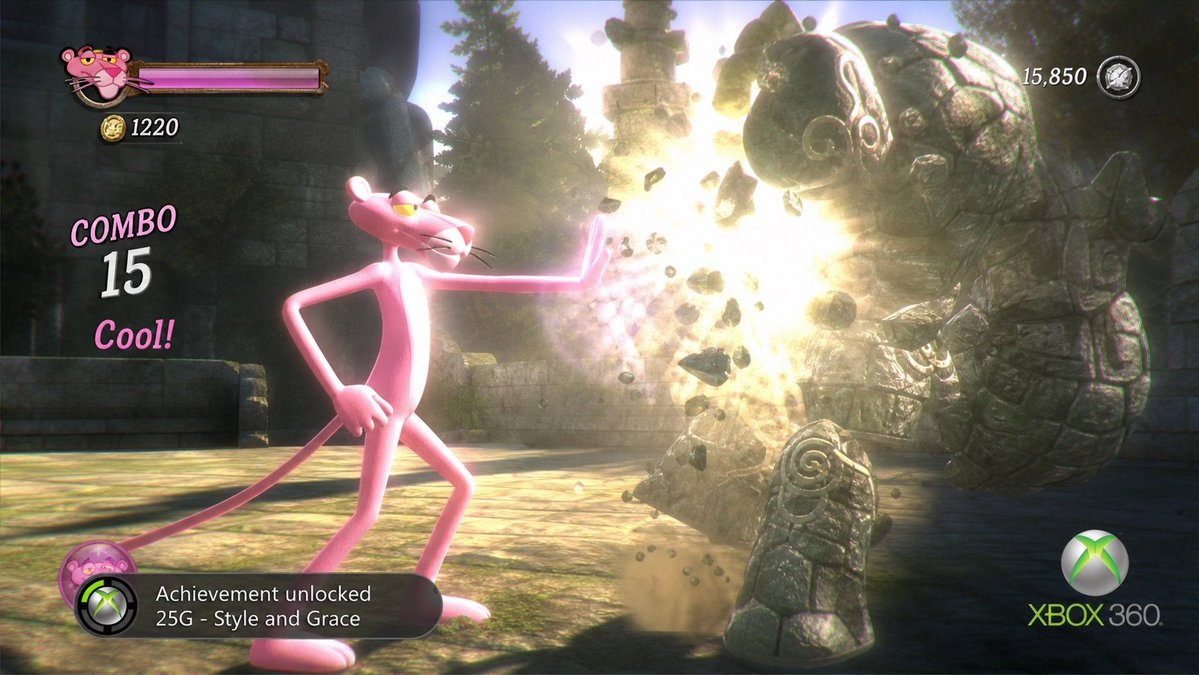
Pink Panther Xbox 360 Action Game Screenshot
Generate a cinematic, retro-styled Xbox 360 game screenshot featuring the Pink Panther in stylish combat with a gargoyle, complete with a full HUD and achievement UI.
프롬프트 소개
Generate a cinematic, retro-styled Xbox 360 game screenshot featuring the Pink Panther in stylish combat with a gargoyle, complete with a full HUD and achievement UI. Use it as a 컨셉 아트 starting point for GPT Image 2: keep the visual structure and style constraints intact, then swap in your own subject, brand, or scene.
This prompt is organized as structured JSON with fields such as type, aspect ratio, scene, main subject, enemy, hud and ui, and text to render. Keeping that hierarchy helps the model separate the subject, layout, interface elements, and detail constraints.
Start with small changes to subject, scene, camera, and color, then generate a few variations to compare composition and detail without turning the page copy into keyword stuffing.
이 프롬프트 사용법
- Copy the entire prompt body text provided.
- Choose a compatible AI image generation model like Sora.
- Replace the placeholder arguments (e.g.,
{argument name="main character" default="Pink Panther"}) with your desired character or text to customize the output. - Adjust the aspect ratio or other scene details if needed.
- Generate the image to create your unique, nostalgic Xbox 360-style action screenshot.


