
GPT Image 2AI 프롬프트
Popmart 3D Character Toy Poster Prompt — Matte Clay Aesthetic
Create a premium, collectible-style 3D character toy poster with Popmart aesthetics, featuring a cute clay figure and bold typography.
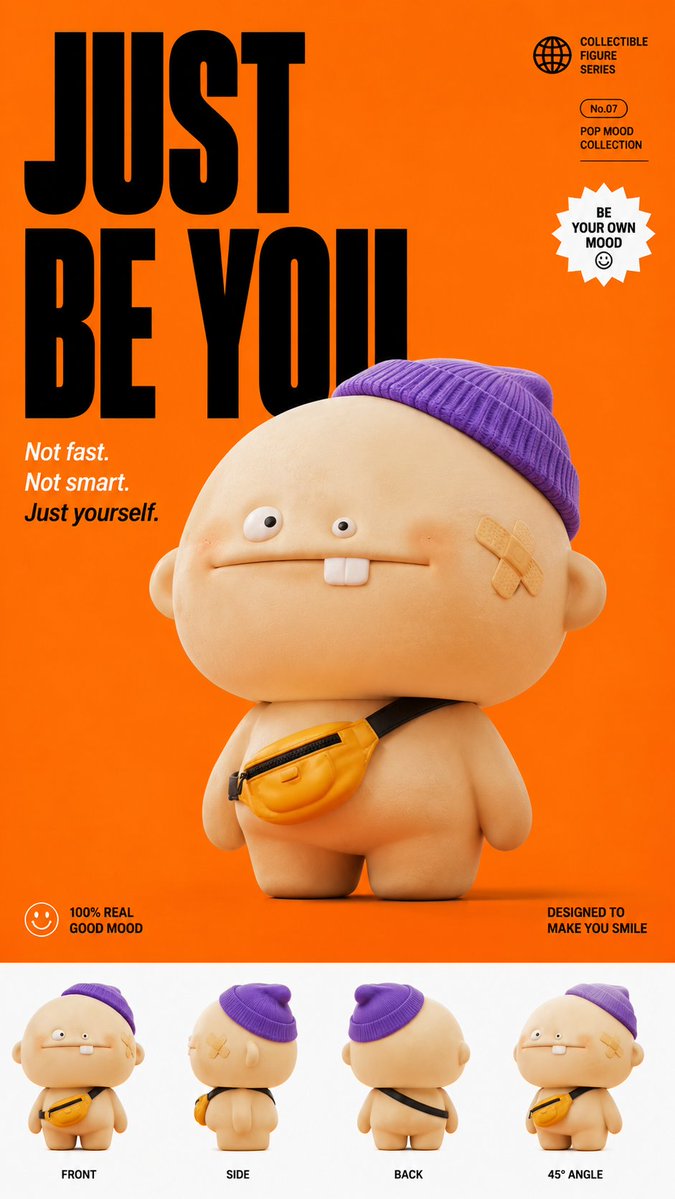
프롬프트 · EN
一张高级收藏级玩具人偶产品海报,背景为醒目的纯色 argbackground color: 橙色,主角是一个圆滚滚、可爱的 3D 角色,有着超大的圆脑袋、细小且不对称的卡通眼睛、扁平宽大的嘴巴并露出一颗兔牙,头戴一顶微微倾斜的 arghat type: 紫色针织冷帽,身上斜挎着一个小巧的黄色腰包,脸颊贴着一张创可贴。角色采用柔和的哑光粘土质感渲染,带有细腻的环境光遮蔽阴影,以微仰视角拍摄。左上角为醒目的黑色大号压缩字体,写着 "argtitle text: JUST BE YOU",下方配有小号斜体描述文字 "Not fast. Not smart. Just yourself."。底部白色条带展示了角色的正面、侧面、背面及 45 度角视图,呈现出纯净、高级的 Popmart 盲盒收藏品美学,9:16 竖屏比例。
프롬프트 소개
Create a premium, collectible-style 3D character toy poster with Popmart aesthetics, featuring a cute clay figure and bold typography. Use it as a 컨셉 아트 starting point for GPT Image 2: keep the visual structure and style constraints intact, then swap in your own subject, brand, or scene.
Start by replacing background color, hat type, and title text, then keep the camera, composition, and material cues in the same order. This makes the output easier to compare across variations.
이 프롬프트 사용법
- Copy the full prompt from the page.
- Choose an AI image generator like Sora 2 or Midjourney.
- Customize the variables: change the background color, hat style, and title text to your liking.
- Paste the prompt and generate the image.
- Refine and iterate for the perfect 9:16 poster design.


