
Pro iOS App UI — Binance-Style Sora 2 Prompt
Generate a professional-grade iOS app interface mockup in the style of top-tier platforms like Binance, customizable for any function.
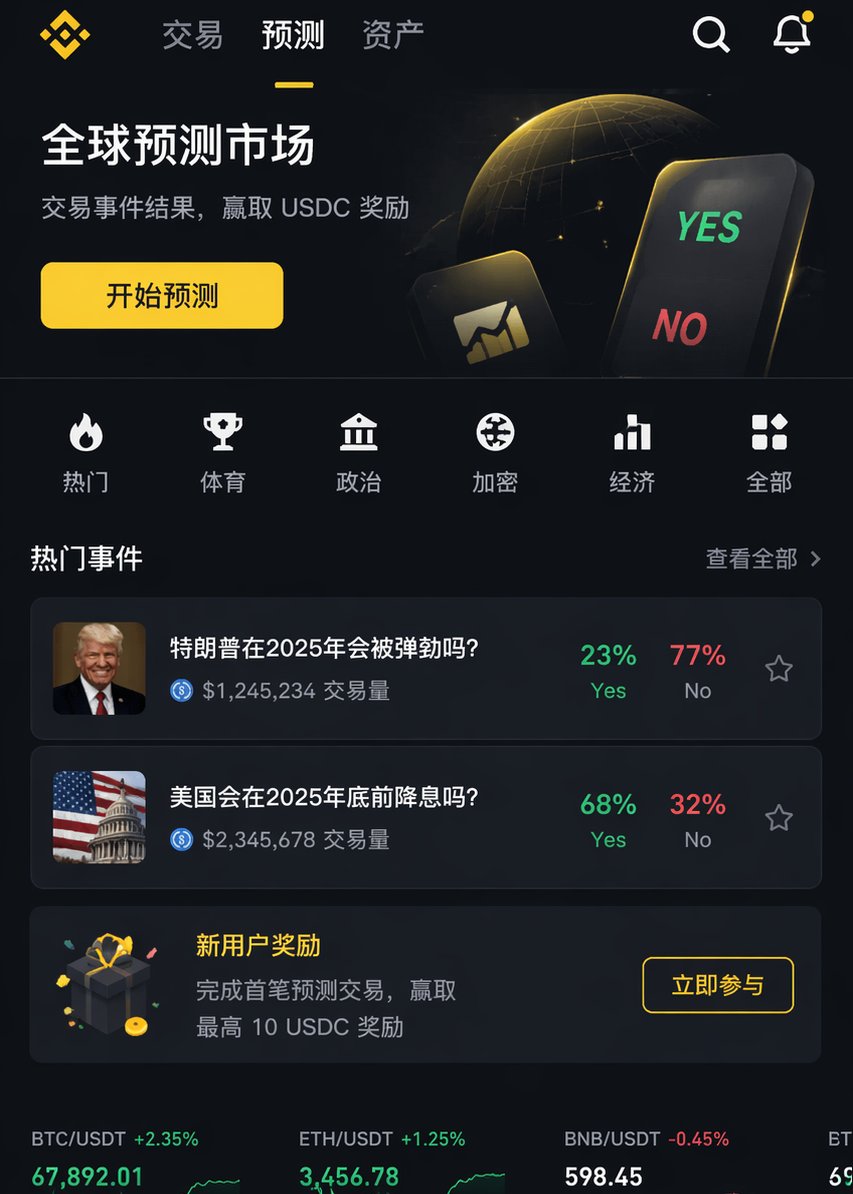
Render a professional IOS APP page image, similar to argreference platform: Binance, but with content similar to the argfunction: XX function. Requires professional-grade design.
프롬프트 소개
Generate a professional-grade iOS app interface mockup in the style of top-tier platforms like Binance, customizable for any function. Use it as a 컨셉 아트 starting point for GPT Image 2: keep the visual structure and style constraints intact, then swap in your own subject, brand, or scene.
Common directions include gptimage2api prompts, gptimage2api, and zh. Treat these tags as creative cues; the prompt structure and preview image are the more useful guide.
Start by replacing reference platform and function, then keep the camera, composition, and material cues in the same order. This makes the output easier to compare across variations.
이 프롬프트 사용법
- Copy the entire prompt text above.
- Paste it into your preferred AI image generator (like Sora 2).
- Replace the
reference platformandfunctionvariables with your desired style and feature (e.g., 'Spotify' and 'music playlist'). - Add any extra details about color scheme or layout to the prompt.
- Generate the image and iterate on the variables for different results.


