
Sora2 Hub
Sora2 Hub
  • 프롬프트 라이브러리
  • 가격
  • 쇼케이스
Sora2 Hub
Sora2 Hub
Sora2 Hub

Sora2 Hub

Sora 2, Veo 3.1, Nano Banana Pro로 구동되는 전문 AI 창작 플랫폼입니다. 고급 제어, HD 화질, 워터마크 없는 놀라운 동영상과 스튜디오급 이미지를 제작하세요.

Email:support@sora2hub.org

AI 비디오 생성

  • 텍스트에서 비디오
  • 이미지에서 비디오
  • Veo 3.1
  • Sora 2
  • Kling 3.0
  • Kling 2.6
  • Kling 2.5
  • Runway
  • Wan 2.6
  • Seedance 2.0
  • Hailuo 2.3
  • Grok Imagine
  • HappyHorse-1.0

AI 이미지 생성기

  • 텍스트에서 이미지
  • 이미지에서 이미지
  • Nano Banana Pro
  • Nano Banana
  • 4o Image
  • Flux Kontext
  • Z Image
  • Seedream 4.5
  • Seedream 5.0 Lite
  • Nano Banana 2
  • GPT Image 2
  • AI 이미지 업스케일러

AI 효과

  • AI 나이 필터
  • AI 성별 변환
  • AI 키스
  • AI 허그
  • 지브리 이미지
  • AI 인어 필터
  • AI 바디쉐이크
  • 스마일 필터
  • AI 뚱뚱하게
  • 액션 피규어

제품

  • 기능
  • 쇼케이스
  • 가격

회사

  • 소개
  • 문의

© 2025 • Sora2 Hub ORG 모든 권리 보유.

  • 개인정보 처리방침
  • 서비스 약관
  • 환불 정책
  1. 홈
  2. /
  3. 프롬프트
  4. /
  5. GPT Image 2
  6. /
  7. Low-Angle Fashion Portrait on Yellow Cube — Sora 2 Prompt
GPT Image 2AI 프롬프트

Low-Angle Fashion Portrait on Yellow Cube — Sora 2 Prompt

Generate a cinematic, editorial-style fashion portrait with a bold low-angle perspective and stylish athleticwear on a minimalist studio set.
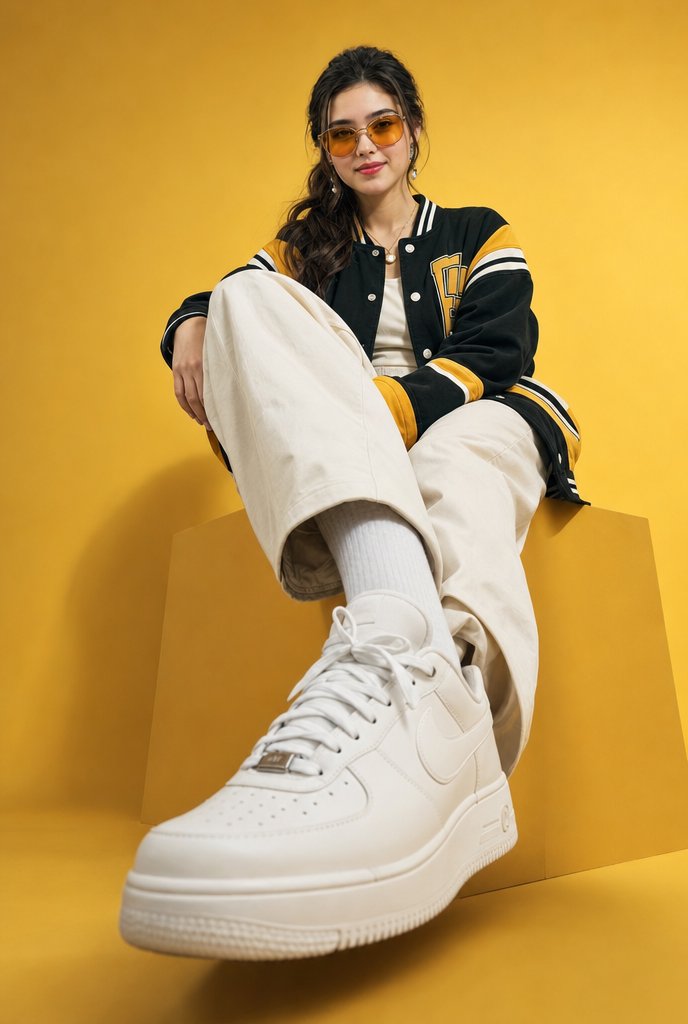
Low-Angle Fashion Portrait on Yellow Cube — Sora 2 Prompt
프롬프트 · EN
创作一张低角度电影感时尚肖像,主角为一位时尚的 argsubject: 年轻女性,她坐在一个极简摄影棚内的大型哑光几何立方体底座上。使用纯色 argbackground color: 金黄色 无缝背景布和相匹配的黄色地面,并带有柔和的摄影棚阴影。相机位置非常低且靠近主角伸出的脚,采用广角透视,使前景中的白色运动鞋看起来超大且占据主导地位,而上半身则向后退缩。主角姿态随意,一条腿伸向镜头,另一条膝盖弯曲,放松的手放在弯曲的膝盖上。服装:一件高级超大款黑色棒球风格夹克,带有芥末黄色拼接,领口、袖口、袖子和下摆有白色条纹装饰,按扣设计,胸前有学院风字母贴布;奶油色超大款阔腿裤;白色罗纹袜;干净的白色皮革 Nike 风格低帮运动鞋,带有鞋带和打孔鞋头;内搭简约白色上衣;佩戴小圆环耳环和短项链。头发为深色、长波浪卷,松散地束在脑后,发丝散落在脸庞周围。脸部应通过平滑的居中矩形模糊/马赛克遮挡进行刻意匿名化处理,同时保留时尚姿势。灯光采用精致的编辑类摄影棚布光,温暖且高端,呈现清晰的织物细节、逼真的皮革质感、浅景深、轻微的前景强调,采用 2:3 竖构图,无文字,无水印,无多余物体。

프롬프트 소개

Generate a cinematic, editorial-style fashion portrait with a bold low-angle perspective and stylish athleticwear on a minimalist studio set. Use it as a 컨셉 아트 starting point for GPT Image 2: keep the visual structure and style constraints intact, then swap in your own subject, brand, or scene.

Start by replacing subject and background color, then keep the camera, composition, and material cues in the same order. This makes the output easier to compare across variations.

이 프롬프트 사용법

  1. Copy the entire prompt text.
  2. Choose an image generation model like Sora 2 or DALL-E 3.
  3. Customize the {subject} and {background color} variables for your vision.
  4. Paste the prompt into the model's input field.
  5. Generate and refine the image to match your aesthetic.

FAQ

Hania Ai

@HaniaAi12→

게시일
2026년 5월 15일
원본 언어
EN
모델
GPT Image 2
카테고리
컨셉 아트
GPT Image 2컨셉 아트gpt-image-2twitter
조회
1.3K
복사
73
좋아요
36

공유

GPT Image 2의 더 많은 프롬프트

전체 보기
Anime Reaction Thumbnail Prompt — Neon Edgy VTuber

Anime Reaction Thumbnail Prompt — Neon Edgy VTuber

@abdiisan
Anime Mahjong Win Scene with Yakuza Score UI — Sora 2 Prompt

Anime Mahjong Win Scene with Yakuza Score UI — Sora 2 Prompt

@AI_Ossan
Cyberpunk Catgirl Soda Splash — Sora 2 Prompt

Cyberpunk Catgirl Soda Splash — Sora 2 Prompt

@kuso_seisakusyo

Sora2Hub 프롬프트로 더 빠르게 제작하세요.

검색 가능한 프롬프트 페이지에서 시작해 적합한 모델 컨텍스트로 바로 생성하세요.

프롬프트 탐색

