
Sora2 Hub
Sora2 Hub
  • 프롬프트 라이브러리
  • 가격
  • 쇼케이스
Sora2 Hub
Sora2 Hub
Sora2 Hub

Sora2 Hub

Sora 2, Veo 3.1, Nano Banana Pro로 구동되는 전문 AI 창작 플랫폼입니다. 고급 제어, HD 화질, 워터마크 없는 놀라운 동영상과 스튜디오급 이미지를 제작하세요.

Email:support@sora2hub.org

AI 비디오 생성

  • 텍스트에서 비디오
  • 이미지에서 비디오
  • Veo 3.1
  • Sora 2
  • Kling 3.0
  • Kling 2.6
  • Kling 2.5
  • Runway
  • Wan 2.6
  • Seedance 2.0
  • Hailuo 2.3
  • Grok Imagine
  • HappyHorse-1.0

AI 이미지 생성기

  • 텍스트에서 이미지
  • 이미지에서 이미지
  • Nano Banana Pro
  • Nano Banana
  • 4o Image
  • Flux Kontext
  • Z Image
  • Seedream 4.5
  • Seedream 5.0 Lite
  • Nano Banana 2
  • GPT Image 2
  • AI 이미지 업스케일러

AI 효과

  • AI 나이 필터
  • AI 성별 변환
  • AI 키스
  • AI 허그
  • 지브리 이미지
  • AI 인어 필터
  • AI 바디쉐이크
  • 스마일 필터
  • AI 뚱뚱하게
  • 액션 피규어

제품

  • 기능
  • 쇼케이스
  • 가격

회사

  • 소개
  • 문의

© 2025 • Sora2 Hub ORG 모든 권리 보유.

  • 개인정보 처리방침
  • 서비스 약관
  • 환불 정책
  1. 홈
  2. /
  3. 프롬프트
  4. /
  5. GPT Image 2
  6. /
  7. Cute Mascot Sticker Set — 3x3 Anime Puppy Expressions Prompt
GPT Image 2AI 프롬프트

Cute Mascot Sticker Set — 3x3 Anime Puppy Expressions Prompt

Generate a 9-panel grid of adorable Q-version puppy mascot stickers with hand-drawn watercolor style, perfect for emoji packs or sticker collections.
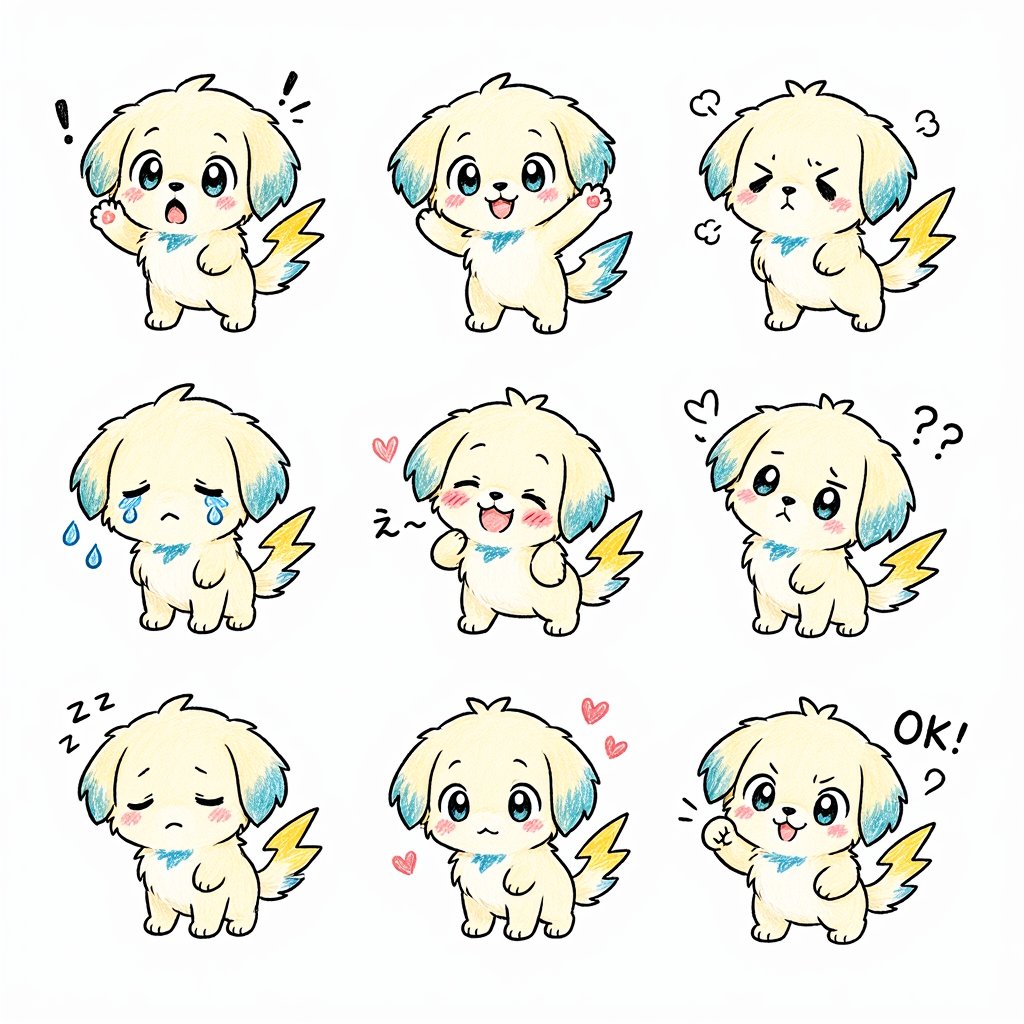
Cute Mascot Sticker Set — 3x3 Anime Puppy Expressions Prompt
프롬프트 · EN
在纯白色背景上创作一套可爱的贴纸风格角色插画:9 个小型 Q 版吉祥物图案,整齐地排列在 3x3 的网格中,并留有充足的间距。角色是一只毛茸茸的奶油色小狗,有着蓝绿色耳尖的垂耳、胸前有一小撮蓝色毛发/标记、大而有光泽的深色眼睛、粉嫩的脸颊、小巧的爪子,以及带有蓝色点缀的黄色闪电状尾巴。采用柔和的手绘动漫线条,带有轻微的素描感黑色轮廓,水彩/蜡笔风格的柔和阴影,圆润的比例,以及富有表现力的可爱面部表情。展示以下 9 种不同的姿势和表情:左上角为惊讶状,张着嘴,一只爪子抬起,头部周围有黑色感叹号;顶部中央为欣喜状,挥舞着双臂,吐着舌头,面带微笑;右上角为撅嘴/恼怒状,一只眼睛紧闭,脸颊鼓起,头部周围有小团蒸汽符号;左侧中间为悲伤哭泣状,嘴角下垂,眼睛周围/下方有 4 滴蓝色泪珠;中间位置为开心地咯咯笑,闭着眼睛,一只爪子抬起,带有粉色腮红,旁边有一个粉色小爱心和手写日文“え〜”;右侧中间为困惑且害羞状,向上看,上方有 2 个黑色问号和一个黑色小爱心涂鸦;左下角为困倦状,闭着眼睛,姿态慵懒,有 3 个手写的“z”睡眠符号;底部中央为害羞/可爱的中性表情,大眼睛,小嘴巴,周围有 3 个粉色小爱心;右下角为欢快的赞同姿势,一只爪子做出手势,吐着舌头,爪子附近有活力符号,上方有手写文字“OK!”。保持所有角色设计和比例一致,无边框,无背景道具,无额外角色,无水印。

프롬프트 소개

Generate a 9-panel grid of adorable Q-version puppy mascot stickers with hand-drawn watercolor style, perfect for emoji packs or sticker collections. Use it as a 컨셉 아트 starting point for GPT Image 2: keep the visual structure and style constraints intact, then swap in your own subject, brand, or scene.

Start with small changes to subject, scene, camera, and color, then generate a few variations to compare composition and detail without turning the page copy into keyword stuffing.

이 프롬프트 사용법

  1. Copy the full prompt from the page.
  2. Paste it into your preferred AI image generator (e.g., Sora 2, Midjourney).
  3. Tweak the character details or expressions to fit your project.
  4. Set output resolution for sticker-sized images (e.g., 1024x1024).
  5. Generate and download your custom sticker sheet.

FAQ

いくら|AIを我が子と遊びたい人。遊びながら学ぶ。

@ikura_no_oyaji→

게시일
2026년 5월 15일
원본 언어
EN
모델
GPT Image 2
카테고리
컨셉 아트
GPT Image 2컨셉 아트gpt-image-2twitter
조회
441
복사
54
좋아요
28

공유

GPT Image 2의 더 많은 프롬프트

전체 보기
AI-Generated Crossover Fighter Screenshot — Sora 2 Prompt

AI-Generated Crossover Fighter Screenshot — Sora 2 Prompt

@momoringo_sub
Futuristic Google Search Ad — AI Prompt

Futuristic Google Search Ad — AI Prompt

@AiWithTariq
AI-Generated Japanese Travel Ad Grid — Sora Prompt

AI-Generated Japanese Travel Ad Grid — Sora Prompt

@jblogpham

Sora2Hub 프롬프트로 더 빠르게 제작하세요.

검색 가능한 프롬프트 페이지에서 시작해 적합한 모델 컨텍스트로 바로 생성하세요.

프롬프트 탐색

