
GPT Image 2AI 프롬프트
Cyberpunk Fashion Portrait — Sora 2 AI Prompt
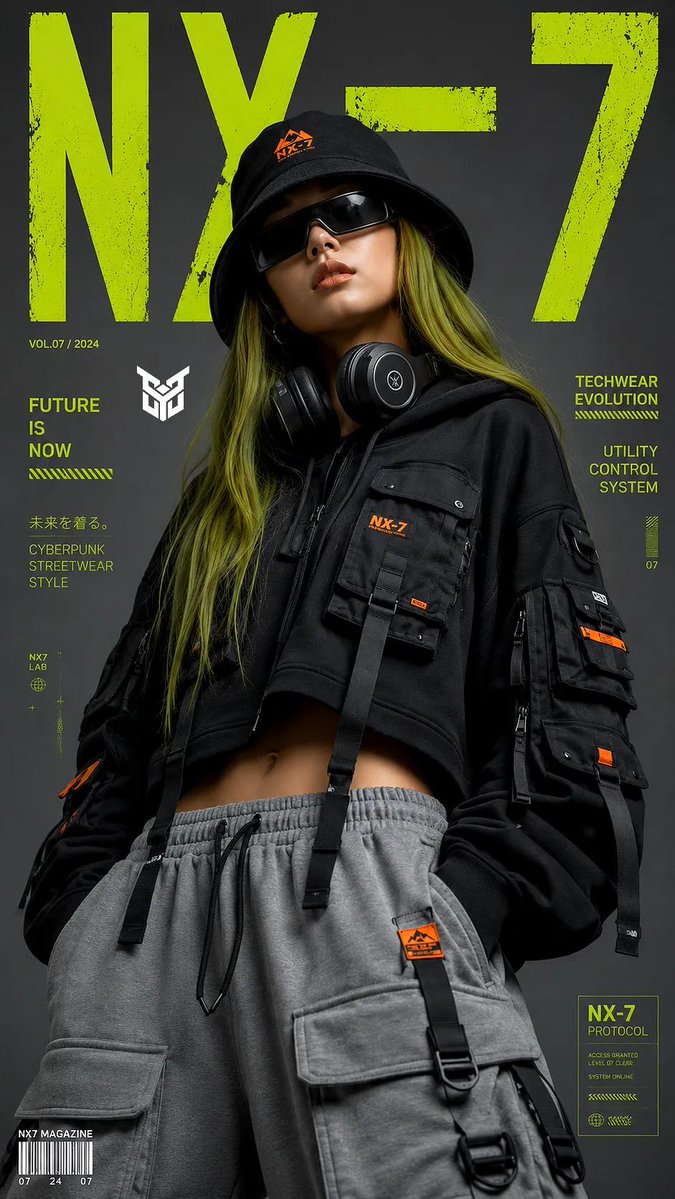
Generate a high-fashion, street-style editorial portrait with cyberpunk aesthetics, featuring a subject in techwear and bold graphic backgrounds.
프롬프트 · EN
一张高级时尚编辑类肖像,主体为 argsubject: 一位留着长直发、发色为苔藓绿的年轻女性,在纯净的哑光灰背景前自信地摆出姿势。她身穿 argoutfit: 一套前卫的机能风服饰,包括一件超大廓形、短款黑色机能连帽衫,配有多个战术工装口袋、绑带及橙色点缀标签。下身搭配宽松的灰色抽绳运动裤,裤侧带有超大口袋。她的配饰包括 argaccessory: 一顶中心带有橙色标志的黑色渔夫帽、未来感十足的环绕式深色墨镜,以及挂在颈部的宽大头戴式耳机。构图采用中景,配合专业影棚布光,营造出柔和的阴影及高对比度的电影感。背景中融入了大型风格化的青柠绿图形排版,模仿现代街头潮流杂志封面。整体美学风格粗犷、都市且细节丰富,8k 分辨率,使用 85mm 镜头拍摄。画面比例为 9:16
프롬프트 소개
Generate a high-fashion, street-style editorial portrait with cyberpunk aesthetics, featuring a subject in techwear and bold graphic backgrounds. Use it as a 컨셉 아트 starting point for GPT Image 2: keep the visual structure and style constraints intact, then swap in your own subject, brand, or scene.
Start by replacing subject, outfit, and accessory, then keep the camera, composition, and material cues in the same order. This makes the output easier to compare across variations.
이 프롬프트 사용법
- Copy the full prompt text from the page.
- Paste it into your chosen AI image or video generator (like Sora 2).
- Customize the variables in curly braces { } to change the subject, outfit, or accessories.
- Adjust the aspect ratio (currently 9:16) if needed for your platform.
- Generate the image and refine by tweaking descriptive details for desired style.


