
Sora2 Hub
Sora2 Hub
  • 프롬프트 라이브러리
  • 가격
  • 쇼케이스
Sora2 Hub
Sora2 Hub
Sora2 Hub

Sora2 Hub

Sora 2, Veo 3.1, Nano Banana Pro로 구동되는 전문 AI 창작 플랫폼입니다. 고급 제어, HD 화질, 워터마크 없는 놀라운 동영상과 스튜디오급 이미지를 제작하세요.

Email:support@sora2hub.org

AI 비디오 생성

  • 텍스트에서 비디오
  • 이미지에서 비디오
  • Veo 3.1
  • Sora 2
  • Kling 3.0
  • Kling 2.6
  • Kling 2.5
  • Runway
  • Wan 2.6
  • Seedance 2.0
  • Hailuo 2.3
  • Grok Imagine
  • HappyHorse-1.0

AI 이미지 생성기

  • 텍스트에서 이미지
  • 이미지에서 이미지
  • Nano Banana Pro
  • Nano Banana
  • 4o Image
  • Flux Kontext
  • Z Image
  • Seedream 4.5
  • Seedream 5.0 Lite
  • Nano Banana 2
  • GPT Image 2
  • AI 이미지 업스케일러

AI 효과

  • AI 나이 필터
  • AI 성별 변환
  • AI 키스
  • AI 허그
  • 지브리 이미지
  • AI 인어 필터
  • AI 바디쉐이크
  • 스마일 필터
  • AI 뚱뚱하게
  • 액션 피규어

제품

  • 기능
  • 쇼케이스
  • 가격

회사

  • 소개
  • 문의

© 2025 • Sora2 Hub ORG 모든 권리 보유.

  • 개인정보 처리방침
  • 서비스 약관
  • 환불 정책
  1. 홈
  2. /
  3. 프롬프트
  4. /
  5. GPT Image 2
  6. /
  7. Luxury Embossed Card Effect — Sora 2 Prompt
GPT Image 2AI 프롬프트

Luxury Embossed Card Effect — Sora 2 Prompt

Transform any illustration into a stunning luxury embossed card with realistic 3D depth, tactile paper or metal textures, and exquisite light-and-shadow relief effects.
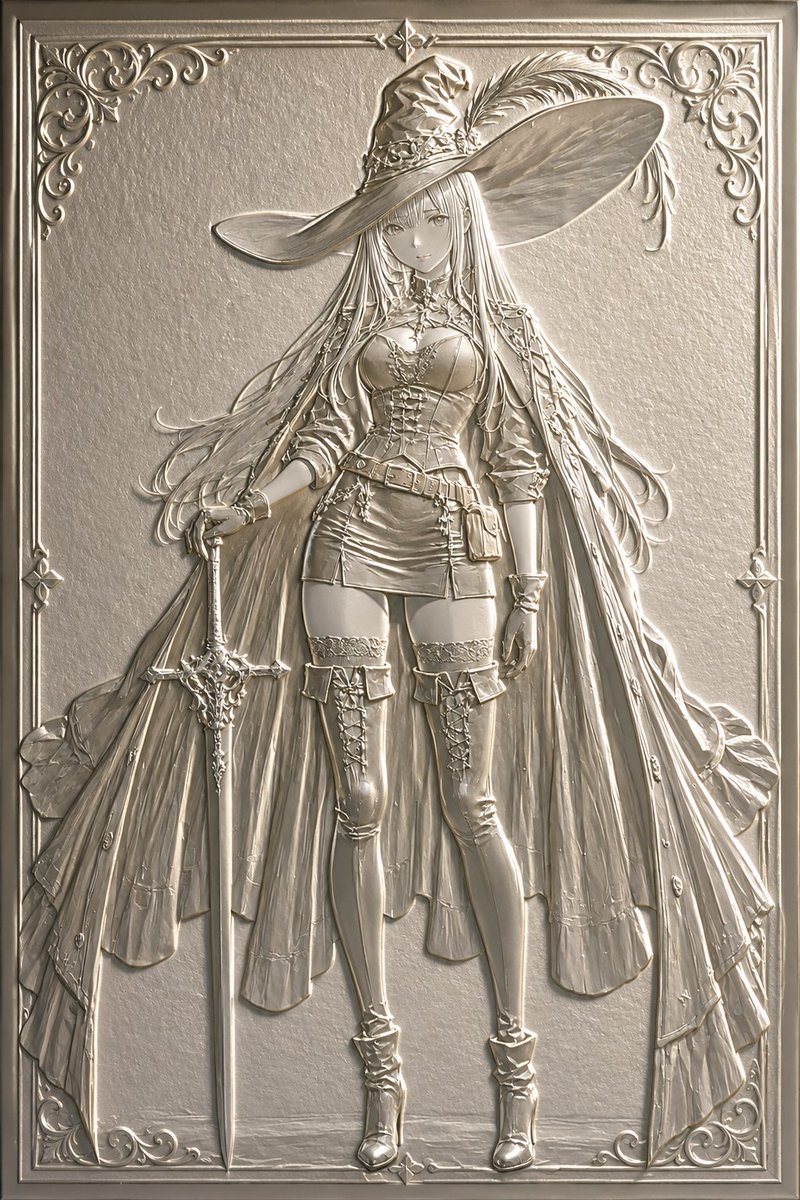
Luxury Embossed Card Effect — Sora 2 Prompt
1 / 4
프롬프트 · EN
将此插画转换为 argprocessing type: 浮雕 argstyle: 奢华卡片或浮雕 风格。强调如同纸张或金属压制般的立体凹凸感,营造出令人想要触摸的质感,并通过光影呈现出精美的浮雕效果。同时保持原插画的构图与角色。

프롬프트 소개

Transform any illustration into a stunning luxury embossed card with realistic 3D depth, tactile paper or metal textures, and exquisite light-and-shadow relief effects. Use it as a 컨셉 아트 starting point for GPT Image 2: keep the visual structure and style constraints intact, then swap in your own subject, brand, or scene.

Start by replacing processing type and style, then keep the camera, composition, and material cues in the same order. This makes the output easier to compare across variations.

이 프롬프트 사용법

  1. Copy the Prompt: Copy the full prompt text from the prompt page.
  2. Choose Your Model: Select a compatible AI image model (e.g., Sora 2, Midjourney, DALL·E).
  3. Set Variables: Customize the {processing type} (e.g., Emboss, Relief) and {style} (e.g., Luxury Card, Metal Emboss) to match your vision.
  4. Attach Your Image: Upload or reference the original illustration you want to transform.
  5. Generate & Refine: Run the prompt and adjust settings for desired depth and texture intensity.

FAQ

のとろ

@notoro_ai→

게시일
2026년 5월 15일
원본 언어
EN
모델
GPT Image 2
카테고리
컨셉 아트
GPT Image 2컨셉 아트gpt-image-2twitter
조회
598
복사
85
좋아요
41

공유

GPT Image 2의 더 많은 프롬프트

전체 보기
Luxury Tennis Fashion Poster — Bold Studio Shoot Sora Prompt

Luxury Tennis Fashion Poster — Bold Studio Shoot Sora Prompt

@blueski68251660
Celebrity Crossover — Sora 2 Prompt

Celebrity Crossover — Sora 2 Prompt

@Conor_D_Dart
Anime Idol Profile Page — Lavender Art Style Prompt

Anime Idol Profile Page — Lavender Art Style Prompt

@uzuyanurp

Sora2Hub 프롬프트로 더 빠르게 제작하세요.

검색 가능한 프롬프트 페이지에서 시작해 적합한 모델 컨텍스트로 바로 생성하세요.

프롬프트 탐색

