
Sora2 Hub
Sora2 Hub
  • 프롬프트 라이브러리
  • 가격
  • 쇼케이스
Sora2 Hub
Sora2 Hub
Sora2 Hub

Sora2 Hub

Sora 2, Veo 3.1, Nano Banana Pro로 구동되는 전문 AI 창작 플랫폼입니다. 고급 제어, HD 화질, 워터마크 없는 놀라운 동영상과 스튜디오급 이미지를 제작하세요.

Email:support@sora2hub.org

AI 비디오 생성

  • 텍스트에서 비디오
  • 이미지에서 비디오
  • Veo 3.1
  • Sora 2
  • Kling 3.0
  • Kling 2.6
  • Kling 2.5
  • Runway
  • Wan 2.6
  • Seedance 2.0
  • Hailuo 2.3
  • Grok Imagine
  • HappyHorse-1.0

AI 이미지 생성기

  • 텍스트에서 이미지
  • 이미지에서 이미지
  • Nano Banana Pro
  • Nano Banana
  • 4o Image
  • Flux Kontext
  • Z Image
  • Seedream 4.5
  • Seedream 5.0 Lite
  • Nano Banana 2
  • GPT Image 2
  • AI 이미지 업스케일러

AI 효과

  • AI 나이 필터
  • AI 성별 변환
  • AI 키스
  • AI 허그
  • 지브리 이미지
  • AI 인어 필터
  • AI 바디쉐이크
  • 스마일 필터
  • AI 뚱뚱하게
  • 액션 피규어

제품

  • 기능
  • 쇼케이스
  • 가격

회사

  • 소개
  • 문의

© 2025 • Sora2 Hub ORG 모든 권리 보유.

  • 개인정보 처리방침
  • 서비스 약관
  • 환불 정책
  1. 홈
  2. /
  3. 프롬프트
  4. /
  5. GPT Image 2
  6. /
  7. Cinematic Film Strip Converter — Sora 2 Prompt
GPT Image 2AI 프롬프트

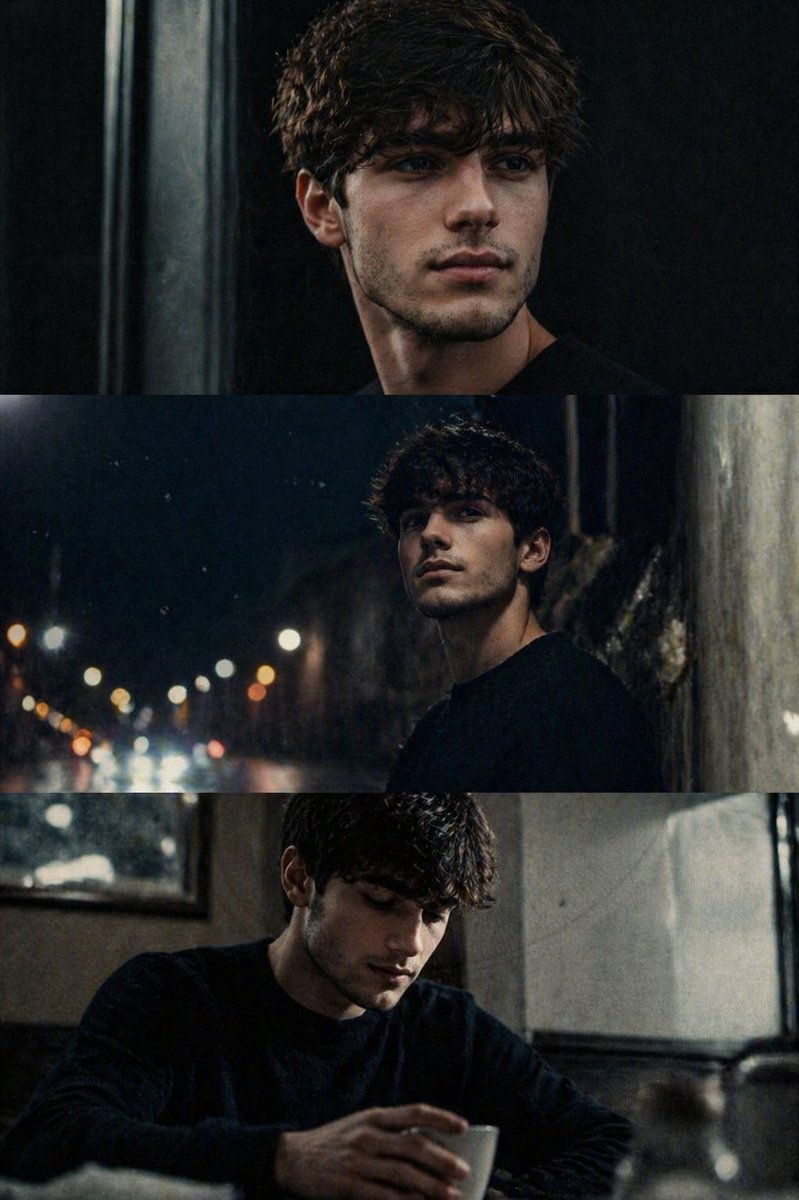
Cinematic Film Strip Converter — Sora 2 Prompt

Transform any uploaded image into a vertical stack of 3 dynamic, narrative film strips with a vintage, high-contrast cinematic aesthetic.
Cinematic Film Strip Converter — Sora 2 Prompt
프롬프트 · EN
将上传的图像转换为电影感 3 帧连续剧照(水平帧垂直堆叠),并实现全出血无边框效果。每一帧应展示同一场景下的不同瞬间,并具有清晰的叙事推进感。通过变换构图、摄像机角度和距离,营造出动态感和故事感。使用电影级、argcolor tone: 冷色调、高对比度、深邃黑色的胶片质感,并进行自然调色。添加细微的胶片颗粒、轻微的动态模糊以及自然瑕疵,以模拟模拟摄影效果。保持构图的抓拍感和情感深度,呈现出一种动态且静谧的叙事氛围。整体美学:电影感、怀旧且有机,如同原始的电影剧照。

프롬프트 소개

Transform any uploaded image into a vertical stack of 3 dynamic, narrative film strips with a vintage, high-contrast cinematic aesthetic. Use it as a 컨셉 아트 starting point for GPT Image 2: keep the visual structure and style constraints intact, then swap in your own subject, brand, or scene.

Start by replacing color tone, then keep the camera, composition, and material cues in the same order. This makes the output easier to compare across variations.

이 프롬프트 사용법

  1. Copy the prompt text.
  2. Select a compatible AI model like Sora or a video generation tool.
  3. Replace the {argument name="color tone" default="冷色调"} variable with your preferred color palette (e.g., 'warm tones', 'desaturated').
  4. Generate the output, which will be a single vertical image containing three connected frames.

FAQ

Harboris

@harboriis→

게시일
2026년 4월 30일
원본 언어
EN
모델
GPT Image 2
카테고리
컨셉 아트
GPT Image 2컨셉 아트gpt-image-2twitter
조회
999
복사
78
좋아요
56

공유

GPT Image 2의 더 많은 프롬프트

전체 보기
Anime Reaction Thumbnail Prompt — Neon Edgy VTuber

Anime Reaction Thumbnail Prompt — Neon Edgy VTuber

@abdiisan
Luxury Tennis Fashion Poster — Bold Studio Shoot Sora Prompt

Luxury Tennis Fashion Poster — Bold Studio Shoot Sora Prompt

@blueski68251660
Guangzhou 2026 Poster: Silk Ribbon Cityscape — Sora 2 Prompt

Guangzhou 2026 Poster: Silk Ribbon Cityscape — Sora 2 Prompt

@alanlovelq

Sora2Hub 프롬프트로 더 빠르게 제작하세요.

검색 가능한 프롬프트 페이지에서 시작해 적합한 모델 컨텍스트로 바로 생성하세요.

프롬프트 탐색

