GPT Image 2AI 프롬프트
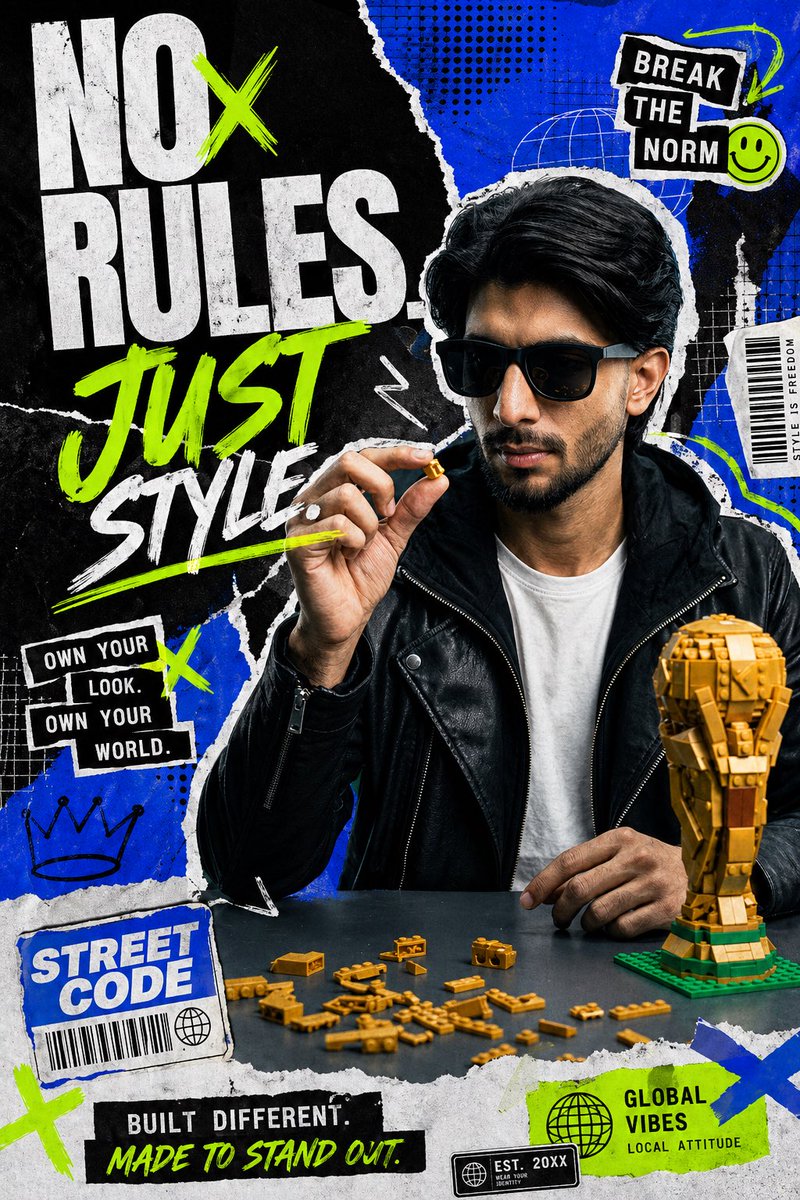
Streetwear Collage Poster with Gold Bricks — Sora 2 Prompt
Create an edgy, high-energy streetwear fashion poster featuring a mosaic-faced model, layered torn-paper collage effects, and bold stacked typography with gold brick accents.
프롬프트 · EN
创作一张具有粗粝编辑风格拼贴美感的醒目街头时尚宣传海报。画面展示一位年轻男性,半身像,坐在深色桌子后方,位置略微偏右,留着厚实的背头,身穿黑色皮质机车夹克,内搭纯白色 T 恤。他的面部被一个矩形马赛克遮挡。他的右手举在脸部附近,拇指和食指捏着一块微小的金色积木,左手放在桌面上。在桌子右下角放置 1 个带有绿色底座的半组装金色积木奖杯,并在他面前的桌面上散落 18 块小型金色积木。背景采用分层的黑色与电光蓝撕纸拼贴效果,边缘粗糙撕裂,带有做旧印刷纹理、半调网点图案、白色涂鸦痕迹、细网格叠加层,以及霓虹绿、白、黑色的贴纸状图形元素。海报左半部分由超大标题占据,采用堆叠排版,巨大的做旧白色块状字体写着“NO RULES.”,其中“O”区域被一个霓虹绿色的“X”划过;下方是巨大的霓虹绿色手绘笔刷字体“JUST”,再下方是白色笔刷字体“STYLE”,并带有霓虹绿色下划线。在构图中添加 8 个辅助贴纸/文字图形:1) 右上角黑色胶带贴纸,写着白色堆叠文字“BREAK THE NORM”,旁边有一个小小的霓虹绿色笑脸;2) 右侧中部狭长的白色垂直标签,写着“STYLE IS FREEDOM”;3) 左侧中部黑色堆叠贴纸,写着“OWN YOUR LOOK. OWN YOUR WORLD.”;4) 左下角蓝色撕纸标签,写着“STREET CODE”,带有条形码和小地球图标;5) 底部中心黑色长条,写着“BUILT DIFFERENT.”,下方有霓虹绿色手写体“MADE TO STAND OUT.”;6) 右下角霓虹绿色标签,写着“GLOBAL VIBES”,下方有较小的文字“LOCAL ATTITUDE”和一个地球图标;7) 右下角小型黑色印章,写着“EST. 20XX”及微小的副标题;8) 左下角手绘皇冠涂鸦。此外,添加若干霓虹绿色“X”标记以及白色箭头/波浪线涂鸦作为装饰图形。使用电光蓝、黑、白和霓虹绿的高对比度配色方案,并将金色积木作为温暖的金属质感点缀。整体氛围应展现出年轻、自信、叛逆、充满活力的感觉,如同现代时尚街头品牌在 Instagram 上的广告。
프롬프트 소개
Create an edgy, high-energy streetwear fashion poster featuring a mosaic-faced model, layered torn-paper collage effects, and bold stacked typography with gold brick accents. Use it as a 컨셉 아트 starting point for GPT Image 2: keep the visual structure and style constraints intact, then swap in your own subject, brand, or scene.
Start with small changes to subject, scene, camera, and color, then generate a few variations to compare composition and detail without turning the page copy into keyword stuffing.
이 프롬프트 사용법
- Copy the entire prompt body text.
- Select a compatible AI image generation model (e.g., Sora 2, DALL·E 3, Midjourney).
- Paste the prompt into the input field and adjust any specific elements like colors, text, or layout to match your brand.
- Generate the image and review the output for desired composition and style.
- If needed, refine the prompt by tweaking details like the number of stickers or background textures.