
GPT Image 2AI 프롬프트
TV News Broadcast AI Prompt — Hyperrealistic & Customizable
Generate a photorealistic Japanese news studio scene with customizable anchor appearance, channel name, headlines, and AI-generated graphics.
프롬프트 · EN
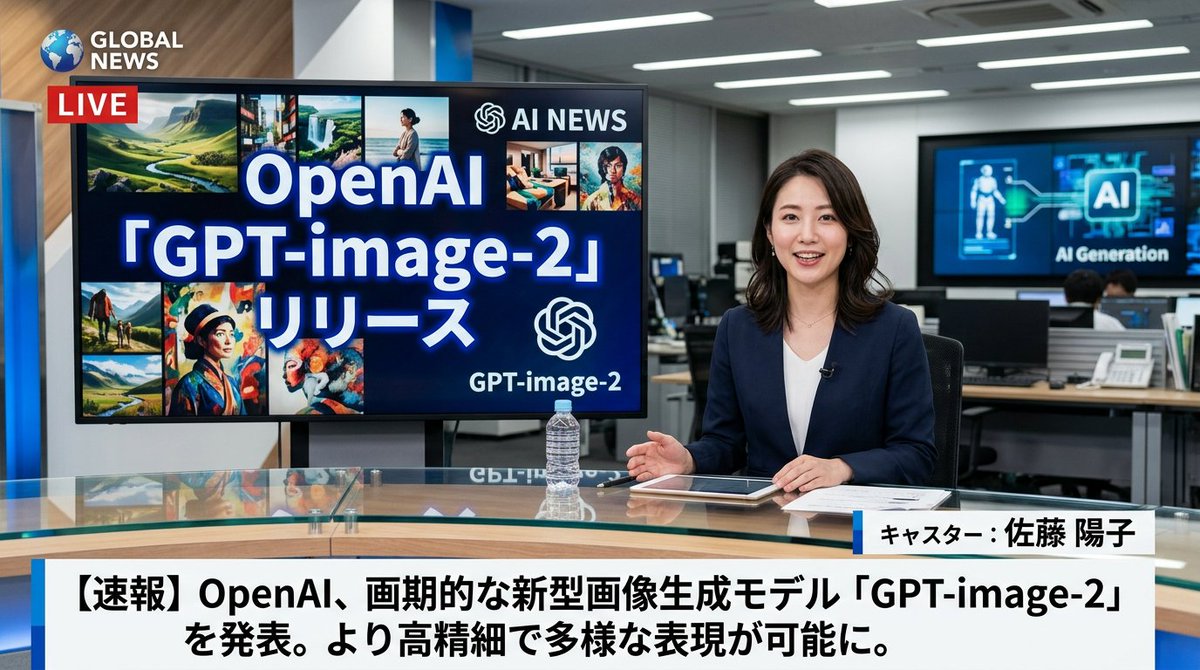
一个超写实的电视新闻广播场景,画面中有一位 arganchor appearance: 身穿深蓝色西装外套搭配白色上衣的日本女性新闻主播 坐在现代新闻演播室的玻璃桌前。她面带微笑,直视镜头,双手放在平板电脑、文件和透明水瓶旁。在她的左侧,一台大显示器上显示着 "argscreen main text: OpenAI 「GPT-image-2」リリース" 字样,旁边是一个 AI 标志以及 8 张较小的多样化 AI 生成图像拼贴。左上角是一个频道标志,显示为 "argnews channel name: GLOBAL NEWS",并配有红色的 "LIVE" 徽标。背景展示了一个繁忙的办公室,配有电脑和显示 "AI Generation" 的墙面屏幕。屏幕底部是一个标准的新闻下三分之一图形,显示主播姓名 "arganchor name: キャスター:佐藤 陽子" 以及一条突发新闻标题 "argmain headline text: 【速報】OpenAI、画期的な新型画像生成モデル「GPT-image-2」を発表。より高精細で多様な表現が可能に。"(以粗体日语文本显示)。
프롬프트 소개
Generate a photorealistic Japanese news studio scene with customizable anchor appearance, channel name, headlines, and AI-generated graphics. Use it as a 컨셉 아트 starting point for GPT Image 2: keep the visual structure and style constraints intact, then swap in your own subject, brand, or scene.
Start by replacing anchor appearance, screen main text, news channel name, and anchor name, then keep the camera, composition, and material cues in the same order. This makes the output easier to compare across variations.
이 프롬프트 사용법
- Copy the prompt template.
- Open your preferred AI image/video generation model (e.g., Sora 2, Midjourney, DALL·E).
- Edit the variables in curly braces to set your anchor's look, channel name, screen text, and headline.
- Paste the modified prompt and generate your unique newsroom scene.
- (Optional) Tweak settings like aspect ratio or style for best results.


