
GPT Image 2AI 프롬프트
Dark Anime Tengu Girl with Glowing Eyes — Sora 2 Prompt
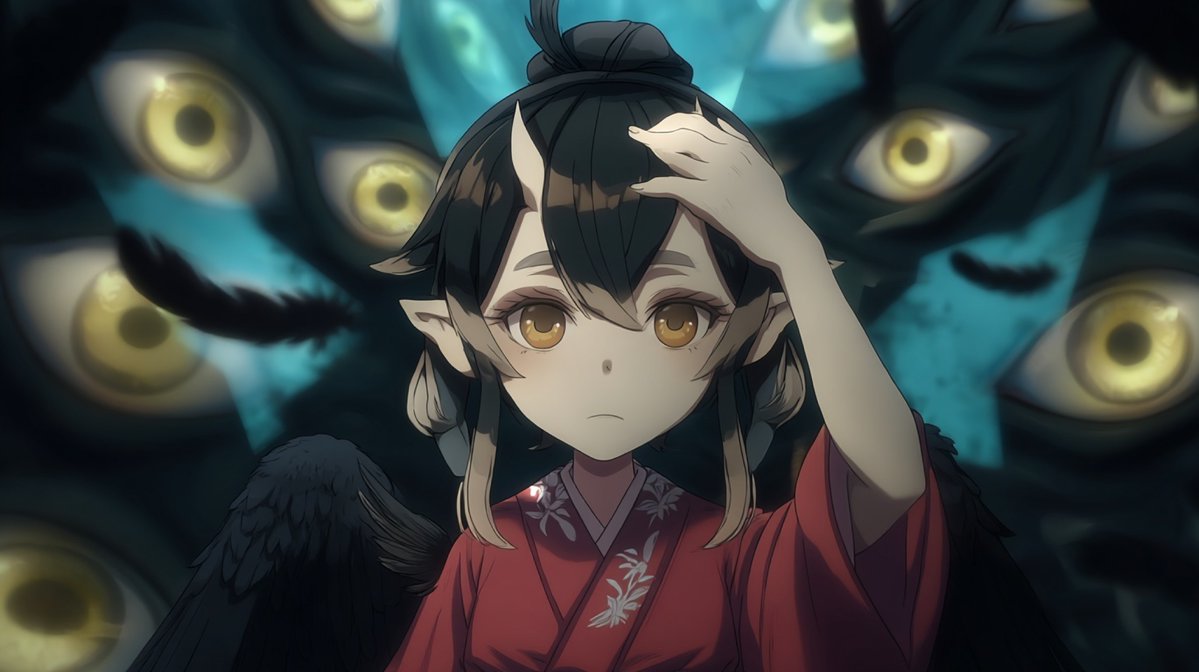
Generate a cinematic, dark fantasy anime scene of a winged tengu girl in a red kimono, veiled by a shadowy block and surrounded by mysterious glowing eyes.
1 / 4
프롬프트 · EN
创作一个暗黑电影质感的动漫风格场景,主角为 argcharacter name: 一位年轻的天狗少女,采用中景特写构图。她身着深红色和服,配有淡色花卉刺绣和深色领口;皮肤白皙,长有精灵般的尖耳,黑色长发扎成高发髻,两侧留有碎发,并佩戴小型角状发饰。她的右手抬起至额头,仿佛在遮挡或保持平衡,身后展开一对巨大的黑色羽翼。在她的面部中心放置一个实心不透明的方形遮挡块,颜色为柔和的灰褐色,遮住她的五官。背景为超现实的青蓝色黑暗空间,其中嵌入了 6 只发光的黄色大眼睛,眼睛位于阴影般的面具状形态中:左上方有一只模糊的大眼,左侧中心有一只较小的眼睛,右上角有一只眼睛,远右上角有一只半遮掩的眼睛,右侧中部有一只大眼,左下角有一只半遮掩的眼睛。添加 2 片飘落的黑色羽毛,左右各一片。采用戏剧性的低调照明,柔和的景深,忧郁的蓝绿色阴影,明亮的金色眼部高光,绘画感动漫渲染,羽毛和和服面料细节丰富,16:9 宽屏构图,营造紧张的超自然氛围,无文字,无水印。
프롬프트 소개
Generate a cinematic, dark fantasy anime scene of a winged tengu girl in a red kimono, veiled by a shadowy block and surrounded by mysterious glowing eyes. Use it as a 컨셉 아트 starting point for GPT Image 2: keep the visual structure and style constraints intact, then swap in your own subject, brand, or scene.
Start by replacing character name, then keep the camera, composition, and material cues in the same order. This makes the output easier to compare across variations.
이 프롬프트 사용법
- Copy the entire prompt text below.
- Choose your preferred AI video or image generation model (like Sora 2, Runway, or Midjourney).
- Paste the prompt into the model's input field. You can tweak the
{character name}variable to change the character. - Generate the image and adjust the prompt if needed for different lighting or composition.


