Sora2 Hub
Sora2 Hub
  • 프롬프트 라이브러리
  • 가격
  • 쇼케이스
Sora2 Hub
Sora2 Hub
Sora2 Hub

Sora2 Hub

Sora 2, Veo 3.1, Nano Banana Pro로 구동되는 전문 AI 창작 플랫폼입니다. 고급 제어, HD 화질, 워터마크 없는 놀라운 동영상과 스튜디오급 이미지를 제작하세요.

Email:support@sora2hub.org

AI 비디오 생성

  • 텍스트에서 비디오
  • 이미지에서 비디오
  • Veo 3.1
  • Sora 2
  • Kling 3.0
  • Kling 2.6
  • Kling 2.5
  • Runway
  • Wan 2.6
  • Seedance 2.0
  • Hailuo 2.3
  • Grok Imagine
  • HappyHorse-1.0

AI 이미지 생성기

  • 텍스트에서 이미지
  • 이미지에서 이미지
  • Nano Banana Pro
  • Nano Banana
  • 4o Image
  • Flux Kontext
  • Z Image
  • Seedream 4.5
  • Seedream 5.0 Lite
  • Nano Banana 2
  • GPT Image 2
  • AI 이미지 업스케일러

AI 효과

  • AI 나이 필터
  • AI 성별 변환
  • AI 키스
  • AI 허그
  • 지브리 이미지
  • AI 인어 필터
  • AI 바디쉐이크
  • 스마일 필터
  • AI 뚱뚱하게
  • 액션 피규어

제품

  • 기능
  • 쇼케이스
  • 가격

회사

  • 소개
  • 문의

© 2025 • Sora2 Hub ORG 모든 권리 보유.

  • 개인정보 처리방침
  • 서비스 약관
  • 환불 정책
  1. 홈
  2. /
  3. 프롬프트
  4. /
  5. GPT Image 2
  6. /
  7. Poster Layout Hack: Flip Portrait, Add Eras — Sora 2 Prompt
GPT Image 2AI 프롬프트

Poster Layout Hack: Flip Portrait, Add Eras — Sora 2 Prompt

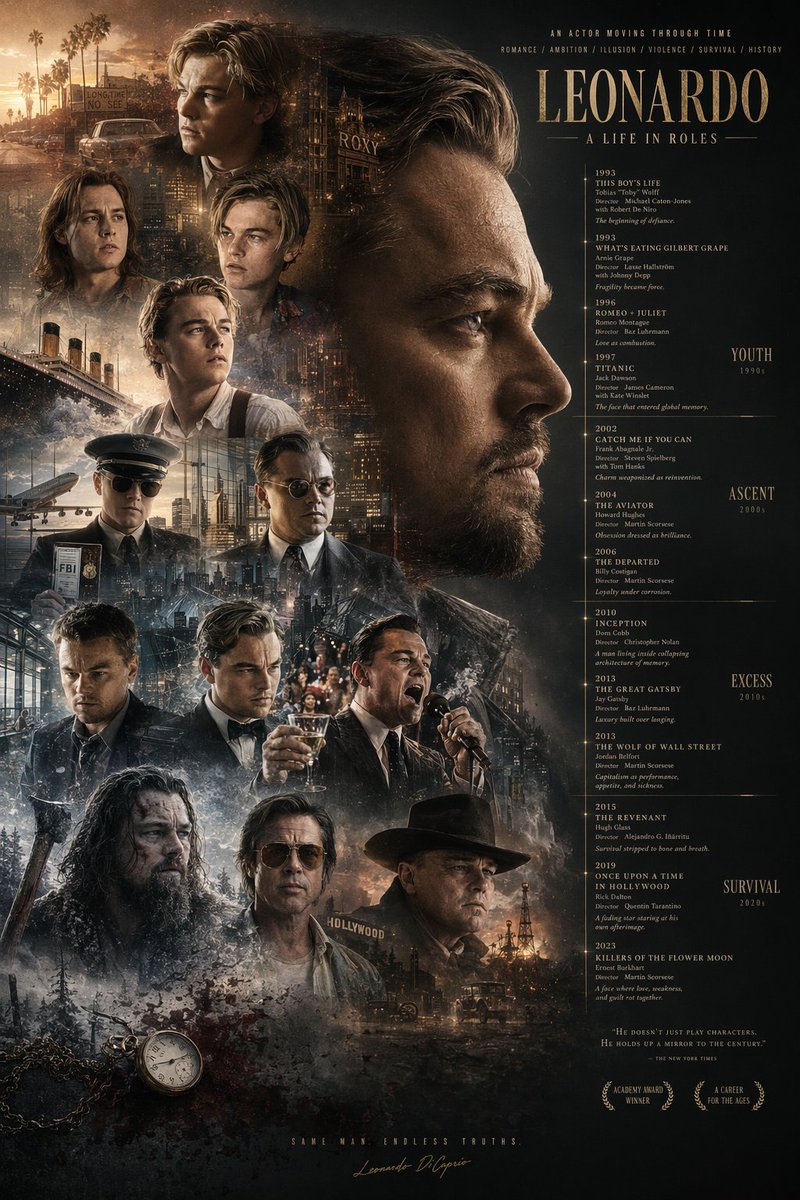
Effortlessly redesign any poster into a rich montage with flipped portraits, era labels, iconic background props, plus a pocket watch and blood.
Poster Layout Hack: Flip Portrait, Add Eras — Sora 2 Prompt
프롬프트 · EN
使用提供的参考图像,对海报布局进行重组。将主标题 argmain title: LEONARDO A LIFE IN ROLES 移至右上角。将中央的大幅侧面肖像移至右上象限,并将其水平翻转使其朝向右侧。将时间轴文本重新定位到右侧,并在最右侧添加 4 个新的时代分类:argera categories: YOUTH 1990s, ASCENT 2000s, EXCESS 2010s, SURVIVAL 2020s。在左侧和底部聚拢 13 个较小的角色肖像。在这些肖像后方整合新的背景元素:argbackground elements: Titanic ship, airplane, cityscapes, Hollywood sign, oil derrick。在左下角添加一个 argadded objects: pocket watch with chain and blood splatters。更新底部文本,加入 2 个月桂花环图标以及标语 argbottom tagline: SAME MAN. ENDLESS TRUTHS.。

프롬프트 소개

Effortlessly redesign any poster into a rich montage with flipped portraits, era labels, iconic background props, plus a pocket watch and blood. Use it as a 컨셉 아트 starting point for GPT Image 2: keep the visual structure and style constraints intact, then swap in your own subject, brand, or scene.

Start by replacing main title, era categories, background elements, and added objects, then keep the camera, composition, and material cues in the same order. This makes the output easier to compare across variations.

이 프롬프트 사용법

  1. Copy the prompt text provided.
  2. Customize the placeholder values: main title, era categories, background elements, added objects, and bottom tagline.
  3. Upload a reference poster image as input if using an image-to-image model.
  4. Select a suitable AI model for image editing, such as Sora 2 or Stable Diffusion.
  5. Generate the output and experiment with different seeds for varied compositions.
FAQ

虎小象

@hx831126→

게시일
2026년 4월 25일
원본 언어
EN
모델
GPT Image 2
카테고리
컨셉 아트
GPT Image 2컨셉 아트gpt-image-2twitter
조회
343
복사
31
좋아요
26

공유

GPT Image 2의 더 많은 프롬프트

전체 보기
AI-Generated Crossover Fighter Screenshot — Sora 2 Prompt

AI-Generated Crossover Fighter Screenshot — Sora 2 Prompt

@momoringo_sub
Minimalist Skincare Brand Manual — Sora 2 Prompt

Minimalist Skincare Brand Manual — Sora 2 Prompt

@FranromeGraph
Sleeping Anime Star Witch — Dreamy Cosmic Sora 2 Prompt

Sleeping Anime Star Witch — Dreamy Cosmic Sora 2 Prompt

@prompts

Sora2Hub 프롬프트로 더 빠르게 제작하세요.

검색 가능한 프롬프트 페이지에서 시작해 적합한 모델 컨텍스트로 바로 생성하세요.

프롬프트 탐색