
GPT Image 2AI 프롬프트
Vintage Korean Gimbap Recipe Poster Prompt
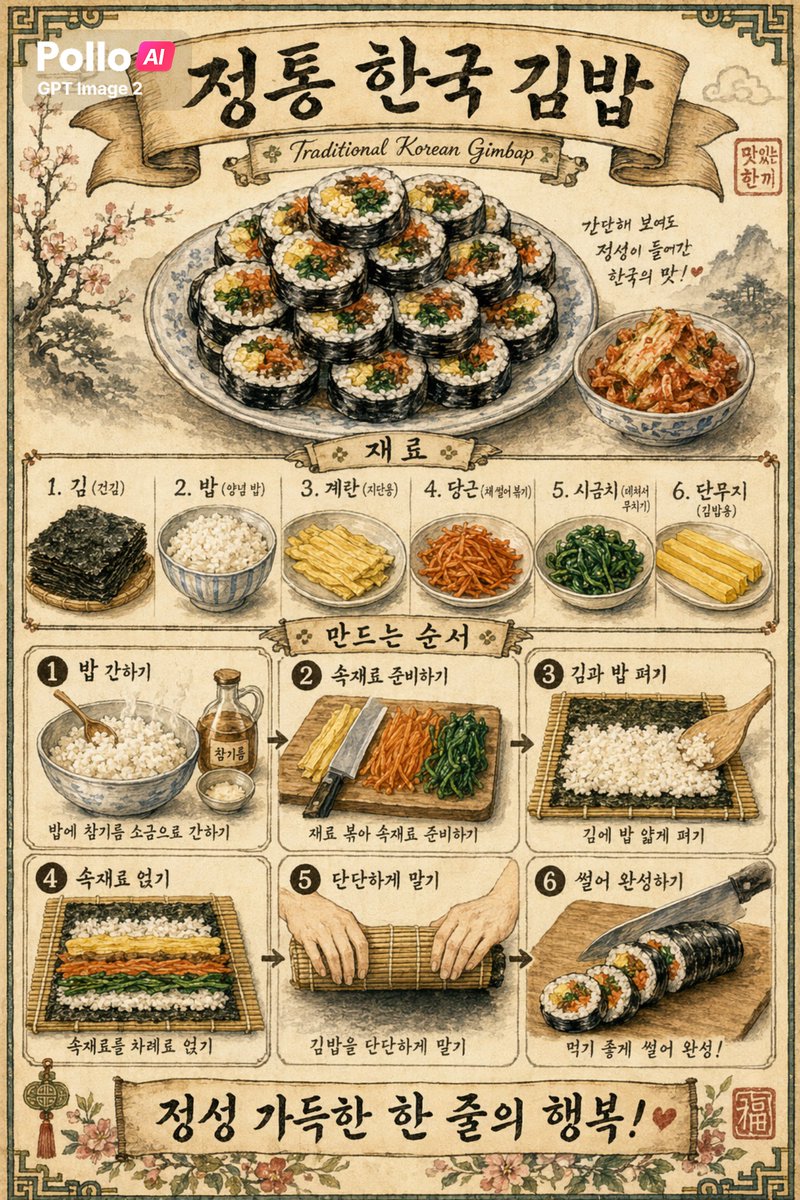
Generate a step-by-step vintage Korean gimbap infographic poster with this AI prompt, ideal for food marketing, restaurant decor, and cultural art.
프롬프트 · EN
创作一张复古风格的韩国美食海报,背景为带有轻微污渍和纹理的做旧米色羊皮纸,配有深色装饰性边框,采用传统手绘水墨与水彩插画风格。海报为单张垂直排列的信息图,主题为 argdish name: 정통 한국 김밥,顶部饰有优雅的大号韩文书法,下方配有弧形丝带横幅,文字为 argsubtitle text: Traditional Korean Gimbap。在上方中心位置,展示一个堆满 12 片紫菜包饭切片的精美瓷盘,每片切片清晰可见白米饭、黄色鸡蛋、橙色胡萝卜、绿色菠菜和深色海苔包裹的馅料。在盘子右侧,放置一小碗泡菜,并配有一段简短的手写韩文便签:“간단한 보여도 정성이 들어간 한국의 맛! ♥”。在右上角附近添加一枚带有韩文的小红印章。在中间位置,添加一个带有丝带标题“재료”的食材区,横向排列 6 个食材板块:1. 김 (건김) 展示堆叠的海苔片,2. 밥 (양념 밥) 展示一碗米饭,3. 계란 (지단용) 展示切好的熟鸡蛋条,4. 당근 (채썰어볶기) 展示切好的胡萝卜丝,5. 시금치 (데쳐서 무치기) 展示调味菠菜,6. 단무지 (김밥용) 展示黄色腌萝卜条。下方添加另一个丝带标题“만드는 순서”,并展示 6 个带边框的步骤板块,分两行三列排列,中间用箭头从左到右连接。步骤 1 标注为“1 밥 간하기”,展示一碗米饭及旁边的香油和盐,配文“밥에 참기름 소금으로 간하기”。步骤 2 标注为“2 속재료 준비하기”,展示砧板上的鸡蛋、胡萝卜、菠菜和一把刀,配文“재료 볶아 속재료 준비하기”。步骤 3 标注为“3 김과 밥 펴기”,展示竹帘上的海苔及铺好的米饭,配文“김에 밥 얇게 펴기”。步骤 4 标注为“4 속재료 얹기”,展示在米饭上横向排列的馅料,配文“속재료를 차례로 얹기”。步骤 5 标注为“5 단단하게 말기”,展示双手紧紧卷起竹帘的动作,配文“김밥을 단단하게 말기”。步骤 6 标注为“6 썰어 완성하기”,展示厨师刀将紫菜包饭卷切成片,配文“먹기 좋게 썰어 완성!”。在底部添加一个宽横幅,上面印有醒目的韩文书法 argbottom slogan: 정성 가득한 한 줄의 행복! 和一颗小爱心。用花卉图案装饰下角,并在右下角添加一枚刻有汉字“福”的红色方形印章。使用柔和的深褐色、棕色、奶油色、橄榄绿和褪色的红色调,结合精细的素描轮廓、柔和的水彩阴影以及地道的印刷海报构图。在左上角添加一个小型的现代叠加标志,文字为 argbrand text: Pollo AI GPT Image 2。
프롬프트 소개
Generate a step-by-step vintage Korean gimbap infographic poster with this AI prompt, ideal for food marketing, restaurant decor, and cultural art. Use it as a 컨셉 아트 starting point for GPT Image 2: keep the visual structure and style constraints intact, then swap in your own subject, brand, or scene.
Start by replacing dish name, subtitle text, bottom slogan, and brand text, then keep the camera, composition, and material cues in the same order. This makes the output easier to compare across variations.
이 프롬프트 사용법
- Copy the provided prompt from the page.
- Open an AI image generator like DALL·E 3, Midjourney, or Stable Diffusion.
- Customize the variables: change the dish name, subtitle text, bottom slogan, and brand text if desired.
- Paste the prompt and generate the image.
- Review the result, and if needed, tweak the prompt or regenerate for a perfect vintage poster.


