
GPT Image 2AI 프롬프트
Sakae Nagoya Watercolor Travel Poster — Sora 2 Prompt
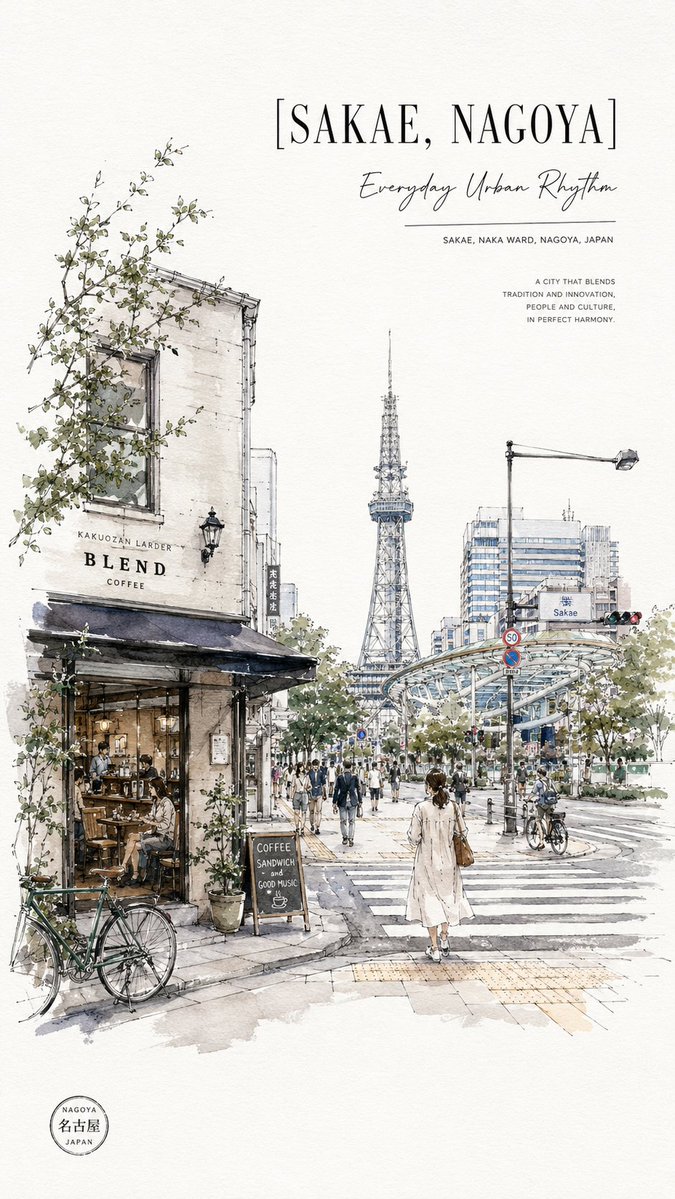
Creates a delicate, poster-style watercolor and ink urban sketch of Nagoya's vibrant Sakae district, ideal for stylish travel prints.
프롬프트 · EN
创作一张竖版旅行海报插画,主题为 arglocation title: SAKAE, NAGOYA,采用精致的水彩与墨水城市速写风格,背景为温暖的米白色纹理纸。画面展示了日本名古屋荣区一个充满活力的街头十字路口,从人行道视角呈现,具有强烈的深度透视感。左侧前景绘制一座迷人的老式街角咖啡馆,墙面为风化的奶油色,配有黑色遮阳篷、大窗户、温馨的室内座位、盆栽植物、攀爬的绿叶藤蔓,以及停在路边的一辆绿色自行车;包含清晰可见的咖啡馆招牌:“KAKUOZAN LARDER”、“BLEND” 和 “COFFEE”。在店外放置一块写有 “COFFEE / SANDWICH / and / GOOD MUSIC” 的小黑板,并绘有一个小咖啡杯。远景中心处,名古屋电视塔清晰地耸立在树木和城市建筑之上。右侧展示现代化的架空玻璃金属交通设施、路灯、交通信号灯、“Sakae” 标志、道路标线、自行车以及走在宽阔斑马线上的行人。在下方中心前景处,加入一位从背后看去的女性,身穿浅米色长外套,背着棕色单肩包,正走进城市。添加许多小行人,但保持速写感和氛围感。使用细腻的黑色钢笔线条、淡灰色阴影、柔和的蓝灰色建筑色调、柔和的绿色植被,以及克制的色彩渲染,并留出大量空白。 海报排版:在右上角,设置大号括号标题 “[arglocation title: SAKAE, NAGOYA]”,采用优雅的高衬线大写字体。在其下方,添加手写体副标题 “argsubtitle: Everyday Urban Rhythm”、一条细横线以及小号大写文字 “SAKAE, NAKA WARD, NAGOYA, JAPAN”。在更右侧,添加一个紧凑的引语块:“A CITY THAT BLENDS / TRADITION AND INNOVATION, / PEOPLE AND CULTURE, / IN PERFECT HARMONY.” 在左下角边缘,添加一个小圆形的旅行印章,文字为 “NAGOYA / 名古屋 / JAPAN”。保持构图空灵、精致、具有编辑感且适合印刷,无需照片级真实感,也不要添加额外文字。
프롬프트 소개
Creates a delicate, poster-style watercolor and ink urban sketch of Nagoya's vibrant Sakae district, ideal for stylish travel prints. Use it as a 컨셉 아트 starting point for GPT Image 2: keep the visual structure and style constraints intact, then swap in your own subject, brand, or scene.
Start by replacing location title and subtitle, then keep the camera, composition, and material cues in the same order. This makes the output easier to compare across variations.
이 프롬프트 사용법
- Copy the entire prompt text.
- Select a compatible AI image generation model (e.g., Sora 2, DALL-E, Midjourney).
- Replace the variables like
{location title}and{subtitle}with your desired city name and slogan. - Generate the image and refine the prompt for your preferred detail level.


