Sora2 Hub
Sora2 Hub
  • 프롬프트 라이브러리
  • 가격
  • 쇼케이스
Sora2 Hub
Sora2 Hub
Sora2 Hub

Sora2 Hub

Sora 2, Veo 3.1, Nano Banana Pro로 구동되는 전문 AI 창작 플랫폼입니다. 고급 제어, HD 화질, 워터마크 없는 놀라운 동영상과 스튜디오급 이미지를 제작하세요.

Email:support@sora2hub.org

AI 비디오 생성

  • 텍스트에서 비디오
  • 이미지에서 비디오
  • Veo 3.1
  • Sora 2
  • Kling 3.0
  • Kling 2.6
  • Kling 2.5
  • Runway
  • Wan 2.6
  • Seedance 2.0
  • Hailuo 2.3
  • Grok Imagine
  • HappyHorse-1.0

AI 이미지 생성기

  • 텍스트에서 이미지
  • 이미지에서 이미지
  • Nano Banana Pro
  • Nano Banana
  • 4o Image
  • Flux Kontext
  • Z Image
  • Seedream 4.5
  • Seedream 5.0 Lite
  • Nano Banana 2
  • GPT Image 2
  • AI 이미지 업스케일러

AI 효과

  • AI 나이 필터
  • AI 성별 변환
  • AI 키스
  • AI 허그
  • 지브리 이미지
  • AI 인어 필터
  • AI 바디쉐이크
  • 스마일 필터
  • AI 뚱뚱하게
  • 액션 피규어

제품

  • 기능
  • 쇼케이스
  • 가격

회사

  • 소개
  • 문의

© 2025 • Sora2 Hub ORG 모든 권리 보유.

  • 개인정보 처리방침
  • 서비스 약관
  • 환불 정책
  1. 홈
  2. /
  3. 프롬프트
  4. /
  5. GPT Image 2
  6. /
  7. Japanese Beauty Before & After — Side-by-Side Makeup Comparison Prompt
GPT Image 2AI 프롬프트

Japanese Beauty Before & After — Side-by-Side Makeup Comparison Prompt

Create a realistic editorial photo-style beauty transformation comparison image with labeled before/after panels and checklist annotations for social media.
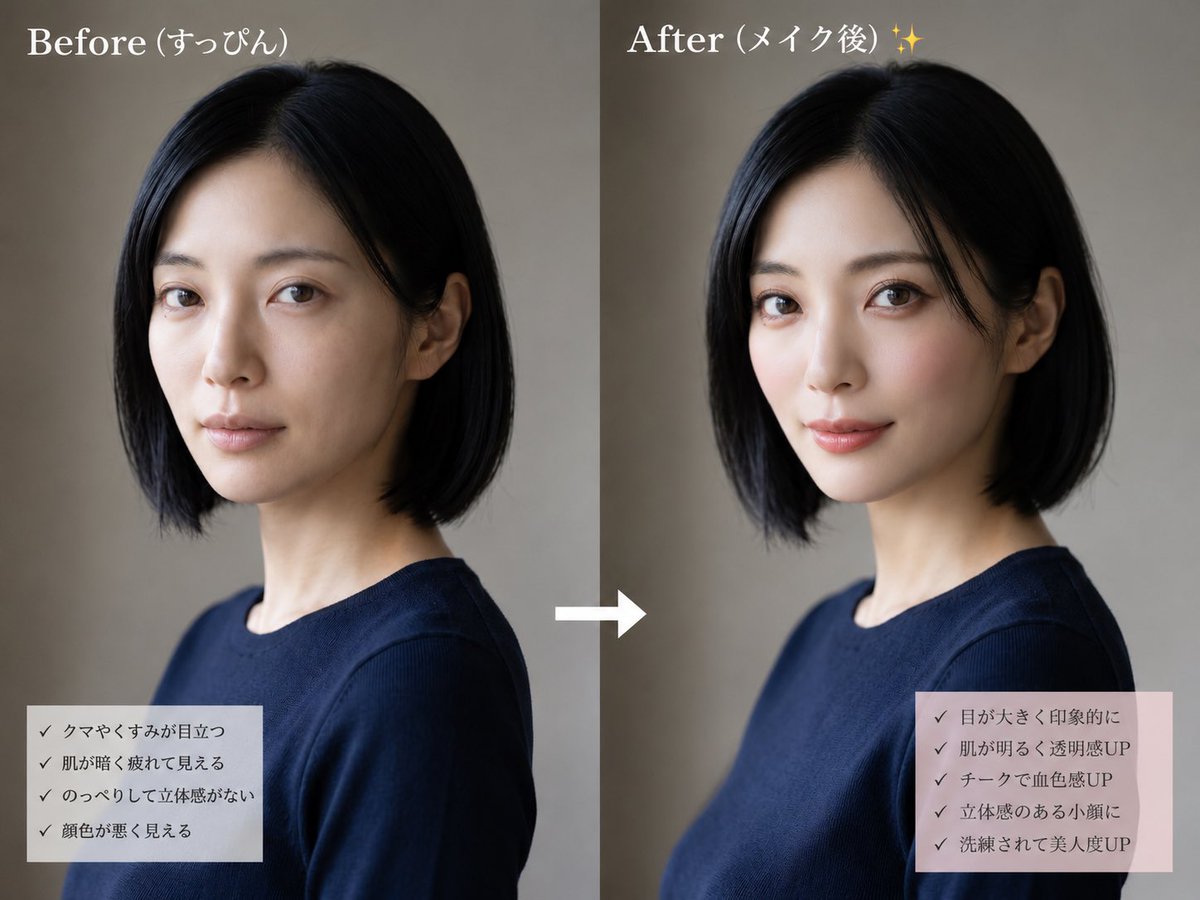
Japanese Beauty Before & After — Side-by-Side Makeup Comparison Prompt
프롬프트 · EN
type
side-by-side beauty transformation comparison image
style
realistic editorial photo, soft natural studio lighting, muted beige-gray background, clean social-media makeover layout
subject
description
same adult woman shown twice from chest up in a three-quarter side profile, short straight black bob haircut, slim neck, wearing a simple navy crew-neck top
face treatment
large opaque rectangular mosaic/privacy block covering the entire face in both panels, preserving only hair, ears, neck, and clothing visible
hair color
{argument name="hair color" default="black"}
outfit
{argument name="outfit" default="navy crew-neck top"}
layout
canvas
landscape 4:3 composition split into two equal vertical panels
panel count
2
left panel
title
{argument name="before title" default="妆前 (すっぴん)"}
position
left half
visual state
before makeup, subdued and slightly tired impression, darker overall tone
checklist box
position
bottom left
background
semi-transparent pale gray rectangle
count
4
items
item 1
黑眼圈和暗沉明显
item 2
肤色暗沉显疲态
item 3
面部扁平缺乏立体感
item 4
气色看起来较差
right panel
title
{argument name="after title" default="妆后 (メイク後) ✨"}
position
right half
visual state
after makeup, brighter polished impression, warmer skin tone and more refined styling while keeping the same pose and outfit
checklist box
position
bottom right
background
semi-transparent pale pink rectangle
count
5
items
item 1
双眼变大更有神
item 2
肤色提亮通透感提升
item 3
腮红增加血色感
item 4
立体小颜效果
item 5
精致感与美貌度提升
center element
description
single white right-pointing arrow between the panels
count
1
typography
large white serif titles at the top, small dark Japanese checklist text with checkmark symbols
overall instruction
Create a convincing no-reference before-and-after makeup comparison using the same woman, same pose, same clothing, and same background, with the right panel subtly more flattering and luminous than the left.

프롬프트 소개

Create a realistic editorial photo-style beauty transformation comparison image with labeled before/after panels and checklist annotations for social media. Use it as a 컨셉 아트 starting point for GPT Image 2: keep the visual structure and style constraints intact, then swap in your own subject, brand, or scene.

This prompt is organized as structured JSON with fields such as type, style, subject, layout, typography, and overall instruction. Keeping that hierarchy helps the model separate the subject, layout, interface elements, and detail constraints.

Start with small changes to subject, scene, camera, and color, then generate a few variations to compare composition and detail without turning the page copy into keyword stuffing.

이 프롬프트 사용법

  1. Copy the full prompt JSON from the site.
  2. Select a compatible AI image generation model like Sora 2, DALL-E 3, or Midjourney.
  3. Customize the variables (hair color, outfit, panel titles) to match your desired look.
  4. Paste the prompt into the model's input field.
  5. Generate the image and review the side-by-side comparison layout.
FAQ

うみつる

@umitsuru_fire→

게시일
2026년 5월 15일
원본 언어
EN
모델
GPT Image 2
카테고리
컨셉 아트
GPT Image 2컨셉 아트gpt-image-2twitter
조회
253
복사
37
좋아요
12

공유

GPT Image 2의 더 많은 프롬프트

전체 보기
Sleeping Anime Star Witch — Dreamy Cosmic Sora 2 Prompt

Sleeping Anime Star Witch — Dreamy Cosmic Sora 2 Prompt

@prompts
Minimalist Japanese Electric Nail Clipper Product Landing Page — Sora 2 Prompt

Minimalist Japanese Electric Nail Clipper Product Landing Page — Sora 2 Prompt

@eisho_m
AI-Generated Crossover Fighter Screenshot — Sora 2 Prompt

AI-Generated Crossover Fighter Screenshot — Sora 2 Prompt

@momoringo_sub

Sora2Hub 프롬프트로 더 빠르게 제작하세요.

검색 가능한 프롬프트 페이지에서 시작해 적합한 모델 컨텍스트로 바로 생성하세요.

프롬프트 탐색