
Sora2 Hub
Sora2 Hub
  • 프롬프트 라이브러리
  • 가격
  • 쇼케이스
Sora2 Hub
Sora2 Hub
Sora2 Hub

Sora2 Hub

Sora 2, Veo 3.1, Nano Banana Pro로 구동되는 전문 AI 창작 플랫폼입니다. 고급 제어, HD 화질, 워터마크 없는 놀라운 동영상과 스튜디오급 이미지를 제작하세요.

Email:support@sora2hub.org

AI 비디오 생성

  • 텍스트에서 비디오
  • 이미지에서 비디오
  • Veo 3.1
  • Sora 2
  • Kling 3.0
  • Kling 2.6
  • Kling 2.5
  • Runway
  • Wan 2.6
  • Seedance 2.0
  • Hailuo 2.3
  • Grok Imagine
  • HappyHorse-1.0

AI 이미지 생성기

  • 텍스트에서 이미지
  • 이미지에서 이미지
  • Nano Banana Pro
  • Nano Banana
  • 4o Image
  • Flux Kontext
  • Z Image
  • Seedream 4.5
  • Seedream 5.0 Lite
  • Nano Banana 2
  • GPT Image 2
  • AI 이미지 업스케일러

AI 효과

  • AI 나이 필터
  • AI 성별 변환
  • AI 키스
  • AI 허그
  • 지브리 이미지
  • AI 인어 필터
  • AI 바디쉐이크
  • 스마일 필터
  • AI 뚱뚱하게
  • 액션 피규어

제품

  • 기능
  • 쇼케이스
  • 가격

회사

  • 소개
  • 문의

© 2025 • Sora2 Hub ORG 모든 권리 보유.

  • 개인정보 처리방침
  • 서비스 약관
  • 환불 정책
  1. 홈
  2. /
  3. 프롬프트
  4. /
  5. GPT Image 2
  6. /
  7. Minimalist Medieval Travel Poster Prompt — Sora 2
GPT Image 2AI 프롬프트

Minimalist Medieval Travel Poster Prompt — Sora 2

Generate stunning minimalist isometric travel posters with technical line art, a strict 3-color palette, and a classic screen-print texture.
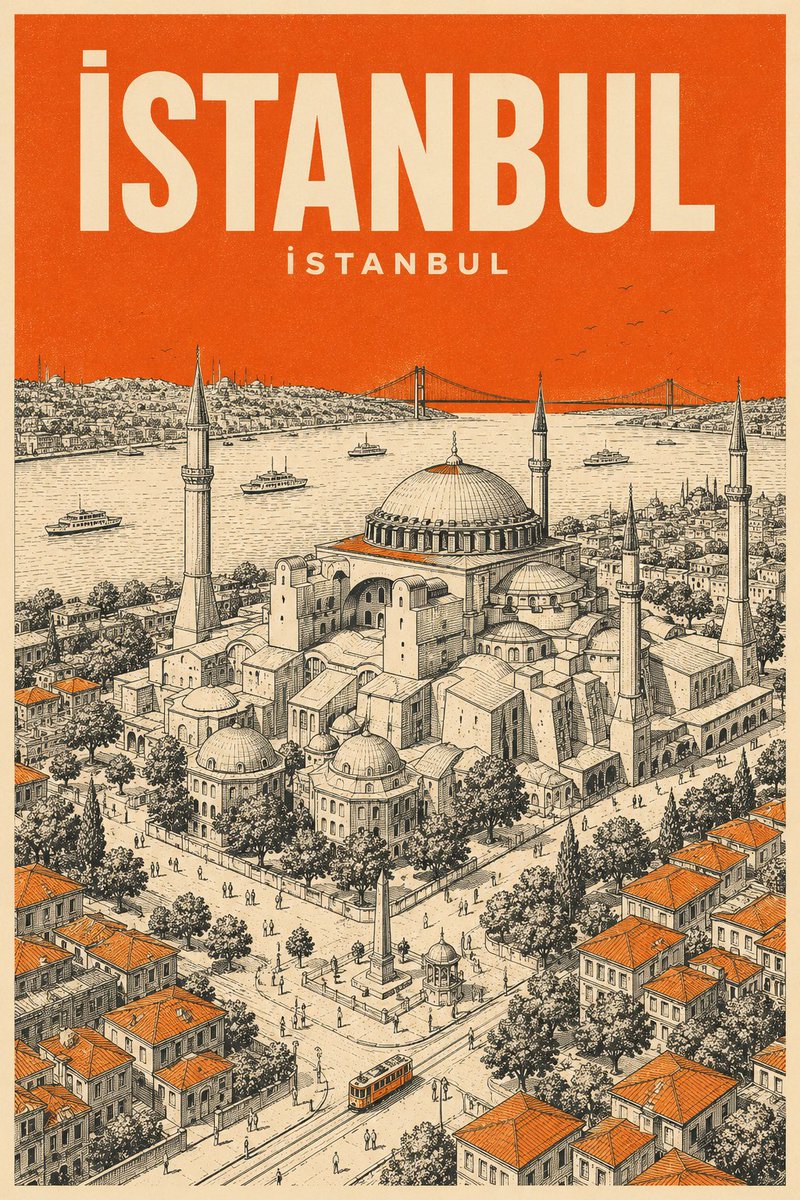
Minimalist Medieval Travel Poster Prompt — Sora 2
1 / 2
프롬프트 · EN
为 argcity: [城市名称] 创作一张竖版中世纪风格旅行海报,以 arglandmark: [地标名称] 为主题。使用严格的 3 色配色方案:奶油色纸张、黑色技术线条以及 argaccent color: [颜色]。
风格:极简主义等轴测鸟瞰图,带有超细阴影线和丝网印刷纹理。
色彩运用:整个天空以及屋顶或街道上的小面积点缀使用纯色 argaccent color: [颜色]。无渐变。
文字:顶部使用奶油色粗体无衬线字体标注“argcity: [城市名称]”,下方用较小的奶油色文字标注当地语言名称。

프롬프트 소개

Generate stunning minimalist isometric travel posters with technical line art, a strict 3-color palette, and a classic screen-print texture. Use it as a 컨셉 아트 starting point for GPT Image 2: keep the visual structure and style constraints intact, then swap in your own subject, brand, or scene.

Start by replacing city, landmark, and accent color, then keep the camera, composition, and material cues in the same order. This makes the output easier to compare across variations.

이 프롬프트 사용법

  1. Copy the prompt template into your AI model (e.g., Sora 2).
  2. Fill in the variables: [city name], [landmark], and [accent color].
  3. Adjust the text fields at the top for the desired output language and naming.
  4. Generate the image. Tweak the accent color or landmark for different variations.
  5. Use the output as a unique poster, wallpaper, or design asset.

FAQ

simeon-sanai

@Naiknelofar788→

게시일
2026년 5월 15일
원본 언어
EN
모델
GPT Image 2
카테고리
컨셉 아트
GPT Image 2컨셉 아트gpt-image-2twitter
조회
1.4K
복사
171
좋아요
33

공유

GPT Image 2의 더 많은 프롬프트

전체 보기
AI-Generated Crossover Fighter Screenshot — Sora 2 Prompt

AI-Generated Crossover Fighter Screenshot — Sora 2 Prompt

@momoringo_sub
Futuristic Google Search Ad — AI Prompt

Futuristic Google Search Ad — AI Prompt

@AiWithTariq
Luxury Tennis Fashion Poster — Bold Studio Shoot Sora Prompt

Luxury Tennis Fashion Poster — Bold Studio Shoot Sora Prompt

@blueski68251660

Sora2Hub 프롬프트로 더 빠르게 제작하세요.

검색 가능한 프롬프트 페이지에서 시작해 적합한 모델 컨텍스트로 바로 생성하세요.

프롬프트 탐색

