
GPT Image 2AI 프롬프트
Anime Cinematic Storyboard: 9-Scene Grid (16:9)
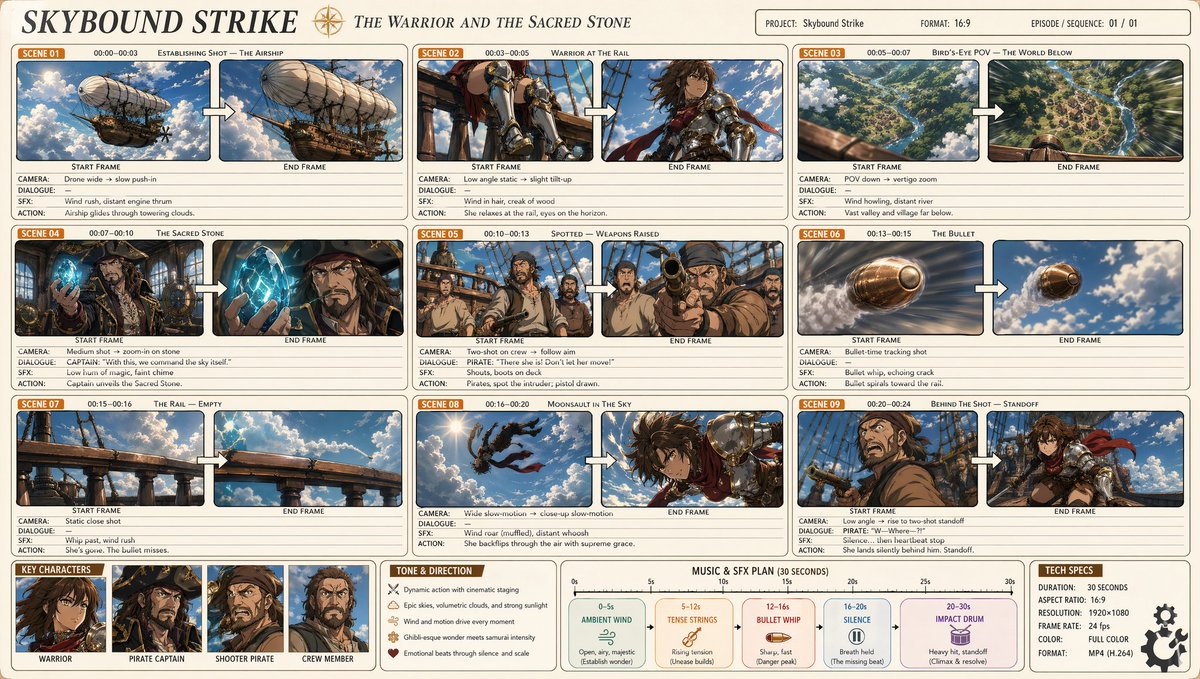
Generate a polished 9-scene anime storyboard with dynamic character action, cinematic camera work, and Makoto Shinkai-inspired visual aesthetics.
프롬프트 · EN
一个专业动漫电影级项目(16:9),标题为“argtitle: Sky Strike”,副标题为“argsubtitle: Warriors and the Holy Stone”。简洁的浅米色背景,圆角矩形面板排列成三列网格,共 9 个场景。每个场景面板显示:一个橙色的“Scene XX”标签、时间码、场景标题,以及两个并排的帧,分别标记为“Start Frame”→“End Frame”,中间由白色箭头连接,下方附有注释(镜头/对话/VFX/动作)。艺术风格:清晰的赛璐珞风格 argart style: Makoto Shinkai x Studio Wit, x Attack on Titan ——柔和的灯光、体积云、温暖的金色阳光、电影级广角镜头、动态动作姿势、丰富的天蓝色和翡翠绿色调,并带有黄铜和铜色点缀。需描绘的场景:1. 广角镜头 - 一艘雄伟的蒸汽朋克飞艇... [详细场景描述]... 布局:简洁的信息图表、细边框、柔和的网格,每个帧内包含高度详细的动漫关键视觉效果,呈现专业的制作文档美感。
프롬프트 소개
Generate a polished 9-scene anime storyboard with dynamic character action, cinematic camera work, and Makoto Shinkai-inspired visual aesthetics. Use it as a 컨셉 아트 starting point for GPT Image 2: keep the visual structure and style constraints intact, then swap in your own subject, brand, or scene.
Start by replacing title, subtitle, and art style, then keep the camera, composition, and material cues in the same order. This makes the output easier to compare across variations.
이 프롬프트 사용법
- Copy the prompt text below.
- Paste it into an AI image generator (e.g., Midjourney, DALL·E 3, Stable Diffusion).
- Customize the
{title},{subtitle}, and{art style}placeholders to match your theme. - Generate the image. For best results, use a model with strong anime and cinematic capabilities.
- Refine by adjusting the prompt details and regenerating if needed.


