
GPT Image 2AI 프롬프트
Dark Anime Boy with Pins & Prism Light — Sora 2 Prompt
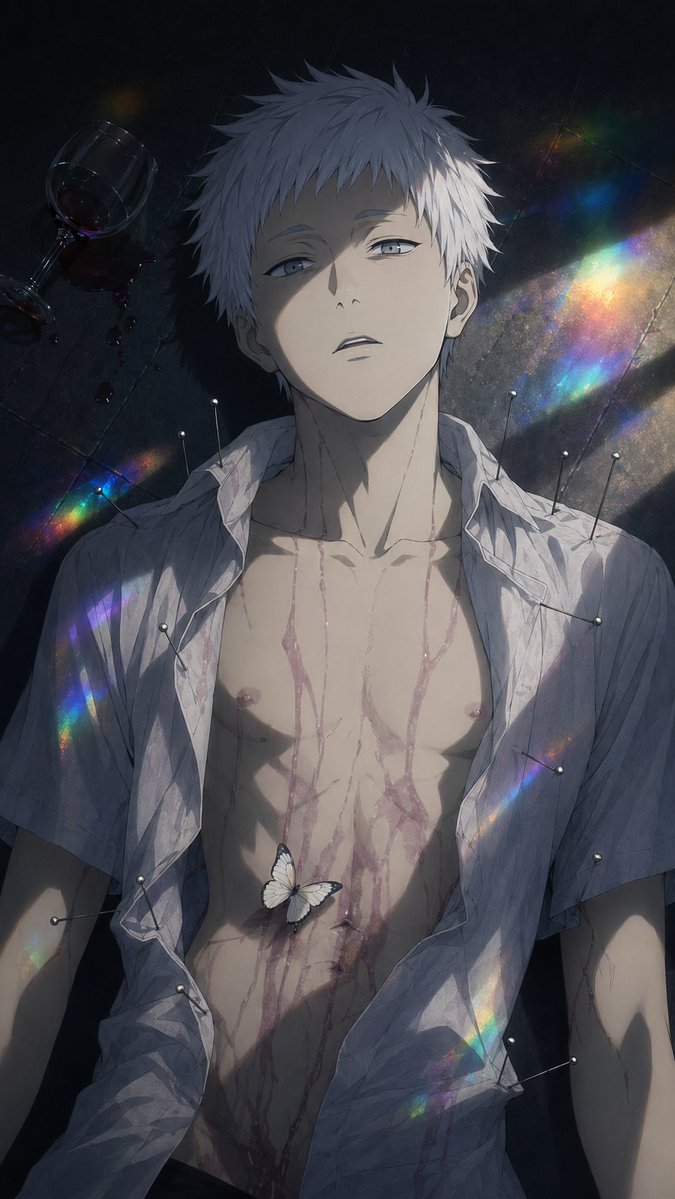
Generate a hauntingly beautiful, melancholic anime illustration of a fallen boy adorned with symbolic pins, rainbow prism light, and ethereal details for poster art.
프롬프트 · EN
一张暗黑、忧郁的动漫风格插画,描绘了一名身材纤细的少年平躺在阴暗的地板上,采用垂直构图的俯视视角。他留着凌乱的短发(arghair color: 白色),肤色苍白,面部大部分被阴影遮蔽,构图留有模糊感,营造出一种诡异而诗意的氛围。他穿着的 argshirt color: 白色 衬衫已被浸湿、褶皱且完全敞开,露出了胸部和腹部。细细的血流从颈部顺着躯干和下半身流下,呈现出风格化而非血腥的视觉效果。画面中需精确绘制 10 枚缝纫别针,别在衣物上及身体周围:左肩和上袖处 2 枚,左下侧腰部和前臂附近 2 枚,右胸和肩部区域 3 枚,右侧躯干中部 1 枚,右下摆附近 2 枚。在左上角放置 1 个倒扣的酒杯,旁边洒出红酒。在他的下腹部轻轻停着 1 只白蝴蝶。添加斜向的彩虹棱镜光带,横穿黑暗的地板和他的身体,呈现出电影般的高对比度、柔和的绘画质感、细腻的线条以及忧郁的象征性叙事。整体氛围应悲剧、唯美、空灵且令人不安,如同心理类动漫中极具戏剧性的视觉主图。
프롬프트 소개
Generate a hauntingly beautiful, melancholic anime illustration of a fallen boy adorned with symbolic pins, rainbow prism light, and ethereal details for poster art. Use it as a 컨셉 아트 starting point for GPT Image 2: keep the visual structure and style constraints intact, then swap in your own subject, brand, or scene.
Start by replacing hair color and shirt color, then keep the camera, composition, and material cues in the same order. This makes the output easier to compare across variations.
이 프롬프트 사용법
- Copy the full prompt text from the page.
- Choose an AI image generator that supports detailed anime-style prompts (e.g., Sora 2, Midjourney, or Stable Diffusion).
- Customize the variables such as
{hair color}and{shirt color}to match your desired aesthetic. - Paste the prompt into the model’s input field and generate.
- Iterate by adjusting details or regenerating for variations that best capture the mood.


