Sora2 Hub
Sora2 Hub
  • 프롬프트 라이브러리
  • 가격
  • 쇼케이스
Sora2 Hub
Sora2 Hub
Sora2 Hub

Sora2 Hub

Sora 2, Veo 3.1, Nano Banana Pro로 구동되는 전문 AI 창작 플랫폼입니다. 고급 제어, HD 화질, 워터마크 없는 놀라운 동영상과 스튜디오급 이미지를 제작하세요.

Email:support@sora2hub.org

AI 비디오 생성

  • 텍스트에서 비디오
  • 이미지에서 비디오
  • Veo 3.1
  • Sora 2
  • Kling 3.0
  • Kling 2.6
  • Kling 2.5
  • Runway
  • Wan 2.6
  • Seedance 2.0
  • Hailuo 2.3
  • Grok Imagine
  • HappyHorse-1.0
  • HappyHorse 1.1
  • Kling 3.0 Turbo
  • Volcengine Video-to-Video Lip Sync
  • OmniHuman 1.5
  • Grok Imagine Video 1.5
  • Gemini Omni
  • Wan 2.7 Video
  • Seedance 2.0 Mini

AI 이미지 생성기

  • 텍스트에서 이미지
  • 이미지에서 이미지
  • Nano Banana Pro
  • Nano Banana
  • 4o Image
  • Flux Kontext
  • Z Image
  • Seedream 4.5
  • Seedream 5.0 Lite
  • Nano Banana 2
  • GPT Image 2
  • AI 이미지 업스케일러
  • Seedream 5.0 Pro
  • Nano Banana 2 Lite
  • Qwen Image 2.0

AI 효과

  • AI 나이 필터
  • AI 성별 변환
  • AI 키스
  • AI 허그
  • 지브리 이미지
  • AI 인어 필터
  • AI 바디쉐이크
  • 스마일 필터
  • AI 뚱뚱하게
  • 액션 피규어

제품

  • 기능
  • 쇼케이스
  • 가격

회사

  • 소개
  • 문의

© 2025 • Sora2 Hub ORG 모든 권리 보유.

  • 개인정보 처리방침
  • 서비스 약관
  • 환불 정책
  1. 홈
  2. /
  3. 프롬프트
  4. /
  5. GPT Image 2
  6. /
  7. Alpine Landscape Souvenir Pin — Sora 2 Prompt
GPT Image 2AI 프롬프트

Alpine Landscape Souvenir Pin — Sora 2 Prompt

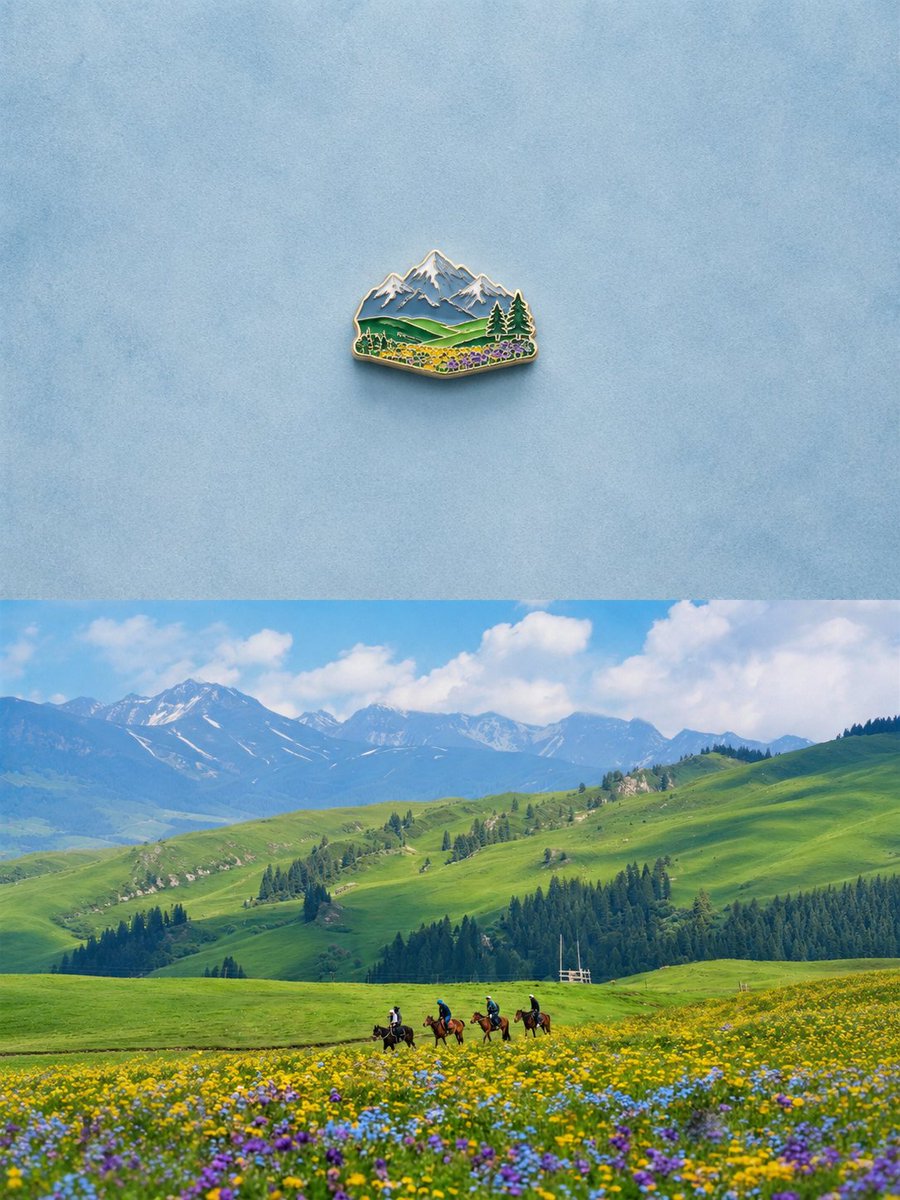
Generate a split image comparing a detailed enamel pin souvenir with its source alpine meadow landscape, perfect for travel memory concepts.
Alpine Landscape Souvenir Pin — Sora 2 Prompt
프롬프트 · EN
创建一张垂直堆叠的对比图,包含 2 个水平部分:顶部是 1 个小型珐琅冰箱贴的极简主义摄影棚产品照,置于浅蓝色纹理背景中央,留有大量负空间;磁贴呈微型高山风景纪念品形状,带有闪亮的金色金属轮廓、凸起的珐琅细节、积雪的蓝灰色山峰、起伏的绿色丘陵、深色的常青树,以及前景中一簇簇细小的黄色、紫色和蓝色野花,投射出柔和逼真的阴影。底部是 arglocation: 高山草甸山谷 在蓝天白云下的明亮逼真风景照:广阔起伏的绿色丘陵、远处带有积雪的山脉、深色的松树林,以及前景中开满黄色、紫色和蓝色花朵的野花草甸。在靠近下方中心的位置,加入 4 名骑马者穿过草甸,在广阔的风景中显得比例较小。使顶部的磁贴呈现出下方风景的精简纪念品版本,并保留相同的关键视觉元素:山脉、绿色丘陵、针叶树、野花和开阔的天空。采用简洁的编辑构图、逼真的光影、清晰的细节、柔和的阴影以及宁静的旅行记忆美学。无可见文字,无标签,无水印。

프롬프트 소개

Generate a split image comparing a detailed enamel pin souvenir with its source alpine meadow landscape, perfect for travel memory concepts. Use it as a 컨셉 아트 starting point for GPT Image 2: keep the visual structure and style constraints intact, then swap in your own subject, brand, or scene.

Start by replacing location, then keep the camera, composition, and material cues in the same order. This makes the output easier to compare across variations.

이 프롬프트 사용법

  1. Copy the full prompt text from the page.
  2. Choose a compatible AI image model (e.g., Sora 2, DALL-E 3, or Midjourney).
  3. Paste the prompt into the model's interface, replacing the {location} variable with your desired landscape if needed.
  4. Adjust the aspect ratio to a vertical (portrait) format for optimal split composition.
  5. Generate the image and review the detail preservation between the souvenir and the landscape.
FAQ

两斤

@0x00_Krypt→

게시일
2026년 5월 15일
원본 언어
EN
모델
GPT Image 2
카테고리
컨셉 아트
GPT Image 2컨셉 아트gpt-image-2twitter
조회
904
복사
131
좋아요
57

공유

GPT Image 2의 더 많은 프롬프트

전체 보기
Cyberpunk AI Launch Banner — Cinematic Neon Poster Prompt

Cyberpunk AI Launch Banner — Cinematic Neon Poster Prompt

@ObieriI
Minimalist Skincare Brand Manual — Sora 2 Prompt

Minimalist Skincare Brand Manual — Sora 2 Prompt

@FranromeGraph
Cubist Minimalist Fashion Portrait — Sora 2 Prompt

Cubist Minimalist Fashion Portrait — Sora 2 Prompt

@ChillaiKalan__

Sora2Hub 프롬프트로 더 빠르게 제작하세요.

검색 가능한 프롬프트 페이지에서 시작해 적합한 모델 컨텍스트로 바로 생성하세요.

프롬프트 탐색