
GPT Image 2AI 프롬프트
Chinese Ink City Poster — Elegant Sumi-e Landscape Prompt
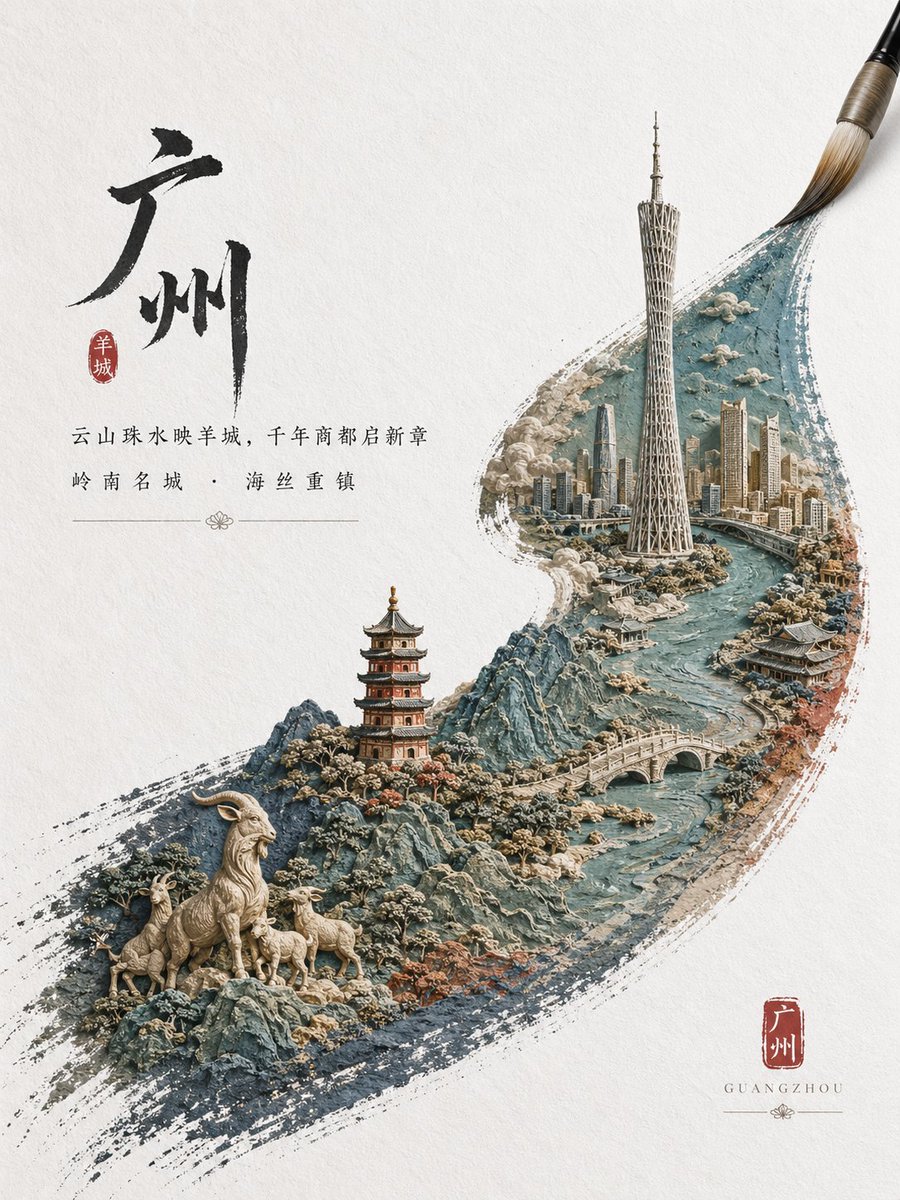
Create a premium vertical travel poster fusing calligraphy, seal design and a hyper-detailed 3D miniature cityscape within a single brushstroke.
프롬프트 · EN
一张优雅的竖版中国城市海报,背景为质感米白色宣纸。左上方置有一个巨大的黑色水墨书法汉字 argcity name: 广州,旁侧配有一枚红色印章。书法下方居中排布两行精致的中文宣传文案,采用经典衬线印刷风格,字形纤细平衡,并配有精美的装饰性分割线。右下方放置第二枚红色印章,内含城市名称,下方以小号间距大写字母标注罗马拼音“GUANGZHOU”。主体画面为一道从左下向右上对角线延伸的挥洒水墨笔触,如同由传统毛笔绘就,笔尖在右上角清晰可见。在这道笔触之中,构建一个高度精细的微缩雕塑景观,融合传统底蕴与现代城市特征:蜿蜒的青绿色河流、崎岖的蓝灰色山脉、传统的多层宝塔、拱形石桥、密集的未来主义天际线,以及一座靠近中右侧、形似广州塔的高耸地标建筑。在笔触左下角的前景中,包含总共 4 只羊:1 只站立的大公羊和 3 只在岩石地形上的小羊,呼应城市的象征性民间传说。将云雾、石材纹理、开花灌木与建筑细节融入场景,使其呈现出嵌入颜料中的雕刻立体模型或浮雕质感。色调采用克制的墨黑、柔和青色、板岩蓝、暖米色石材、柔和赤陶色以及朱砂红点缀。整体构图高级、诗意且富有文化底蕴,将中国传统水墨画、印章设计与超精细 3D 微缩城市景观插画相结合,打造出一张高端旅游宣传海报。
프롬프트 소개
Create a premium vertical travel poster fusing calligraphy, seal design and a hyper-detailed 3D miniature cityscape within a single brushstroke. Use it as a 컨셉 아트 starting point for GPT Image 2: keep the visual structure and style constraints intact, then swap in your own subject, brand, or scene.
Start by replacing city name, then keep the camera, composition, and material cues in the same order. This makes the output easier to compare across variations.
이 프롬프트 사용법
- Copy the full prompt and paste it into your Sora 2 (or similar) text-to-image field.
- Select the highest quality or cinematic style model available for best detail.
- Replace the default city name variable with your desired Chinese city, e.g. 北京 or 成都.
- Adjust the animal count or landmark description to match the city's symbolism if needed.
- Generate multiple variations and upscale the best result for print-ready quality.


