
GPT Image 2AI 프롬프트
Cinematic Beyblade Street Showdown — Sora 2 Prompt
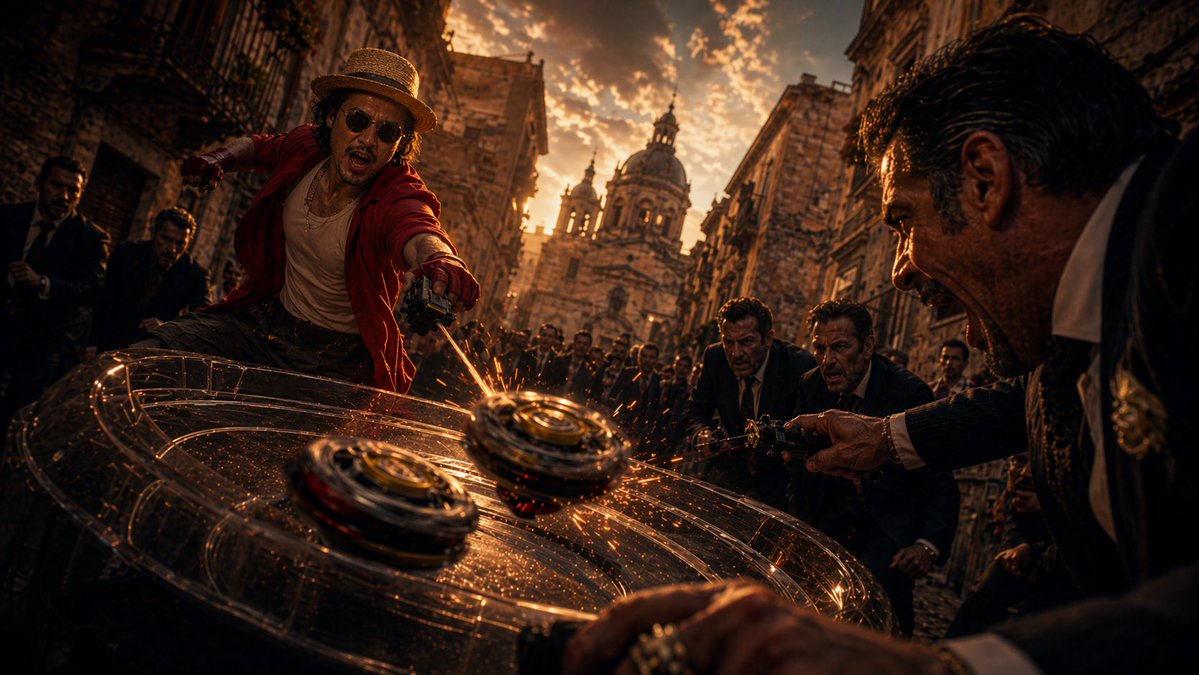
Generate a dramatic live-action scene of a straw-hat hero battling suits in a historic alley, with spinning tops colliding at dusk. Ideal for cinematic posters.
프롬프트 · EN
这是一场电影级的真人动作场景,背景设定在黄昏时分狭窄的欧洲古老石板街上,采用极低角度的特写镜头和戏剧性的广角镜头拍摄。在左前方中心位置,一位灵感来自 argcharacter name: 路飞 的动态男性战士正向前俯冲,他头戴草帽,身穿敞开的 argjacket color: 红色 外套、浅色背心和深色长裤。他的身体剧烈扭转,正使用手持发射器发动陀螺战攻击。在右前方,一名身着深色西装、白色衬衫的黑帮风格男子正倾身向前,同样发射着陀螺;他身后还有两名西装男,街道上挤满了围观群众。在画面最前方,两个陀螺在光亮的深色表面上发生碰撞,迸发出耀眼的橙色火花,多道圆形光轨环绕周围,突显出速度感与冲击力。环境氛围浓厚:两侧是风化的石质建筑,街道挤满了观众,阳光照耀下的背景中矗立着宏伟的巴洛克式大教堂圆顶和塔楼。运用强烈的暖琥珀色和铜色灯光、深邃的阴影、高对比度、尘埃与火花颗粒、粗粝的质感、戏剧性的动态模糊、浅景深,营造出史诗级大片的基调。构图应融合地下对决、街头决斗和动漫改编真人版的风格,充满动能、张力与超写实的细节。
프롬프트 소개
Generate a dramatic live-action scene of a straw-hat hero battling suits in a historic alley, with spinning tops colliding at dusk. Ideal for cinematic posters. Use it as a 컨셉 아트 starting point for GPT Image 2: keep the visual structure and style constraints intact, then swap in your own subject, brand, or scene.
Start by replacing character name and jacket color, then keep the camera, composition, and material cues in the same order. This makes the output easier to compare across variations.
이 프롬프트 사용법
- Copy the full prompt from this page.
- Paste it into your preferred AI image generator (e.g., Sora 2, Midjourney, DALL·E 3).
- Adjust the
character nameandjacket colorarguments to match your desired hero (default: Luffy, red jacket). - Generate the image and experiment with aspect ratios for widescreen cinematic results.


