
Sora2 Hub
Sora2 Hub
  • 프롬프트 라이브러리
  • 가격
  • 쇼케이스
Sora2 Hub
Sora2 Hub
Sora2 Hub

Sora2 Hub

Sora 2, Veo 3.1, Nano Banana Pro로 구동되는 전문 AI 창작 플랫폼입니다. 고급 제어, HD 화질, 워터마크 없는 놀라운 동영상과 스튜디오급 이미지를 제작하세요.

Email:support@sora2hub.org

AI 비디오 생성

  • 텍스트에서 비디오
  • 이미지에서 비디오
  • Veo 3.1
  • Sora 2
  • Kling 3.0
  • Kling 2.6
  • Kling 2.5
  • Runway
  • Wan 2.6
  • Seedance 2.0
  • Hailuo 2.3
  • Grok Imagine
  • HappyHorse-1.0

AI 이미지 생성기

  • 텍스트에서 이미지
  • 이미지에서 이미지
  • Nano Banana Pro
  • Nano Banana
  • 4o Image
  • Flux Kontext
  • Z Image
  • Seedream 4.5
  • Seedream 5.0 Lite
  • Nano Banana 2
  • GPT Image 2
  • AI 이미지 업스케일러

AI 효과

  • AI 나이 필터
  • AI 성별 변환
  • AI 키스
  • AI 허그
  • 지브리 이미지
  • AI 인어 필터
  • AI 바디쉐이크
  • 스마일 필터
  • AI 뚱뚱하게
  • 액션 피규어

제품

  • 기능
  • 쇼케이스
  • 가격

회사

  • 소개
  • 문의

© 2025 • Sora2 Hub ORG 모든 권리 보유.

  • 개인정보 처리방침
  • 서비스 약관
  • 환불 정책
  1. 홈
  2. /
  3. 프롬프트
  4. /
  5. GPT Image 2
  6. /
  7. Anime Idol Portrait — Dramatic Low-Angle Card Art
GPT Image 2AI 프롬프트

Anime Idol Portrait — Dramatic Low-Angle Card Art

Generates a polished, high-detail anime idol portrait with a dramatic low-angle pose, elaborate costume, and clean pastel background.
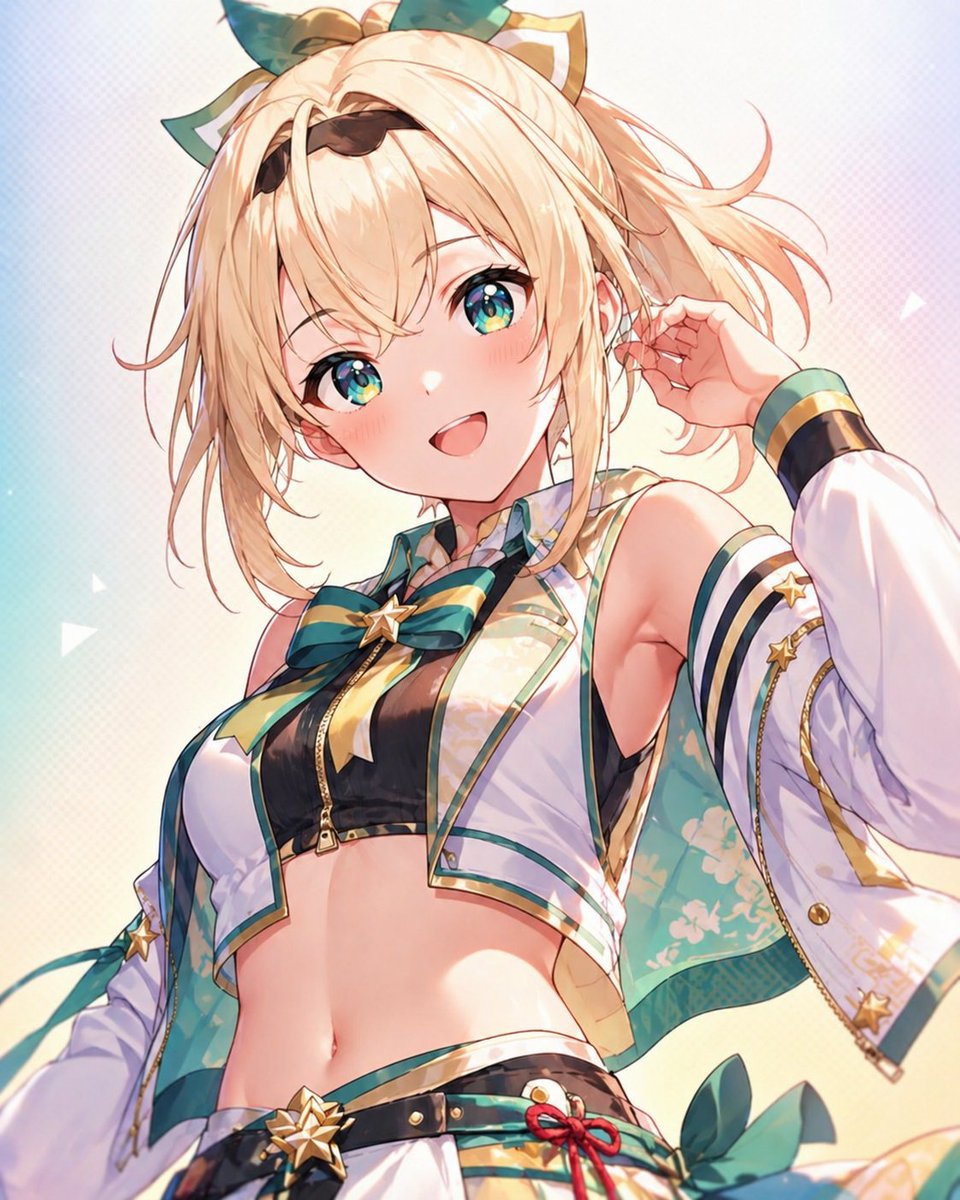
Anime Idol Portrait — Dramatic Low-Angle Card Art
프롬프트 · EN
一张精致的动漫偶像风格肖像,主角为 argcharacter name: 风真伊吕波。采用竖版构图,戏剧性的低角度拍摄,画面从大腿上部截取至头顶,面部被一个位于中央的米色长方形遮挡块完全遮住。她留着蓬松的短发,发色为 arghair color: 金色,凌乱的波波头带有向外翻翘的发梢,两侧留有长发丝,头顶饰有巨大的青金配色蝴蝶结及类似耳朵的小装饰。姿势自信且略带俏皮,一只手抬至耳边,另一只手臂位于画框外,胸部略微向左倾斜,身体微微后仰。她身着时尚的舞台服装,主色调为 argaccent colors: 青色、白色、黑色和金色:黑色拉链露脐上衣,外搭一件无袖短马甲,采用光泽感浅色面料并饰有花卉图案,配有夸张的白色分离式袖套,袖口为深色并带有金色镶边,袖子和胸前蝴蝶结上有星星装饰,领口系有大号条纹蝴蝶结,低腰裙或短裤腰带上饰有星形腰带扣及红色绳结装饰。强调她露出的腰部、纤细的运动型身材、光泽感的面料渲染、精致的金色镶边以及层叠的偶像服装细节。使用柔和的暖光,微妙的柔和渐变,背景中有淡淡的几何闪光,背景色从浅青色过渡到奶油色,干净且通透。插画应具备高细节、平滑、明亮且现代的质感,线条清晰,带有淡淡的腮红,呈现出高级扭蛋卡面或 VTuber 关键视觉图的品质。

프롬프트 소개

Generates a polished, high-detail anime idol portrait with a dramatic low-angle pose, elaborate costume, and clean pastel background. Use it as a 컨셉 아트 starting point for GPT Image 2: keep the visual structure and style constraints intact, then swap in your own subject, brand, or scene.

Start by replacing character name, hair color, and accent colors, then keep the camera, composition, and material cues in the same order. This makes the output easier to compare across variations.

이 프롬프트 사용법

  1. Copy the full prompt text.
  2. Paste it into your preferred AI image generator (e.g., Sora 2, Midjourney, or Stable Diffusion).
  3. Adjust variables like character name, hair color, and accent colors to customize the character.
  4. Regenerate or tweak settings to achieve your desired art style and quality.
  5. Use the output for social media posts, VTuber assets, or character design references.

FAQ

ユメ・アスタAIイラストレーター

@yume00112211→

게시일
2026년 4월 30일
원본 언어
EN
모델
GPT Image 2
카테고리
컨셉 아트
GPT Image 2컨셉 아트gpt-image-2twitter
조회
113
복사
8
좋아요
3

공유

GPT Image 2의 더 많은 프롬프트

전체 보기
Cyberpunk AI Launch Banner — Cinematic Neon Poster Prompt

Cyberpunk AI Launch Banner — Cinematic Neon Poster Prompt

@ObieriI
Cozy Anime Cat Holiday Bedroom — Sora 2 Prompt

Cozy Anime Cat Holiday Bedroom — Sora 2 Prompt

@miya_space
Anime Reaction Thumbnail Prompt — Neon Edgy VTuber

Anime Reaction Thumbnail Prompt — Neon Edgy VTuber

@abdiisan

Sora2Hub 프롬프트로 더 빠르게 제작하세요.

검색 가능한 프롬프트 페이지에서 시작해 적합한 모델 컨텍스트로 바로 생성하세요.

프롬프트 탐색

