
Sora2 Hub
Sora2 Hub
  • 프롬프트 라이브러리
  • 가격
  • 쇼케이스
Sora2 Hub
Sora2 Hub
Sora2 Hub

Sora2 Hub

Sora 2, Veo 3.1, Nano Banana Pro로 구동되는 전문 AI 창작 플랫폼입니다. 고급 제어, HD 화질, 워터마크 없는 놀라운 동영상과 스튜디오급 이미지를 제작하세요.

Email:support@sora2hub.org

AI 비디오 생성

  • 텍스트에서 비디오
  • 이미지에서 비디오
  • Veo 3.1
  • Sora 2
  • Kling 3.0
  • Kling 2.6
  • Kling 2.5
  • Runway
  • Wan 2.6
  • Seedance 2.0
  • Hailuo 2.3
  • Grok Imagine
  • HappyHorse-1.0

AI 이미지 생성기

  • 텍스트에서 이미지
  • 이미지에서 이미지
  • Nano Banana Pro
  • Nano Banana
  • 4o Image
  • Flux Kontext
  • Z Image
  • Seedream 4.5
  • Seedream 5.0 Lite
  • Nano Banana 2
  • GPT Image 2
  • AI 이미지 업스케일러

AI 효과

  • AI 나이 필터
  • AI 성별 변환
  • AI 키스
  • AI 허그
  • 지브리 이미지
  • AI 인어 필터
  • AI 바디쉐이크
  • 스마일 필터
  • AI 뚱뚱하게
  • 액션 피규어

제품

  • 기능
  • 쇼케이스
  • 가격

회사

  • 소개
  • 문의

© 2025 • Sora2 Hub ORG 모든 권리 보유.

  • 개인정보 처리방침
  • 서비스 약관
  • 환불 정책
  1. 홈
  2. /
  3. 프롬프트
  4. /
  5. GPT Image 2
  6. /
  7. Bugatti Chiron at Notre-Dame — Sora 2 Prompt
GPT Image 2AI 프롬프트

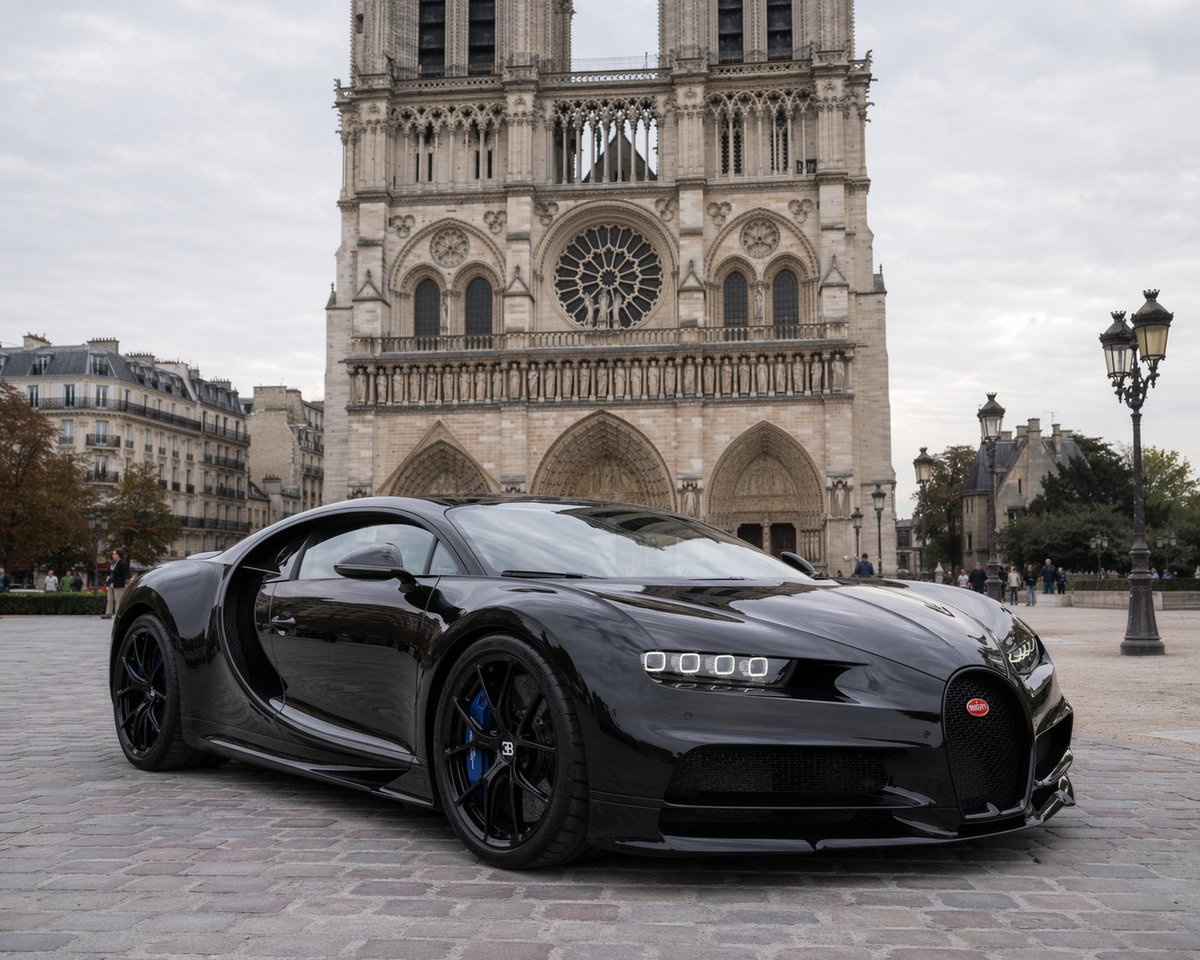
Bugatti Chiron at Notre-Dame — Sora 2 Prompt

Generate a photorealistic image of a glossy Bugatti Chiron supercar parked before the Gothic Notre-Dame cathedral under soft overcast light, with customizable variables.
Bugatti Chiron at Notre-Dame — Sora 2 Prompt
프롬프트 · EN
一张照片级真实、高分辨率的图像,展示了一辆光泽亮丽的 argcar model: 黑色布加迪 Chiron 停在鹅卵石广场上。这辆超级跑车以微倾的角度停放,展现出其流畅的空气动力学曲线、独特的马蹄形前格栅、四眼 LED 大灯、黑色合金轮毂以及亮蓝色的刹车卡钳。车身的高反射漆面映照出周围的环境。背景中矗立着宏伟的 argbackground landmark: 巴黎圣母院 大教堂,展现出其复杂的哥特式建筑风格、巨大的玫瑰花窗和双塔楼。场景设定在 arglighting and weather: 阴天白昼,提供了柔和且漫射的自然光。背景中有几位行人悠闲地走过,广场右侧可见装饰华丽的复古巴黎街灯,增添了浓郁的欧洲城市氛围。

프롬프트 소개

Generate a photorealistic image of a glossy Bugatti Chiron supercar parked before the Gothic Notre-Dame cathedral under soft overcast light, with customizable variables. Use it as a 컨셉 아트 starting point for GPT Image 2: keep the visual structure and style constraints intact, then swap in your own subject, brand, or scene.

Start by replacing car model, background landmark, and lighting and weather, then keep the camera, composition, and material cues in the same order. This makes the output easier to compare across variations.

이 프롬프트 사용법

  1. Copy the prompt to your clipboard.
  2. Open an AI image generator like Sora 2, Midjourney, or DALL·E 3.
  3. Paste the prompt and modify the variables in { } (e.g., change car model, landmark, or lighting).
  4. Generate the image and enjoy your photorealistic scene.
  5. Experiment with additional details like camera angles or car colors for varied results.

FAQ

nazca alwave

@AlwaveNazca→

게시일
2026년 4월 25일
원본 언어
EN
모델
GPT Image 2
카테고리
컨셉 아트
GPT Image 2컨셉 아트gpt-image-2twitter
조회
1.8K
복사
147
좋아요
91

공유

GPT Image 2의 더 많은 프롬프트

전체 보기
Shenzhen Golden Hour City Prompt: Futuristic Heritage Poster

Shenzhen Golden Hour City Prompt: Futuristic Heritage Poster

@ivanalog_com
AI-Generated Japanese Travel Ad Grid — Sora Prompt

AI-Generated Japanese Travel Ad Grid — Sora Prompt

@jblogpham
Sacred Dragon Dome Ceiling Mural — Sora 2 Prompt

Sacred Dragon Dome Ceiling Mural — Sora 2 Prompt

@KanaWorks_AI

Sora2Hub 프롬프트로 더 빠르게 제작하세요.

검색 가능한 프롬프트 페이지에서 시작해 적합한 모델 컨텍스트로 바로 생성하세요.

프롬프트 탐색

