
GPT Image 2AI 프롬프트
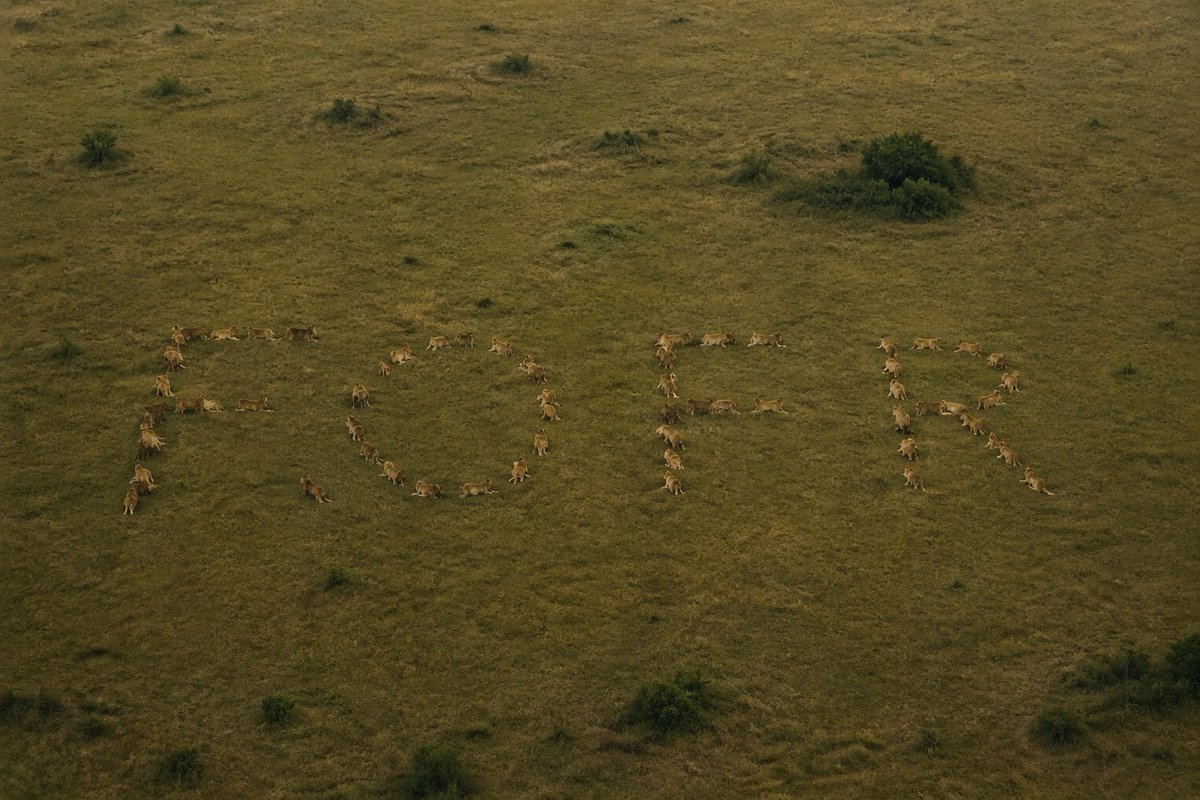
Embed a Hidden Word in a Lion Pride Photo — Sora 2 Prompt
Create mind-bending optical illusions: embed any word in a lion pride photo. Once spotted, it's unforgettable. Perfect for puzzles and creative AI art.
프롬프트 · EN
制作一张将隐藏单词嵌入其中的照片,让这个单词在被发现之前难以察觉,一旦发现后便无法忽视。使用单词 "argword: fofr"。用 argcomposition element: 狮群 来构成这个单词。
프롬프트 소개
Create mind-bending optical illusions: embed any word in a lion pride photo. Once spotted, it's unforgettable. Perfect for puzzles and creative AI art. Use it as a 컨셉 아트 starting point for GPT Image 2: keep the visual structure and style constraints intact, then swap in your own subject, brand, or scene.
Start by replacing word and composition element, then keep the camera, composition, and material cues in the same order. This makes the output easier to compare across variations.
이 프롬프트 사용법
- Copy the prompt from this page.
- Choose a compatible AI image generator (Sora 2, Midjourney, Stable Diffusion).
- Replace
{word}with your secret word (default "fofr") and{composition element}with your visual subject (e.g., "pride of lions"). - Paste the modified prompt into the model and generate.
- Experiment with different words and scenes to create unique illusions.


