
Galgame Style Phone Screenshot — Sora 2 Prompt
Generate a high-def portrait of an anime cosplayer in a mobile screenshot with a galgame dialog box and gentle healing dialogue. Perfect for visual novel styles.
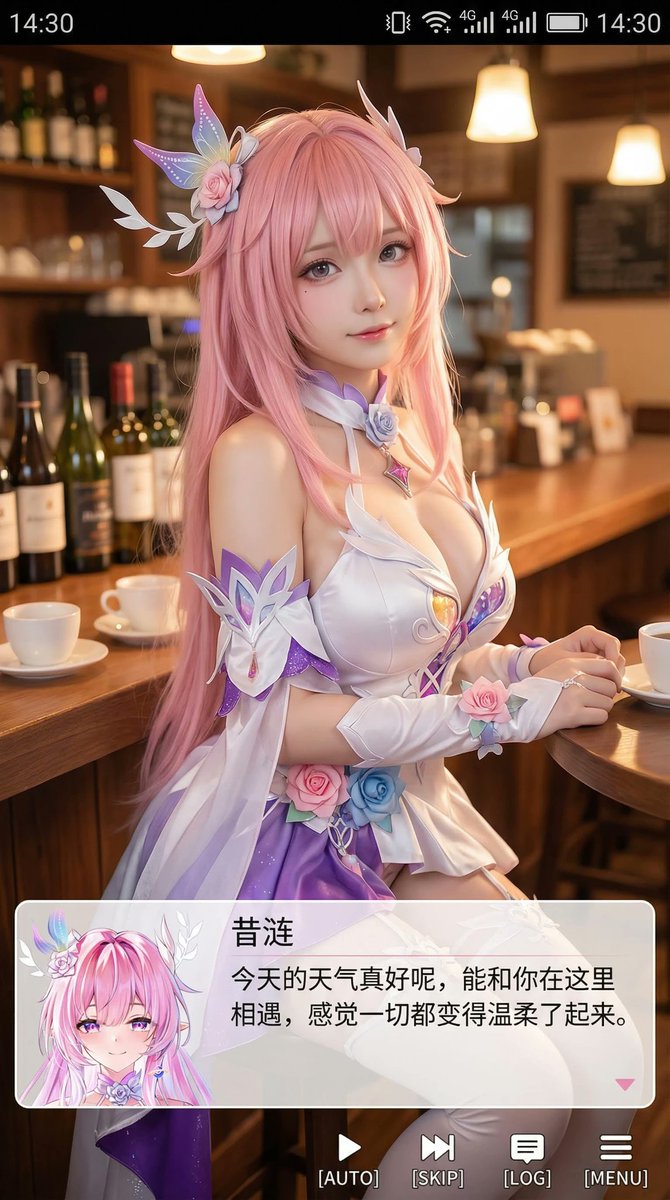
Generate a portrait mobile phone screenshot style image, with an overall aspect ratio close to 9:16. In the upper center of the frame is a real-life coser, playing a 2D anime character named (Character Name). The character is in a realistic style, but with facial features slightly showing an anime feel, delicate skin, slightly larger eyes, a gentle expression looking at the camera, sitting in an indoor casual scene, such as in front of a cafe or bar counter, with background props fitting the scene. At the very top of the image, add a mobile phone system status bar UI, including icons for time, battery, signal, and network, to make the whole image look like a mobile phone screenshot. At the bottom of the image, overlay a wide semi-transparent galgame style dialog box, place an anime or Q-version avatar corresponding to the character in the image on the left side of the dialog box; on the right side of the dialog box, typeset text: the first line displays the same character name as before in a larger font, the following one to two lines display a piece of Simplified Chinese dialogue suitable for this character's personality, in a gentle and healing style, automatically created by you. Then add an operation bar below the dialog box, imitating the galgame UI. The overall style is high-definition, rich in details, with soft lighting, and a natural fusion of 2D anime and real-life photography.
프롬프트 소개
Generate a high-def portrait of an anime cosplayer in a mobile screenshot with a galgame dialog box and gentle healing dialogue. Perfect for visual novel styles. Use it as a 컨셉 아트 starting point for an AI model: keep the visual structure and style constraints intact, then swap in your own subject, brand, or scene.
Common directions include chatgpt, 二次元, 截图, and 扮演. Treat these tags as creative cues; the prompt structure and preview image are the more useful guide.
Start with small changes to subject, scene, camera, and color, then generate a few variations to compare composition and detail without turning the page copy into keyword stuffing.
이 프롬프트 사용법
- Copy the prompt from this page.
- Paste into your AI image generator (Sora, DALL·E, etc.) and select a 9:16 portrait mode.
- Replace
(Character Name)with your desired character and customize the dialogue text in the prompt. - Generate and enjoy a realistic anime cosplay mobile screenshot.


