
GPT Image 2AI 프롬프트
Travel Photo to Monthly Calendar — Non-Destructive Layout Prompt
Turn any travel photo into a magazine-style monthly calendar card with a clean overlay, preserving the original image's authenticity and colors.
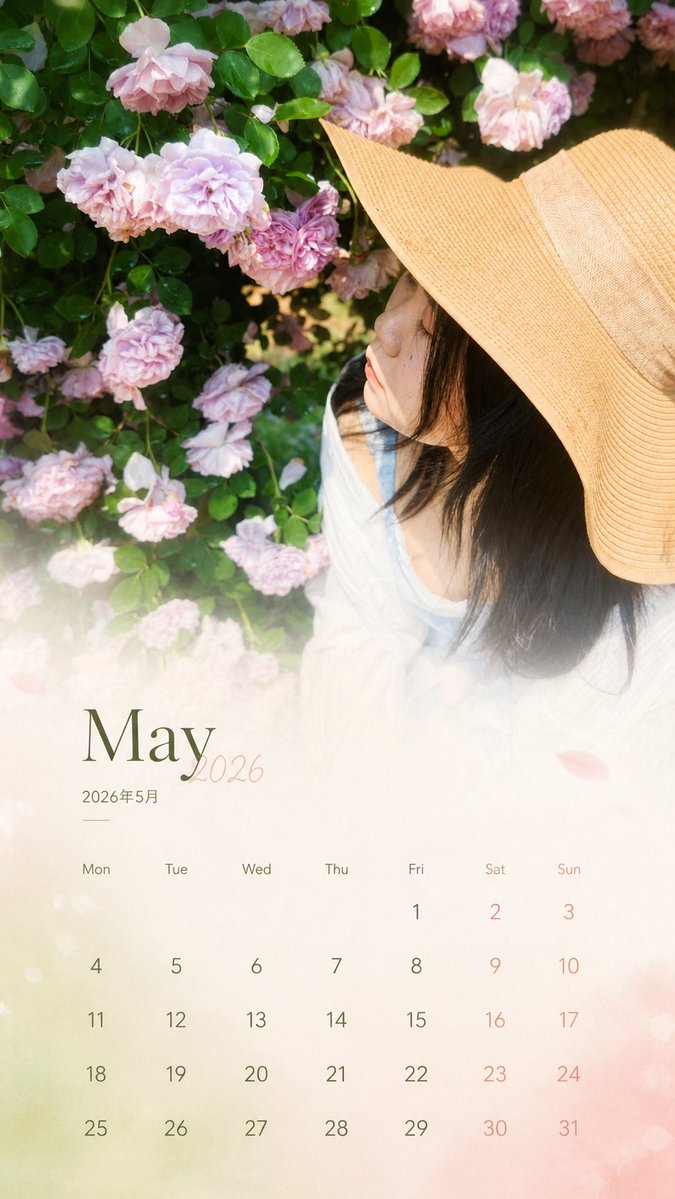
1 / 2
프롬프트 · EN
基于我上传的真实旅行照片,生成一张 9:16 比例的“月历卡”。 [1. 执行方法(最重要)]
这是一项照片编辑任务,而非重新生成。你必须以原始照片作为底图:
- 保持人物的五官、表情、发型和姿态完全不变。
- 保留原始光影、色温和阴影关系。
- 不得进行磨皮、提亮、重绘或风格化处理。
- 不得改变环境、构图或色彩氛围。
- 原始照片必须看起来未经改动。 [2. 允许的操作(仅限叠加)]
仅可在原始照片上方添加设计图层:
- 底部 30% 的渐变扩展(用于放置日历)。
- 柔和的半透明遮罩(确保文字可读性)。
- 日历布局 + 月份标题 + 文案。
禁止:重绘主体/背景、改变整体色调或应用设计滤镜。 [3. 色彩规则]
色彩必须从当前图像中提取(主色/辅色/强调色)。仅允许轻微的去饱和度和亮度统一。保持真实的色彩感。 [4. 布局结构]
顶部 70%:原始照片(未经改动)。
底部 30%:渐变 + 日历区域(自然过渡)。必须看起来像杂志页面,而非模板日历。 [5. 日历内容]
自动生成对应的年份和月份:
- 标题:argdate title: 2026 年 7 月 / 2026.07
- 星期:一 二 三 四 五 六 日
- 日期:根据真实日历排列,严格对齐。 [6. 文案规则]
长度:8-16 个字符。最多两行。不要使用感叹号。不要使用陈词滥调或人生哲理。使用情感碎片或氛围感句子。 [7. 建议]
优先选择侧脸、侧头或动态动作的照片,而非近景正脸肖像,以降低 AI 面部畸变的风险。 最终核心规则:不要试图制作一张“更好”的照片,只需在现有照片上轻盈地覆盖一层设计图层。
프롬프트 소개
Turn any travel photo into a magazine-style monthly calendar card with a clean overlay, preserving the original image's authenticity and colors. Use it as a 컨셉 아트 starting point for GPT Image 2: keep the visual structure and style constraints intact, then swap in your own subject, brand, or scene.
Start by replacing date title, then keep the camera, composition, and material cues in the same order. This makes the output easier to compare across variations.
이 프롬프트 사용법
- Copy the prompt and paste it into a compatible AI image model that supports layered design tasks.
- Upload your travel photo as the primary reference image before generating.
- Tweak the variables like
{date title}to set your desired month and year (e.g., 2026年7月). - Add your short caption in the 8-16 character range for the calendar's mood text.
- Generate and review the output, ensuring the top 70% remains your untouched original photo.


