
GPT Image 2AI 프롬프트
Cinematic Video Game Cutscene Generator — Sora 2 Prompt
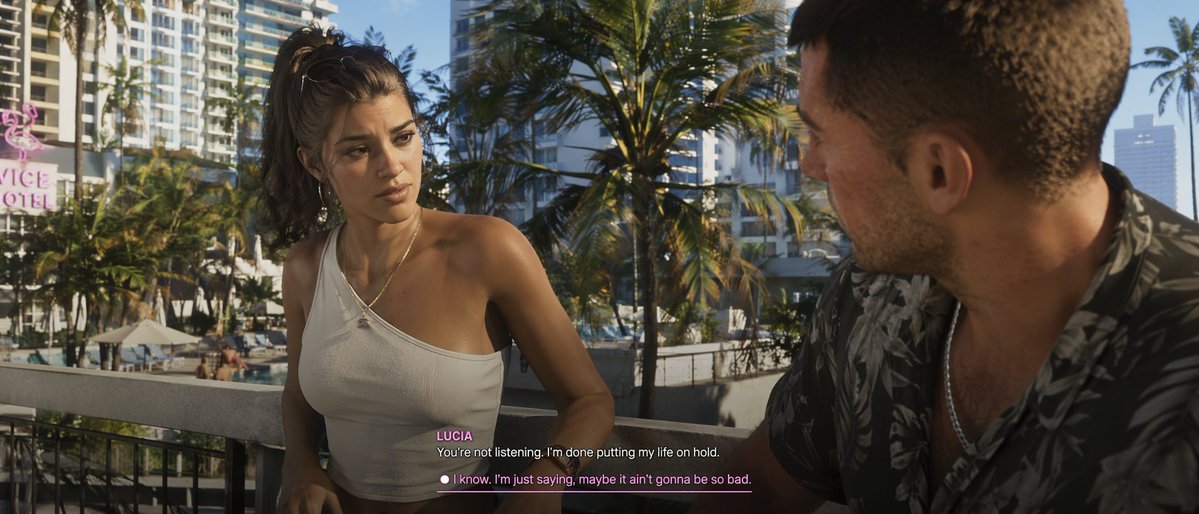
Craft cinematic game cutscenes with AI — customize every detail from characters to dialogue in ultra-realistic 3D.
프롬프트 · EN
一张采用现代开放世界游戏超写实 3D 图形风格的电影级电子游戏过场动画截图。两名角色正在 argsetting: 阳光明媚的热带城市阳台 上进行严肃的对话。左侧是一位年轻的拉丁裔女性,留着棕色凌乱高马尾,身穿白色单肩罗纹短上衣,佩戴圆环耳环和细金项链,正专注地看着对方。右侧是从肩后侧面角度拍摄的一名白人男性,留着棕色短发,身穿深色热带叶片图案短袖衬衫,佩戴银色项链。背景中可以看到棕榈树、下方的游泳池、高层建筑以及一个写着 "arglocation sign: VICE HOTEL" 的粉色霓虹灯牌。光线明亮且温暖,呈现出午后阳光的效果。底部中央设有电子游戏字幕 UI。说话者的名字 "argfemale character name: LUCIA" 以粉色文字显示在白色对话文本上方:"argfemale dialogue: 你根本没在听。我受够了为了你而搁置我的生活。"。下方是一个带有白点和粉色下划线的可选对话选项,内容为:"argmale dialogue choice: 我知道。我只是说,也许情况没那么糟。"。
프롬프트 소개
Craft cinematic game cutscenes with AI — customize every detail from characters to dialogue in ultra-realistic 3D. Use it as a 컨셉 아트 starting point for GPT Image 2: keep the visual structure and style constraints intact, then swap in your own subject, brand, or scene.
Start by replacing setting, location sign, female character name, and female dialogue, then keep the camera, composition, and material cues in the same order. This makes the output easier to compare across variations.
이 프롬프트 사용법
- Copy the prompt template from the text area above.
- Choose your AI model, such as Sora 2 or another text-to-image generator.
- Customize the argument values in double quotes (e.g., setting, character names, dialogue).
- Paste the modified prompt into the model and generate your cinematic cutscene.
- Iterate by tweaking variables to explore different scenarios.


