
Sora2 Hub
Sora2 Hub
  • 프롬프트 라이브러리
  • 가격
  • 쇼케이스
Sora2 Hub
Sora2 Hub
Sora2 Hub

Sora2 Hub

Sora 2, Veo 3.1, Nano Banana Pro로 구동되는 전문 AI 창작 플랫폼입니다. 고급 제어, HD 화질, 워터마크 없는 놀라운 동영상과 스튜디오급 이미지를 제작하세요.

Email:support@sora2hub.org

AI 비디오 생성

  • 텍스트에서 비디오
  • 이미지에서 비디오
  • Veo 3.1
  • Sora 2
  • Kling 3.0
  • Kling 2.6
  • Kling 2.5
  • Runway
  • Wan 2.6
  • Seedance 2.0
  • Hailuo 2.3
  • Grok Imagine
  • HappyHorse-1.0

AI 이미지 생성기

  • 텍스트에서 이미지
  • 이미지에서 이미지
  • Nano Banana Pro
  • Nano Banana
  • 4o Image
  • Flux Kontext
  • Z Image
  • Seedream 4.5
  • Seedream 5.0 Lite
  • Nano Banana 2
  • GPT Image 2
  • AI 이미지 업스케일러

AI 효과

  • AI 나이 필터
  • AI 성별 변환
  • AI 키스
  • AI 허그
  • 지브리 이미지
  • AI 인어 필터
  • AI 바디쉐이크
  • 스마일 필터
  • AI 뚱뚱하게
  • 액션 피규어

제품

  • 기능
  • 쇼케이스
  • 가격

회사

  • 소개
  • 문의

© 2025 • Sora2 Hub ORG 모든 권리 보유.

  • 개인정보 처리방침
  • 서비스 약관
  • 환불 정책
  1. 홈
  2. /
  3. 프롬프트
  4. /
  5. GPT Image 2
  6. /
  7. Film Noir Paris Taxi — Anthropomorphic Character Prompt
GPT Image 2AI 프롬프트

Film Noir Paris Taxi — Anthropomorphic Character Prompt

Create a cinematic, ultra-detailed portrait of two elegantly anonymized anthropomorphic characters riding a vintage taxi through rainy Paris at night.
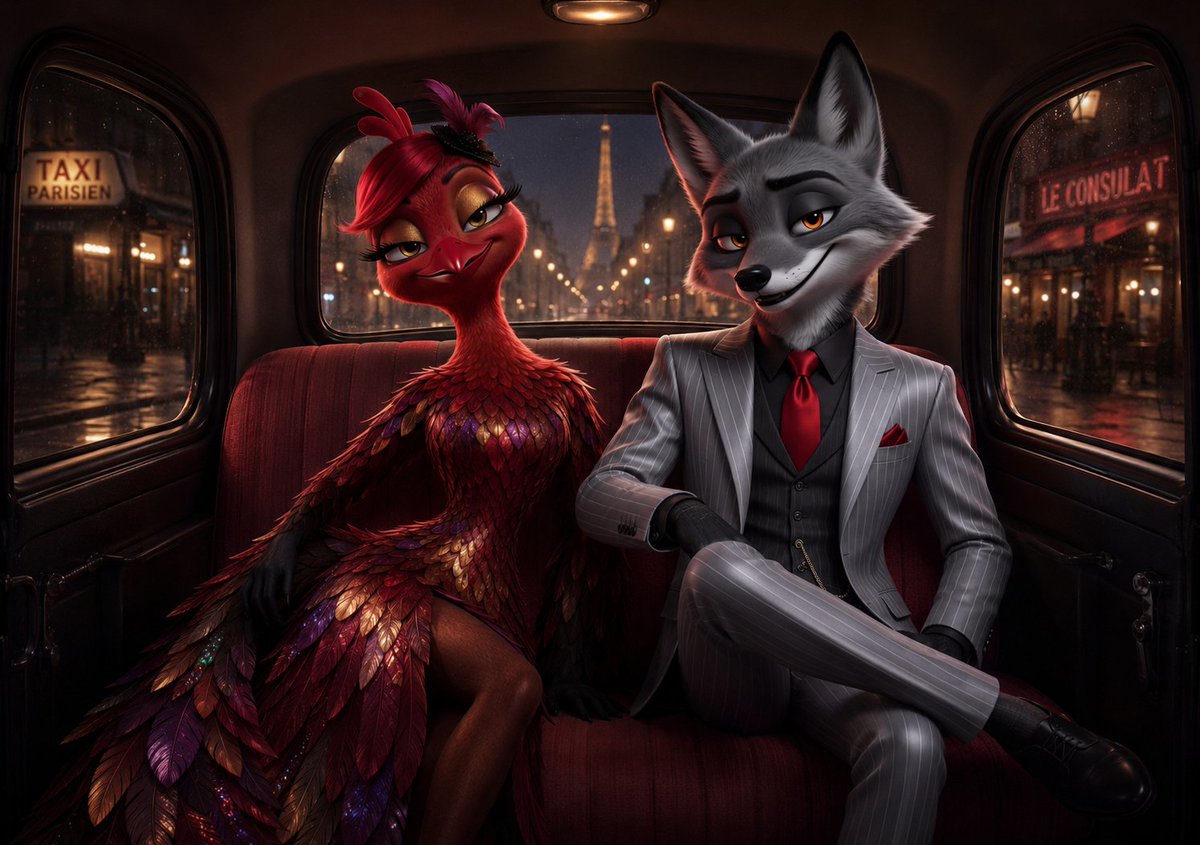
Film Noir Paris Taxi — Anthropomorphic Character Prompt
프롬프트 · EN
创作一张电影级、超精细的黑色电影风格拟人化场景,背景设定在夜晚一辆复古巴黎出租车的后座。两个优雅的角色并排坐在深酒红色天鹅绒长椅上:左侧是 argleft character: 一位迷人的红色羽毛鸟女郎舞者,身着由深红、酒红、铜色、金色和紫色羽毛层叠而成的时装礼服,戴着深色手套,露出修长的双腿,头戴鲜艳的歌舞表演羽毛头饰;右侧是 argright character: 一位灰狼头绅士,身穿剪裁合体的浅灰色细条纹三件套西装,搭配黑色衬衫、鲜红色领带、红色口袋巾、黑色手套和擦得锃亮的黑色皮鞋,坐姿从容,一条腿叠放,一只手臂自信地搭在旁边。两个角色都以优雅而神秘的姿态面向前方,他们的脸部被巨大的不透明方块刻意遮挡,使画面呈现出一种匿名或被涂抹的效果。出租车内部光线昏暗、温暖且奢华,配有弧形车窗、黑色装饰、头顶微弱的圆顶灯以及柔和的琥珀色反光。透过后窗,展示雨夜中的巴黎大道,远处的埃菲尔铁塔位于中心,伴有模糊的街灯、湿漉漉的地面和发光的焦外成像;透过侧窗,左侧可见写着 argleft window sign: TAXI PARISIEN 的店招,右侧可见 argright window sign: LE CONSULAT 的店招。采用戏剧性的低调照明、光亮的雨水反射、浓郁的红金配色、车窗外浅景深效果、写实的奇幻角色设计、高端数字绘画细节以及宽银幕电影构图。

프롬프트 소개

Create a cinematic, ultra-detailed portrait of two elegantly anonymized anthropomorphic characters riding a vintage taxi through rainy Paris at night. Use it as a 컨셉 아트 starting point for GPT Image 2: keep the visual structure and style constraints intact, then swap in your own subject, brand, or scene.

Start by replacing left character, right character, left window sign, and right window sign, then keep the camera, composition, and material cues in the same order. This makes the output easier to compare across variations.

이 프롬프트 사용법

  1. Copy the entire prompt text.
  2. Open your preferred AI image generator (e.g., Sora 2, Midjourney, DALL·E).
  3. Paste the prompt and customize the variable fields (left/right character, window signs) as desired.
  4. Generate the image, adjusting style keywords for different moods or detail levels.

FAQ

Jacob's Lattice

@JacobsLattice→

게시일
2026년 5월 15일
원본 언어
EN
모델
GPT Image 2
카테고리
컨셉 아트
GPT Image 2컨셉 아트gpt-image-2twitter
조회
1.3K
복사
95
좋아요
34

공유

GPT Image 2의 더 많은 프롬프트

전체 보기
Cyberpunk AI Launch Banner — Cinematic Neon Poster Prompt

Cyberpunk AI Launch Banner — Cinematic Neon Poster Prompt

@ObieriI
Celebrity Crossover — Sora 2 Prompt

Celebrity Crossover — Sora 2 Prompt

@Conor_D_Dart
Dynamic Nike Ad Poster — Sora 2 Prompt with Sydney Sweeney

Dynamic Nike Ad Poster — Sora 2 Prompt with Sydney Sweeney

@im_shahid7

Sora2Hub 프롬프트로 더 빠르게 제작하세요.

검색 가능한 프롬프트 페이지에서 시작해 적합한 모델 컨텍스트로 바로 생성하세요.

프롬프트 탐색

