
Sora2 Hub
Sora2 Hub
  • 프롬프트 라이브러리
  • 가격
  • 쇼케이스
Sora2 Hub
Sora2 Hub
Sora2 Hub

Sora2 Hub

Sora 2, Veo 3.1, Nano Banana Pro로 구동되는 전문 AI 창작 플랫폼입니다. 고급 제어, HD 화질, 워터마크 없는 놀라운 동영상과 스튜디오급 이미지를 제작하세요.

Email:support@sora2hub.org

AI 비디오 생성

  • 텍스트에서 비디오
  • 이미지에서 비디오
  • Veo 3.1
  • Sora 2
  • Kling 3.0
  • Kling 2.6
  • Kling 2.5
  • Runway
  • Wan 2.6
  • Seedance 2.0
  • Hailuo 2.3
  • Grok Imagine
  • HappyHorse-1.0

AI 이미지 생성기

  • 텍스트에서 이미지
  • 이미지에서 이미지
  • Nano Banana Pro
  • Nano Banana
  • 4o Image
  • Flux Kontext
  • Z Image
  • Seedream 4.5
  • Seedream 5.0 Lite
  • Nano Banana 2
  • GPT Image 2
  • AI 이미지 업스케일러

AI 효과

  • AI 나이 필터
  • AI 성별 변환
  • AI 키스
  • AI 허그
  • 지브리 이미지
  • AI 인어 필터
  • AI 바디쉐이크
  • 스마일 필터
  • AI 뚱뚱하게
  • 액션 피규어

제품

  • 기능
  • 쇼케이스
  • 가격

회사

  • 소개
  • 문의

© 2025 • Sora2 Hub ORG 모든 권리 보유.

  • 개인정보 처리방침
  • 서비스 약관
  • 환불 정책
  1. 홈
  2. /
  3. 프롬프트
  4. /
  5. GPT Image 2
  6. /
  7. Detailed Physical World Map Prompt with Info Panels & Compass
GPT Image 2AI 프롬프트

Detailed Physical World Map Prompt with Info Panels & Compass

Generate a highly detailed physical world map complete with shaded terrain, ocean depths, grid lines, a compass rose, legend, and five informative data panels along the bottom.
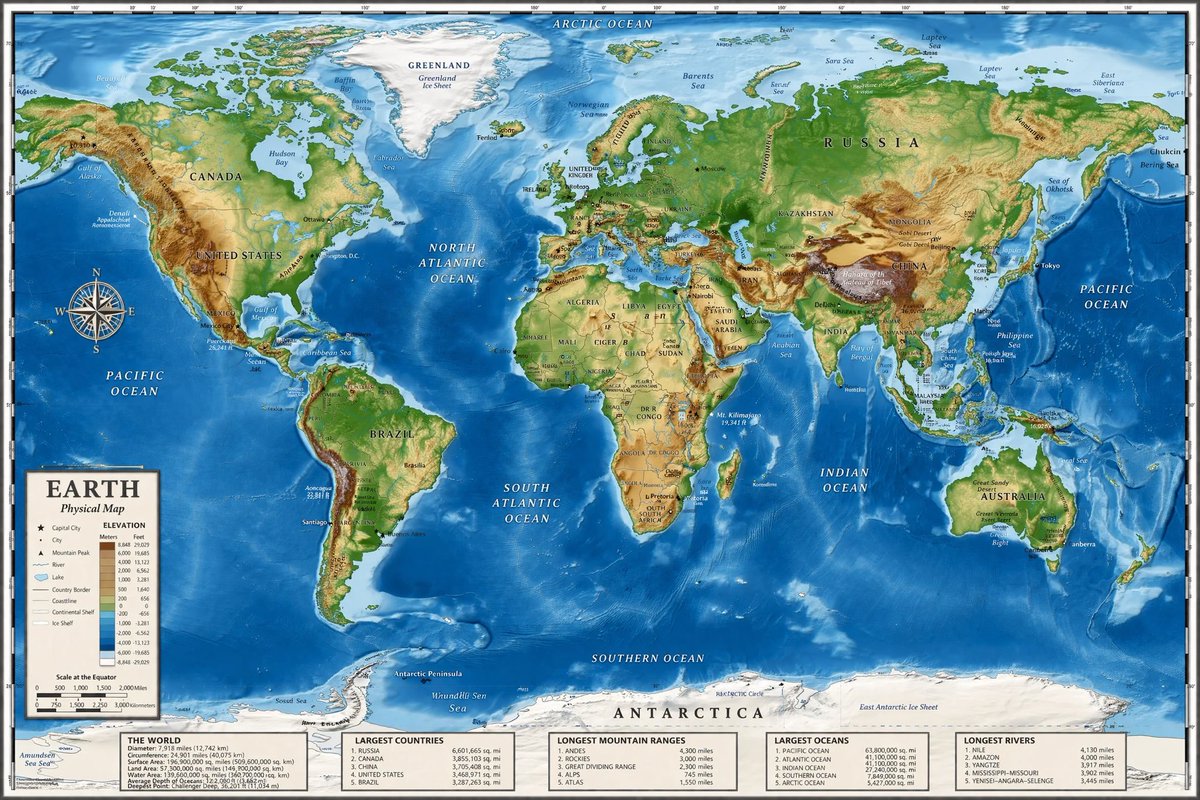
Detailed Physical World Map Prompt with Info Panels & Compass
프롬프트 · EN
type
高度详细的制图世界地图
style
{argument name="color palette" default="逼真的地形和测深色彩"}
map_features
terrain
阴影浮雕,以绿色、棕色和白色显示山脉、山谷和平原
oceans
不同色调的蓝色深度阴影,浅蓝色代表大陆架,深蓝色代表深海沟
grid
覆盖整个地图的经纬线
labels
主要大洲、国家、海洋和海域,以衬线和无衬线字体清晰标注
layout
overlays
item 1
type
罗盘玫瑰
position
中左侧,位于太平洋上方
description
经典的 8 向航海罗盘
item 2
type
图例
position
左下角
title
{argument name="map title" default="地球"}
subtitle
{argument name="map type" default="物理地图"}
contents
海拔颜色键、地图符号和距离比例尺
bottom_panels
count
5
position
沿底部的水平行
labels
item 1
世界概况
item 2
最大国家
item 3
最长山脉
item 4
最大海洋
item 5
最长河流

프롬프트 소개

Generate a highly detailed physical world map complete with shaded terrain, ocean depths, grid lines, a compass rose, legend, and five informative data panels along the bottom. Use it as a 컨셉 아트 starting point for GPT Image 2: keep the visual structure and style constraints intact, then swap in your own subject, brand, or scene.

This prompt is organized as structured JSON with fields such as type, style, map features, and layout. Keeping that hierarchy helps the model separate the subject, layout, interface elements, and detail constraints.

Start with small changes to subject, scene, camera, and color, then generate a few variations to compare composition and detail without turning the page copy into keyword stuffing.

이 프롬프트 사용법

  1. Copy the prompt and paste it into your AI image generator (Sora, Midjourney, etc.).
  2. Adjust the color palette argument to change the terrain and ocean color scheme.
  3. Set the map title and map type to personalize the legend overlay.
  4. Choose a model with strong text rendering for clear labels and details.
  5. Generate the map and iterate on prompt nuances if needed.

FAQ

すぐる | ChatGPTガチ勢 𝕏

@SuguruKun_ai→

게시일
2026년 4월 25일
원본 언어
EN
모델
GPT Image 2
카테고리
컨셉 아트
GPT Image 2컨셉 아트gpt-image-2twitter
조회
1.3K
복사
111
좋아요
101

공유

GPT Image 2의 더 많은 프롬프트

전체 보기
Gothic Anime Girl with Hidden Face — Sora 2 Prompt

Gothic Anime Girl with Hidden Face — Sora 2 Prompt

@hoshi122221
Photorealistic Fashion Magazine Cover — Sora 2 Prompt

Photorealistic Fashion Magazine Cover — Sora 2 Prompt

@aichof21
Gothic Anime Girl Bites Playground Rail — Sora 2 Prompt

Gothic Anime Girl Bites Playground Rail — Sora 2 Prompt

@hoshi122221

Sora2Hub 프롬프트로 더 빠르게 제작하세요.

검색 가능한 프롬프트 페이지에서 시작해 적합한 모델 컨텍스트로 바로 생성하세요.

프롬프트 탐색

