
Sora2 Hub
Sora2 Hub
  • 프롬프트 라이브러리
  • 가격
  • 쇼케이스
Sora2 Hub
Sora2 Hub
Sora2 Hub

Sora2 Hub

Sora 2, Veo 3.1, Nano Banana Pro로 구동되는 전문 AI 창작 플랫폼입니다. 고급 제어, HD 화질, 워터마크 없는 놀라운 동영상과 스튜디오급 이미지를 제작하세요.

Email:support@sora2hub.org

AI 비디오 생성

  • 텍스트에서 비디오
  • 이미지에서 비디오
  • Veo 3.1
  • Sora 2
  • Kling 3.0
  • Kling 2.6
  • Kling 2.5
  • Runway
  • Wan 2.6
  • Seedance 2.0
  • Hailuo 2.3
  • Grok Imagine
  • HappyHorse-1.0

AI 이미지 생성기

  • 텍스트에서 이미지
  • 이미지에서 이미지
  • Nano Banana Pro
  • Nano Banana
  • 4o Image
  • Flux Kontext
  • Z Image
  • Seedream 4.5
  • Seedream 5.0 Lite
  • Nano Banana 2
  • GPT Image 2
  • AI 이미지 업스케일러

AI 효과

  • AI 나이 필터
  • AI 성별 변환
  • AI 키스
  • AI 허그
  • 지브리 이미지
  • AI 인어 필터
  • AI 바디쉐이크
  • 스마일 필터
  • AI 뚱뚱하게
  • 액션 피규어

제품

  • 기능
  • 쇼케이스
  • 가격

회사

  • 소개
  • 문의

© 2025 • Sora2 Hub ORG 모든 권리 보유.

  • 개인정보 처리방침
  • 서비스 약관
  • 환불 정책
  1. 홈
  2. /
  3. 프롬프트
  4. /
  5. GPT Image 2
  6. /
  7. Restaurant Camera Angle Change — Sora 2 Prompt
GPT Image 2AI 프롬프트

Restaurant Camera Angle Change — Sora 2 Prompt

Generate a side-by-side comparison showing how changing only the camera angle transforms a crowded restaurant scene, demonstrating precise viewpoint control.
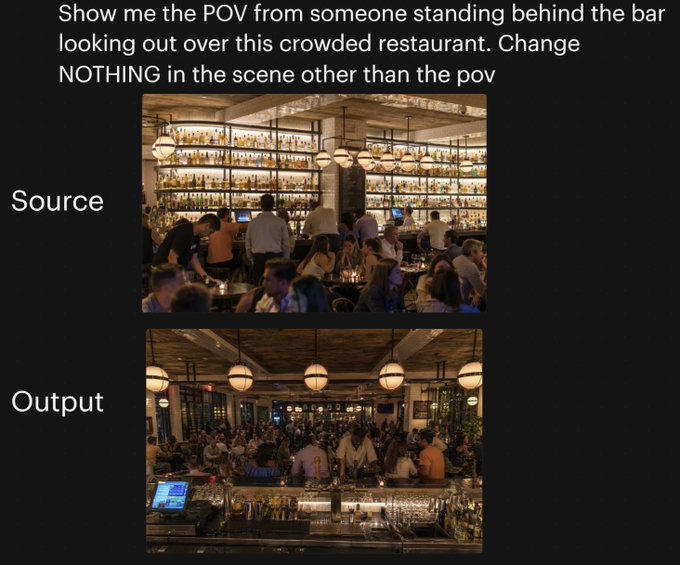
Restaurant Camera Angle Change — Sora 2 Prompt
프롬프트 · EN
一张黑色背景下的并排对比图,展示了同一餐厅场景中摄像机角度的变化。顶部为醒目的白色无衬线大字,内容为:“向我展示有人站在吧台后俯瞰这家拥挤餐厅的视角。除了视角外,不要改变场景中的任何内容”。下方垂直居中放置两张堆叠的矩形照片:顶部图片左侧用白色大字标注为“源图像”(Source),底部图片左侧用白色大字标注为“输出图像”(Output)。顶部照片展示了一个灯光温暖、高档且拥挤的餐厅内部,视角从餐厅用餐区看向吧台,吧台后方的整面墙架上摆满了发光的酒瓶,吧台前有调酒师和顾客,环境采用琥珀色灯光,配有球形吊灯、木质天花板、米色立柱,前景坐满了用餐的客人。底部照片展示了完全相同的餐厅、相同的客流密度、相同的暖色灯光、相同的装饰、相同的吧台货架、相同的球形吊灯以及相同的整体构图元素,但视角变成了站在吧台后向外俯瞰整个拥挤的餐厅;前景包括带有玻璃器皿、金属吧台工具、酒瓶和左下角可见的销售终端(POS)屏幕的吧台,中间区域挤满了顾客和员工,用餐区延伸至背景。请保持两张图片之间仅摄像机位置发生变化,场景中没有其他改动的视觉观感。

프롬프트 소개

Generate a side-by-side comparison showing how changing only the camera angle transforms a crowded restaurant scene, demonstrating precise viewpoint control. Use it as a 컨셉 아트 starting point for GPT Image 2: keep the visual structure and style constraints intact, then swap in your own subject, brand, or scene.

Start with small changes to subject, scene, camera, and color, then generate a few variations to compare composition and detail without turning the page copy into keyword stuffing.

이 프롬프트 사용법

  1. Copy the exact prompt text provided.
  2. Open your AI image generator (e.g., Sora 2, Midjourney, DALL·E).
  3. Paste the prompt and adjust any style or detail variables if desired.
  4. Generate the image to visualize the camera angle transformation while preserving scene elements.

FAQ

Chesny

@chesnyfcb→

게시일
2026년 4월 25일
원본 언어
EN
모델
GPT Image 2
카테고리
컨셉 아트
GPT Image 2컨셉 아트gpt-image-2twitter
조회
1.1K
복사
147
좋아요
74

공유

GPT Image 2의 더 많은 프롬프트

전체 보기
Anime Mahjong Win Scene with Yakuza Score UI — Sora 2 Prompt

Anime Mahjong Win Scene with Yakuza Score UI — Sora 2 Prompt

@AI_Ossan
Dark Anime Devil Girl Mario Kart Poster — Sora 2 Prompt

Dark Anime Devil Girl Mario Kart Poster — Sora 2 Prompt

@opener_ai
Minimalist Mother's Day Wallpaper — Sora 2 Prompt with Calligraphy & Carnations

Minimalist Mother's Day Wallpaper — Sora 2 Prompt with Calligraphy & Carnations

@EdimakorJP

Sora2Hub 프롬프트로 더 빠르게 제작하세요.

검색 가능한 프롬프트 페이지에서 시작해 적합한 모델 컨텍스트로 바로 생성하세요.

프롬프트 탐색

