
GPT Image 2AI 프롬프트
Sora 2 Prompt: 6-Panel Cinematic Storyboard
Generate a polished 6-panel storyboard with consistent characters, cinematic lighting, and a clear product narrative for commercial pitches.
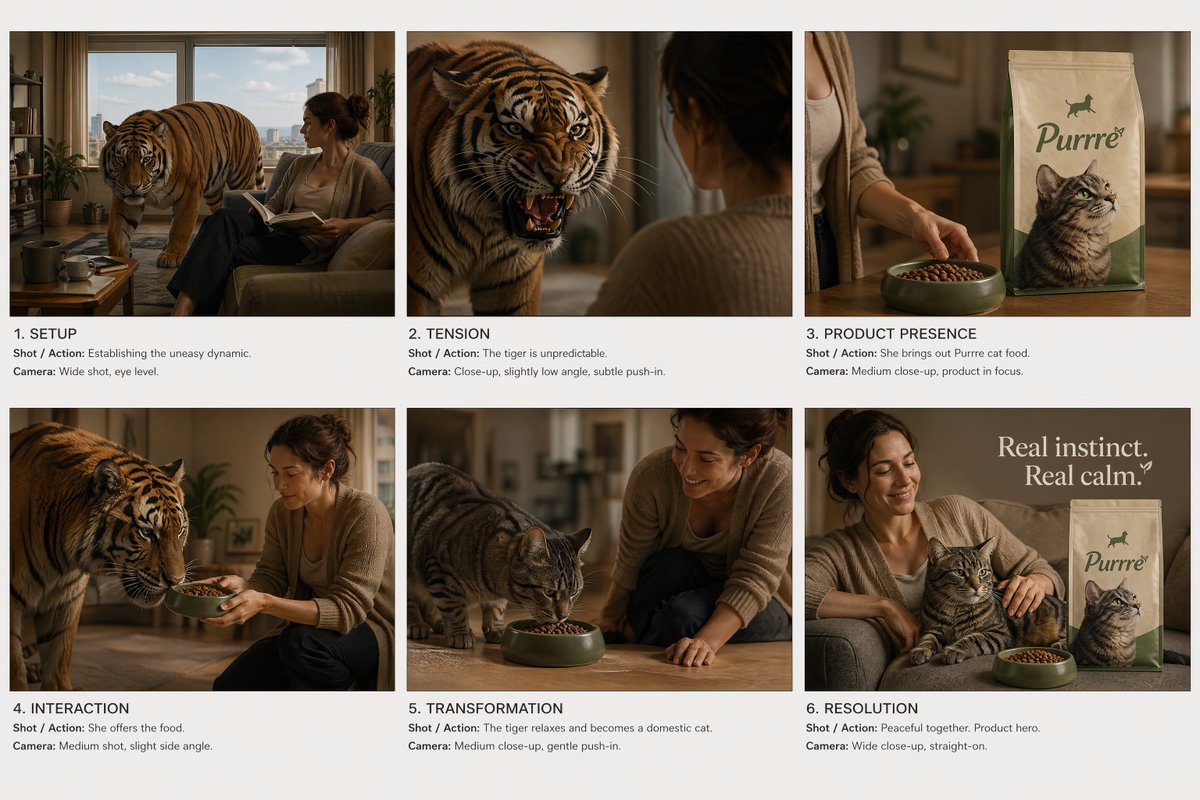
프롬프트 · EN
创建一个电影级商业分镜表。 布局:
- 固定 6 格网格 (2x3),间距均匀
- 干净的白色或中性背景
- 每个面板清晰分隔,无 UI,无杂乱元素 全局风格:
- 电影级写实感,高端商业视觉效果
- 柔和且受控的灯光,在所有面板中保持一致
- 角色或环境无偏移 故事弧线(严格顺序):
1. 铺垫
2. 紧张感
3. 产品展示
4. 产品互动
5. 转变(影响)
6. 简洁的收尾镜头 场景概念:
argstory concept: 一位女性住在一个安静的公寓里,身边有一只紧张且难以预测的老虎。老虎表现得像家猫,但时刻带有危险气息。当她奉上产品(猫粮)时,老虎明显放松下来,并转变为一只平静的家猫。 面板要求(每个面板需包含):
- 电影级画面(构图清晰,主体易读)
- 镜头 / 动作(聚焦于角色 + 产品,如适用)
- 摄影(镜头类型、角度、运动) 产品规则:
- 产品在第 3、4、6 面板中必须清晰、易读且光照充足
- 无畸变,无重新设计
- 包装必须保持一致 视觉优先级:
- 紧张感(老虎)与放松感(猫)之间的强烈对比
- 每一帧都具备清晰的易读性
- 无抽象或超现实的扭曲,基于现实主义 文字:
- 极简,仅使用小型专业标签(面板编号 + 简短镜头备注)
- 无额外图形
프롬프트 소개
Generate a polished 6-panel storyboard with consistent characters, cinematic lighting, and a clear product narrative for commercial pitches. Use it as a 컨셉 아트 starting point for GPT Image 2: keep the visual structure and style constraints intact, then swap in your own subject, brand, or scene.
Start by replacing story concept, then keep the camera, composition, and material cues in the same order. This makes the output easier to compare across variations.
이 프롬프트 사용법
- Copy the full prompt.
- Open Sora 2 or any compatible AI image generator.
- Paste the prompt and generate your storyboard.
- To customize, replace the 'story concept' variable with your own scenario.
- Regenerate for variations until the panel sequence and product visibility are perfect.


