
GPT Image 2AI 프롬프트
Nurse Mascot Brand & Merch Design — Sora 2 Prompt
Generate a complete brand identity system for a nurse mascot character, including logos, posters, social media profiles, and a 9-piece merch collection from one structured prompt.
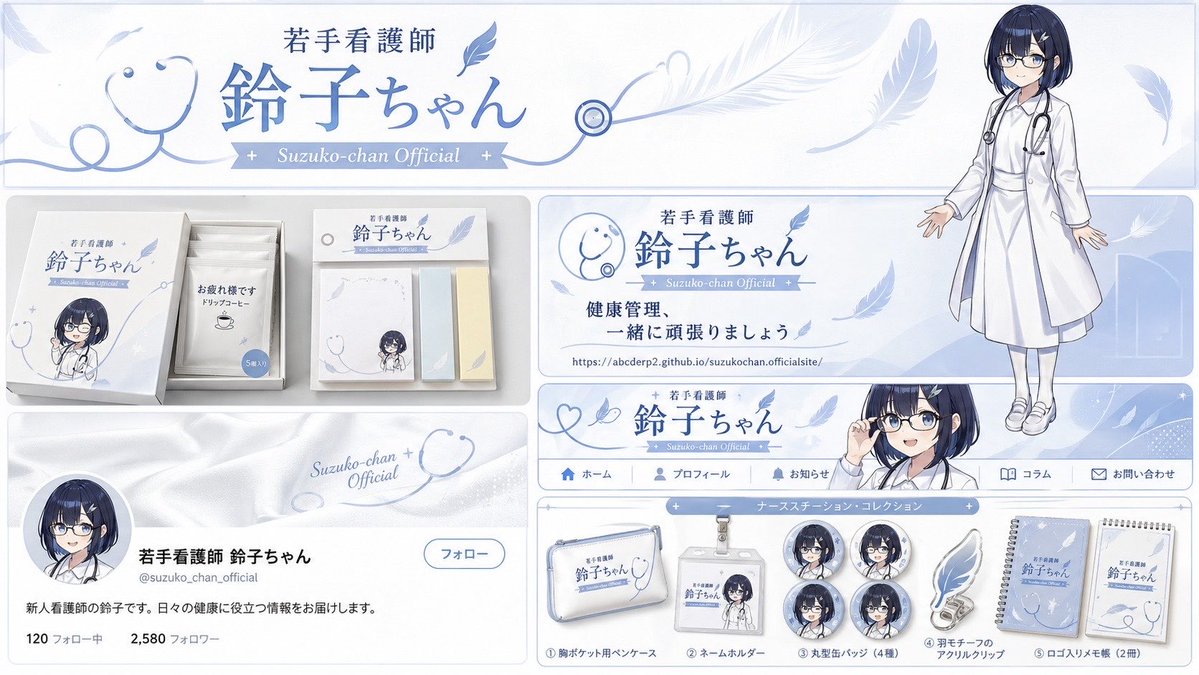
프롬프트 · EN
{ "type": "品牌形象与周边商品设计项目", "theme": { "color_palette": "argtheme color: 淡蓝色 与白色(侧重于整洁与信任感)", "motif": "argmotif 1: 听诊器 与 argmotif 2: 羽毛发饰" }, "character": { "description": "年轻护士,深蓝色短波波头,戴眼镜,身穿白大褂,脖子上挂着听诊器。头发上有一个独特的羽毛状发饰。", "image_source": "image_0.png" }, "branding": { "main_logo": "年轻护士 Suzuko-chan", "sub_logo": "Suzuko-chan 官方" }, "layout": { "sections": [ { "type": "官方页眉横幅", "position": "顶部", "elements": ["主 Logo '年轻护士 Suzuko-chan'", "使用羽毛图案的线条装饰", "右侧 Suzuko-chan 全身插图(参考图片)"] }, { "type": "实用周边礼盒", "position": "中左", "elements": ["干净的白色长方形礼盒", "Suzuko-chan 的 Q 版插图", "5 包独立包装的挂耳咖啡,印有“辛苦了”的留言", "带有 Logo 的便签纸套装"] }, { "type": "宣传海报", "position": "中右", "elements": ["Suzuko-chan 的肖像(参考图片)", "听诊器图标", "主 Logo", "文字“让我们一起努力做好健康管理”", "官方网址 'https://t.co/RzPF9OQenz'"] }, { "type": "网页导航横幅", "position": "中下", "elements": ["主 Logo", "羽毛图形", "右侧 Suzuko-chan 的半身像(强调眼镜和微笑)"] }, { "type": "社交媒体个人资料展示", "position": "左下", "elements": ["以白大褂质感为构想的页眉背景", "Suzuko-chan 的头像", "名称 '年轻护士 Suzuko-chan'", "自我介绍 '我是新晋护士 Suzuko。我将为您提供有益于日常健康的信息。'"] }, { "type": "护士站周边系列", "position": "右下", "count": 9, "items": ["1 个带 Logo 的胸前口袋笔袋", "1 个带 Suzuko-chan 插图的证件套", "4 枚圆形徽章(不同表情)", "1 个羽毛图案亚克力夹", "2 本带 Logo 的记事本"] } ] }
}
프롬프트 소개
Generate a complete brand identity system for a nurse mascot character, including logos, posters, social media profiles, and a 9-piece merch collection from one structured prompt. Use it as a 컨셉 아트 starting point for GPT Image 2: keep the visual structure and style constraints intact, then swap in your own subject, brand, or scene.
Start by replacing theme color, motif 1, and motif 2, then keep the camera, composition, and material cues in the same order. This makes the output easier to compare across variations.
이 프롬프트 사용법
- Copy the full JSON prompt from this page.
- Choose a compatible AI image generator (e.g., Sora 2, Midjourney, or DALL·E).
- Customize the
{theme color},{motif 1}, and{motif 2}arguments to match your brand vision. - Optionally swap
image_0.pngwith your own character reference image. - Submit the prompt and review the generated brand collateral layouts.


