
Sora2 Hub
Sora2 Hub
  • 프롬프트 라이브러리
  • 가격
  • 쇼케이스
Sora2 Hub
Sora2 Hub
Sora2 Hub

Sora2 Hub

Sora 2, Veo 3.1, Nano Banana Pro로 구동되는 전문 AI 창작 플랫폼입니다. 고급 제어, HD 화질, 워터마크 없는 놀라운 동영상과 스튜디오급 이미지를 제작하세요.

Email:support@sora2hub.org

AI 비디오 생성

  • 텍스트에서 비디오
  • 이미지에서 비디오
  • Veo 3.1
  • Sora 2
  • Kling 3.0
  • Kling 2.6
  • Kling 2.5
  • Runway
  • Wan 2.6
  • Seedance 2.0
  • Hailuo 2.3
  • Grok Imagine
  • HappyHorse-1.0

AI 이미지 생성기

  • 텍스트에서 이미지
  • 이미지에서 이미지
  • Nano Banana Pro
  • Nano Banana
  • 4o Image
  • Flux Kontext
  • Z Image
  • Seedream 4.5
  • Seedream 5.0 Lite
  • Nano Banana 2
  • GPT Image 2
  • AI 이미지 업스케일러

AI 효과

  • AI 나이 필터
  • AI 성별 변환
  • AI 키스
  • AI 허그
  • 지브리 이미지
  • AI 인어 필터
  • AI 바디쉐이크
  • 스마일 필터
  • AI 뚱뚱하게
  • 액션 피규어

제품

  • 기능
  • 쇼케이스
  • 가격

회사

  • 소개
  • 문의

© 2025 • Sora2 Hub ORG 모든 권리 보유.

  • 개인정보 처리방침
  • 서비스 약관
  • 환불 정책
  1. 홈
  2. /
  3. 프롬프트
  4. /
  5. GPT Image 2
  6. /
  7. Chinese Cinematic Poster Prompt — Dark Ink & Psychological Depth
GPT Image 2AI 프롬프트

Chinese Cinematic Poster Prompt — Dark Ink & Psychological Depth

Create a high-end, cinematic Chinese-style concept poster with a dark, mysterious atmosphere and philosophical symbolism.
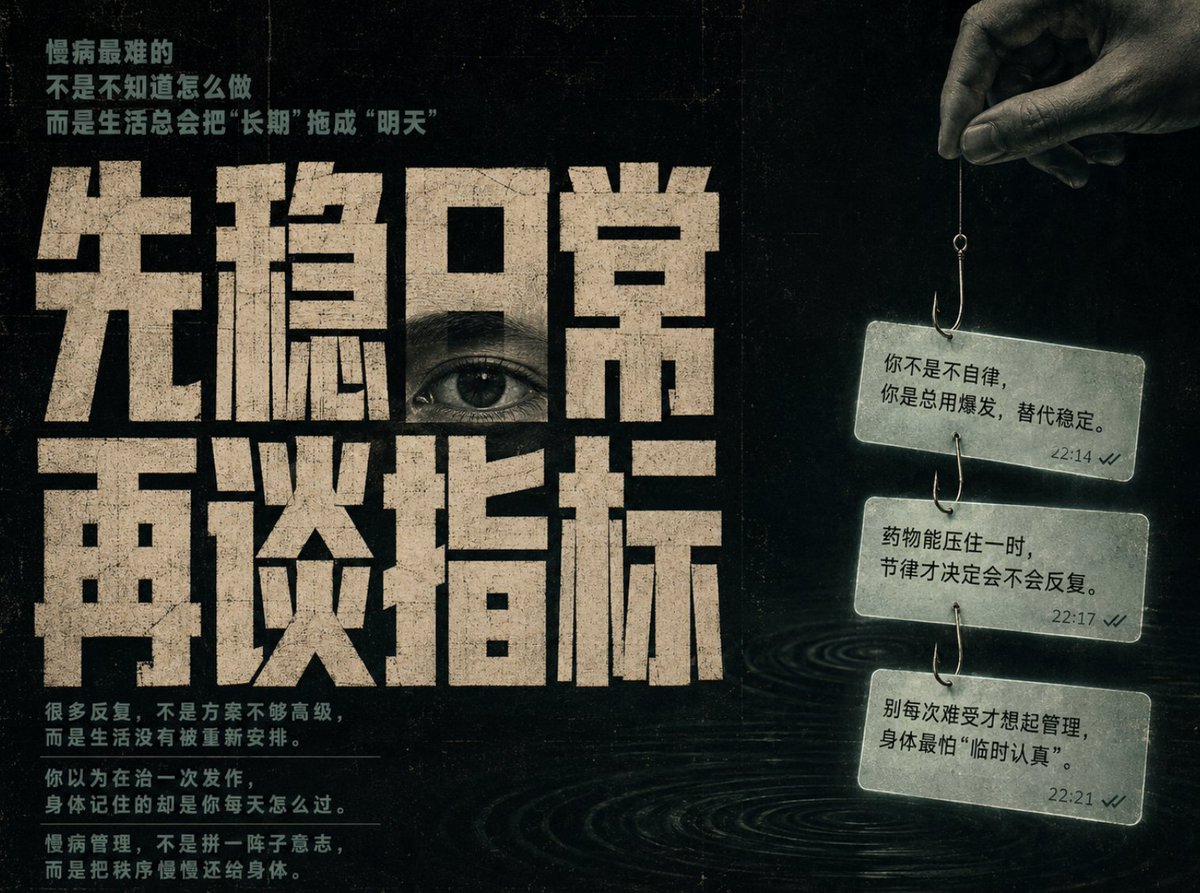
Chinese Cinematic Poster Prompt — Dark Ink & Psychological Depth
프롬프트 · EN
基于我提供的 argtheme: 慢性病管理方法,自动生成一张 argaspect ratio: 横向 4:3 的高端中式概念海报。你的任务是将主题转化为具有心理洞察力、静谧观察感及哲学氛围的视觉作品。风格:中式编辑海报,杂志封面质感,带有粗粝印刷纹理的暗色电影海报。布局:左侧为大型中文字体(占比 70%),可将一只写实的眼睛嵌入文字之中。文字应包含小标题、巨大的主标题以及辅助文本。右侧(占比 30%):暗区,上方伸出一只手,手持一根细线连接着鱼钩,钩上悬挂着三张对话气泡风格的卡片,象征“被钓出的记忆或提醒”。背景:argbackground color: 纯黑 或深暗绿色,带有胶片颗粒感和纸张纹理。氛围:低光、高对比度、神秘且沉静。排版:厚重的工业风黑色字体,带有水墨质感。配色:黑色、深绿色、米白色及低饱和度的蓝绿色。

프롬프트 소개

Create a high-end, cinematic Chinese-style concept poster with a dark, mysterious atmosphere and philosophical symbolism. Use it as a 컨셉 아트 starting point for GPT Image 2: keep the visual structure and style constraints intact, then swap in your own subject, brand, or scene.

Start by replacing theme, aspect ratio, and background color, then keep the camera, composition, and material cues in the same order. This makes the output easier to compare across variations.

이 프롬프트 사용법

  1. Copy the prompt into your AI image generator.
  2. Select a model known for high-detail, artistic outputs (e.g., Sora 2, Midjourney).
  3. Customize the variables in the curly braces: theme (e.g., 'Digital Detox'), aspect ratio (e.g., 'Portrait 3:4'), and background color (e.g., 'Deep Navy').
  4. Generate the image. For best results, use the provided English description with your chosen model's text-to-image feature.
  5. Refine the prompt by adjusting the symbolic elements or color palette based on your initial output.


FAQ

LAMA.Ai

@Ambitfun→

게시일
2026년 5월 15일
원본 언어
EN
모델
GPT Image 2
카테고리
컨셉 아트
GPT Image 2컨셉 아트gpt-image-2twitter
조회
504
복사
60
좋아요
36

공유

GPT Image 2의 더 많은 프롬프트

전체 보기
Sacred Dragon Dome Ceiling Mural — Sora 2 Prompt

Sacred Dragon Dome Ceiling Mural — Sora 2 Prompt

@KanaWorks_AI
Gothic Anime Girl with Hidden Face — Sora 2 Prompt

Gothic Anime Girl with Hidden Face — Sora 2 Prompt

@hoshi122221
Minimalist Skincare Brand Manual — Sora 2 Prompt

Minimalist Skincare Brand Manual — Sora 2 Prompt

@FranromeGraph

Sora2Hub 프롬프트로 더 빠르게 제작하세요.

검색 가능한 프롬프트 페이지에서 시작해 적합한 모델 컨텍스트로 바로 생성하세요.

프롬프트 탐색
