
GPT Image 2AI 프롬프트
Medieval Shot Reverse Shot Sequence — Sora 2 Prompt
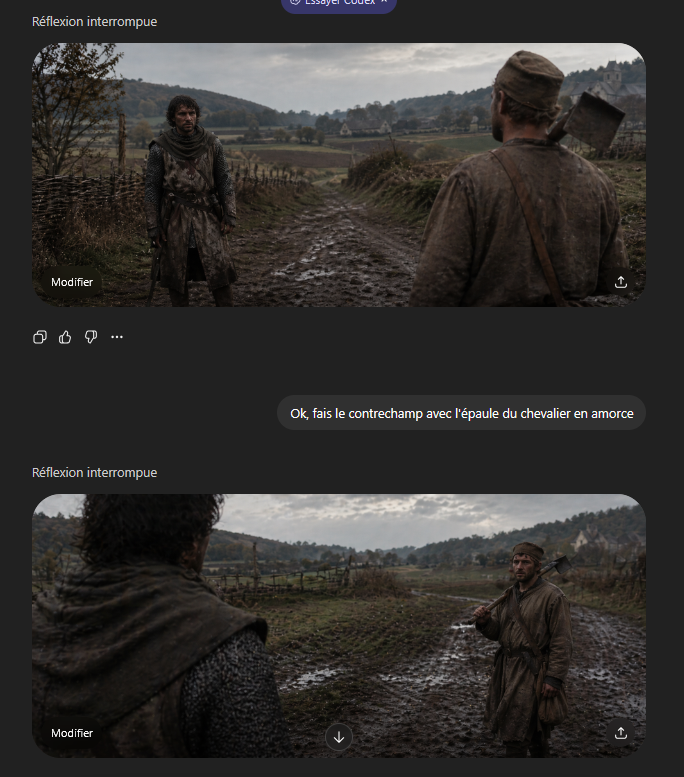
Create a filmic side-by-side comparison of over-the-shoulder framing with a gritty medieval aesthetic, perfect for learning cinematic shot grammar.
프롬프트 · EN
一组电影级的中世纪正反打镜头,呈现为具有颗粒感的历史电影剧照,采用 21:9 超宽画幅,阴天自然光,柔和的大地色调,潮湿的秋季氛围,逼真的泥泞质感,浅景深,以及强烈的过肩构图。场景设定在一条穿越乡村山谷的泥泞乡间小路上,两侧有粗糙的木制篱笆,远处是覆盖着稀疏树木的低矮连绵丘陵、开阔的田野,以及右侧远方山坡上的一座浅色石制农舍或教堂。两个角色在路上相对而立。其中一人是疲惫的中世纪农民,身穿脏兮兮的棕色束腰外衣和帽子,身材中等,肩上扛着一把木柄斧头,胸前斜跨着皮带。另一人是身穿深色风化锁子甲和破旧连帽罩衫的骑士或武装旅人,姿态戒备地站着。请将其制作成电影语法中的反打镜头演示:第一帧展示 argforeground character: 扛斧头的农民 从右侧前景的背面视角,他的肩膀和背部占据了画面右侧近景,而 argbackground character: 穿锁子甲的骑士 则在左侧中景全身出镜,面向镜头站在泥泞的道路上;第二帧反转角度,展示骑士的肩膀和连帽背影在左侧前景虚化,而农民站在右侧中景,肩扛斧头。保持两个镜头在地点、天气、服装连贯性、镜头质感和角色间距上的一致性,呈现出克制的戏剧写实感和紧张的对峙氛围。
프롬프트 소개
Create a filmic side-by-side comparison of over-the-shoulder framing with a gritty medieval aesthetic, perfect for learning cinematic shot grammar. Use it as a 컨셉 아트 starting point for GPT Image 2: keep the visual structure and style constraints intact, then swap in your own subject, brand, or scene.
Start by replacing foreground character and background character, then keep the camera, composition, and material cues in the same order. This makes the output easier to compare across variations.
이 프롬프트 사용법
- Copy this prompt into your AI video generator (e.g., Sora, Runway Gen-3).
- (Optional) Tweak the
foreground characterandbackground characterarguments to swap roles or customize appearances. - Generate the sequence; the first shot frames one character in foreground, the second reverses the angle.
- Use the output to study consistent over-the-shoulder composition, lighting, and camera logic.


