
Sora2 Hub
Sora2 Hub
  • 프롬프트 라이브러리
  • 가격
  • 쇼케이스
Sora2 Hub
Sora2 Hub
Sora2 Hub

Sora2 Hub

Sora 2, Veo 3.1, Nano Banana Pro로 구동되는 전문 AI 창작 플랫폼입니다. 고급 제어, HD 화질, 워터마크 없는 놀라운 동영상과 스튜디오급 이미지를 제작하세요.

Email:support@sora2hub.org

AI 비디오 생성

  • 텍스트에서 비디오
  • 이미지에서 비디오
  • Veo 3.1
  • Sora 2
  • Kling 3.0
  • Kling 2.6
  • Kling 2.5
  • Runway
  • Wan 2.6
  • Seedance 2.0
  • Hailuo 2.3
  • Grok Imagine
  • HappyHorse-1.0

AI 이미지 생성기

  • 텍스트에서 이미지
  • 이미지에서 이미지
  • Nano Banana Pro
  • Nano Banana
  • 4o Image
  • Flux Kontext
  • Z Image
  • Seedream 4.5
  • Seedream 5.0 Lite
  • Nano Banana 2
  • GPT Image 2
  • AI 이미지 업스케일러

AI 효과

  • AI 나이 필터
  • AI 성별 변환
  • AI 키스
  • AI 허그
  • 지브리 이미지
  • AI 인어 필터
  • AI 바디쉐이크
  • 스마일 필터
  • AI 뚱뚱하게
  • 액션 피규어

제품

  • 기능
  • 쇼케이스
  • 가격

회사

  • 소개
  • 문의

© 2025 • Sora2 Hub ORG 모든 권리 보유.

  • 개인정보 처리방침
  • 서비스 약관
  • 환불 정책
  1. 홈
  2. /
  3. 프롬프트
  4. /
  5. GPT Image 2
  6. /
  7. Modern Engineering Sketch Slides — Sora 2 Prompt
GPT Image 2AI 프롬프트

Modern Engineering Sketch Slides — Sora 2 Prompt

Create clean, professional slides mimicking Apple/Tesla product design sketches, with hand-drawn engineering annotations and subtle watercolor accents.
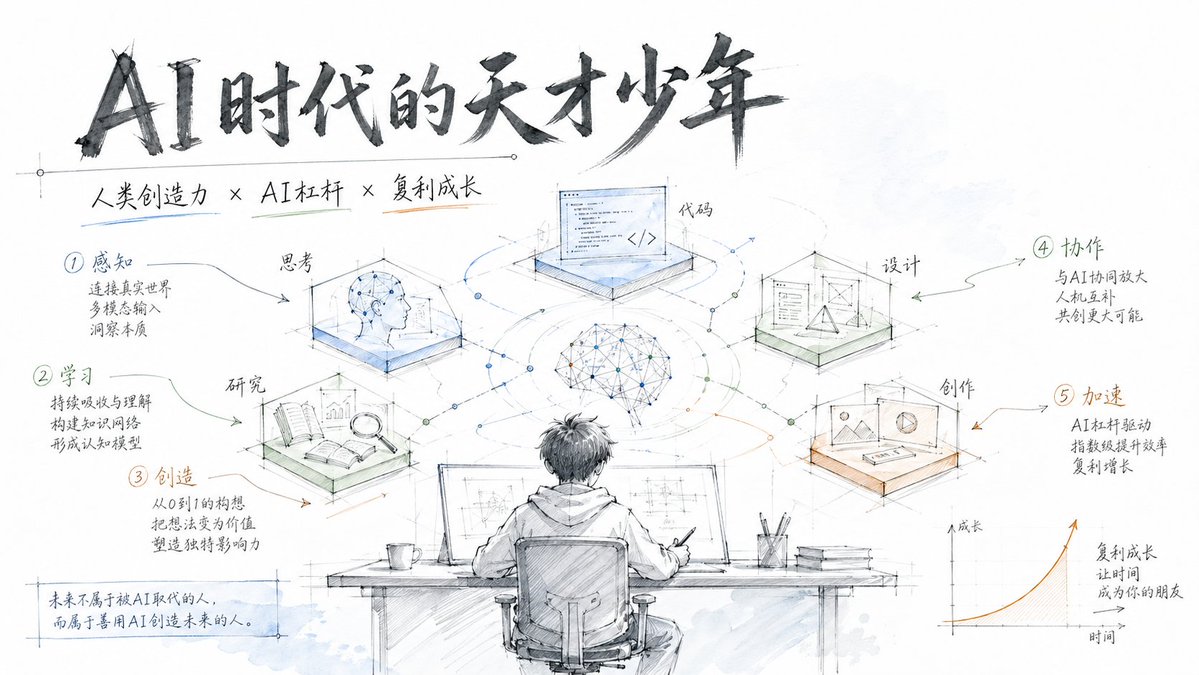
Modern Engineering Sketch Slides — Sora 2 Prompt
1 / 4
프롬프트 · EN
生成具有现代化工程手绘风格的完整 Slides,类似于 Apple 或 Tesla 的产品设计手稿。支持自定义主题和分步流程,采用纯白背景、工程标注和轻盈的水彩点缀,营造出简洁、专业且富有科技感的视觉效果。 - 纯白背景,留白充足
- 工程制图线条风格(细腻、精准)
- 手写标题(深灰色)
- 通过工程标注方式展示步骤
- 浅蓝、浅绿和浅橙色水彩点缀(高透明度)
- 类似于 Apple/Tesla 产品设计草图的现代感
- 简洁图标搭配步骤说明
- 简洁、专业、科技感 主题:argtheme: AI 时代的极客少年

프롬프트 소개

Create clean, professional slides mimicking Apple/Tesla product design sketches, with hand-drawn engineering annotations and subtle watercolor accents. Use it as a 컨셉 아트 starting point for GPT Image 2: keep the visual structure and style constraints intact, then swap in your own subject, brand, or scene.

Start by replacing theme, then keep the camera, composition, and material cues in the same order. This makes the output easier to compare across variations.

이 프롬프트 사용법

  1. Copy the prompt from the box above.
  2. Open Sora 2 or any AI image generator that supports text-to-image or slide creation.
  3. Replace the theme variable with your desired topic (e.g., "Product Launch 2025" or "Renewable Energy Tech").
  4. Generate the slides. If using Sora, the model will produce a sequence of slides; other models may output a single image.
  5. Optionally refine by adjusting the sketch style or watercolor colors in the prompt.

FAQ

LAMA

@Ambitfun→

게시일
2026년 4월 30일
원본 언어
EN
모델
GPT Image 2
카테고리
컨셉 아트
GPT Image 2컨셉 아트gpt-image-2twitter
조회
1.5K
복사
208
좋아요
67

공유

GPT Image 2의 더 많은 프롬프트

전체 보기
Luxury Tennis Fashion Poster — Bold Studio Shoot Sora Prompt

Luxury Tennis Fashion Poster — Bold Studio Shoot Sora Prompt

@blueski68251660
Cyberpunk AI Launch Banner — Cinematic Neon Poster Prompt

Cyberpunk AI Launch Banner — Cinematic Neon Poster Prompt

@ObieriI
Anime Schoolgirls Sharing Transparent Umbrella — Sora 2 Prompt

Anime Schoolgirls Sharing Transparent Umbrella — Sora 2 Prompt

@yB7CqdfoDmrbhgD

Sora2Hub 프롬프트로 더 빠르게 제작하세요.

검색 가능한 프롬프트 페이지에서 시작해 적합한 모델 컨텍스트로 바로 생성하세요.

프롬프트 탐색

