
GPT Image 2AI 프롬프트
Microsoft Edge #1 Browser for Chrome Downloads Prompt
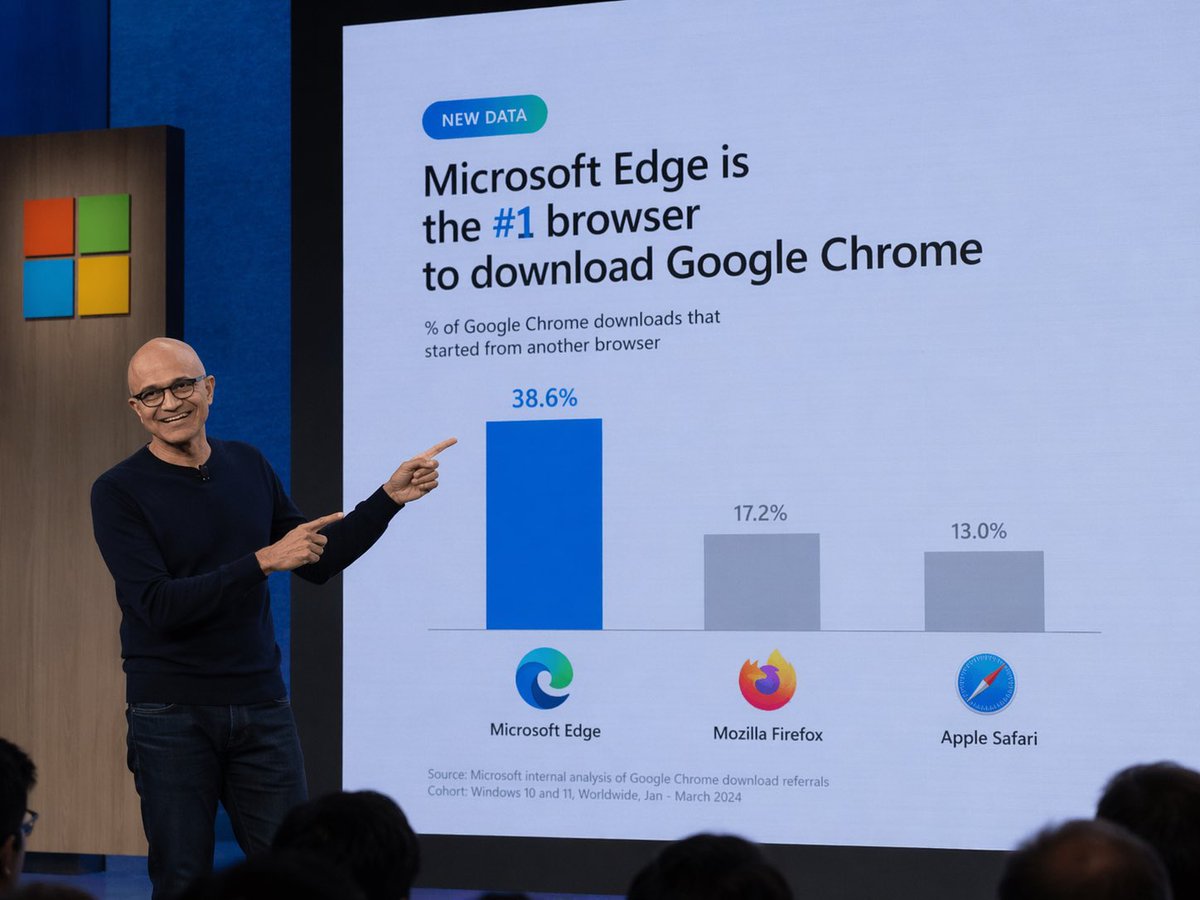
Easily create a humorous tech keynote photo featuring a slide that shows Microsoft Edge as the top browser for Chrome downloads.
프롬프트 · EN
一张科技主题演讲的照片。一位戴眼镜的秃头男子,身穿深蓝色毛衣和牛仔裤,站在舞台左侧,微笑着并用双手食指指向身后的大型演示屏幕。屏幕上显示着一张浅蓝色背景的 Slides。左上角有一个写着“NEW DATA”的青色胶囊状小徽章。下方的主标题写着“argheadline: Microsoft Edge is the #1 browser to download Google Chrome”,其中“#1”以蓝色高亮显示。副标题写着“% of Google Chrome downloads that started from another browser”。下方是一个包含三个柱状的条形图。第一根柱子较高且为蓝色,上方标注“38.6%”,下方带有 Microsoft Edge 标志和“Microsoft Edge”文字。第二根柱子较短且为灰色,上方标注“17.2%”,下方带有 Mozilla Firefox 标志和“Mozilla Firefox”文字。第三根柱子最短且为灰色,上方标注“13.0%”,下方带有 Apple Safari 标志和“Apple Safari”文字。在 Slides 左下角,小字写着“Source: Microsoft internal analysis of Google Chrome download referrals Cohort: Windows 10 and 11, Worldwide, Jan - March 2024”。屏幕左侧的木板上印有 Microsoft 标志(四个彩色方块)。前景底部可见观众的后脑勺。
프롬프트 소개
Easily create a humorous tech keynote photo featuring a slide that shows Microsoft Edge as the top browser for Chrome downloads. Use it as a 컨셉 아트 starting point for GPT Image 2: keep the visual structure and style constraints intact, then swap in your own subject, brand, or scene.
Start by replacing headline, then keep the camera, composition, and material cues in the same order. This makes the output easier to compare across variations.
이 프롬프트 사용법
- Copy the complete prompt from this page.
- Paste it into an AI image generator like DALL·E 3, Midjourney, or Sora.
- Optionally modify the
{headline}argument to customize the slide title. - Generate the image and download your realistic presenter photo.


