
GPT Image 2AI 프롬프트
Claude-Inspired Warm Editorial Slide Design Prompt
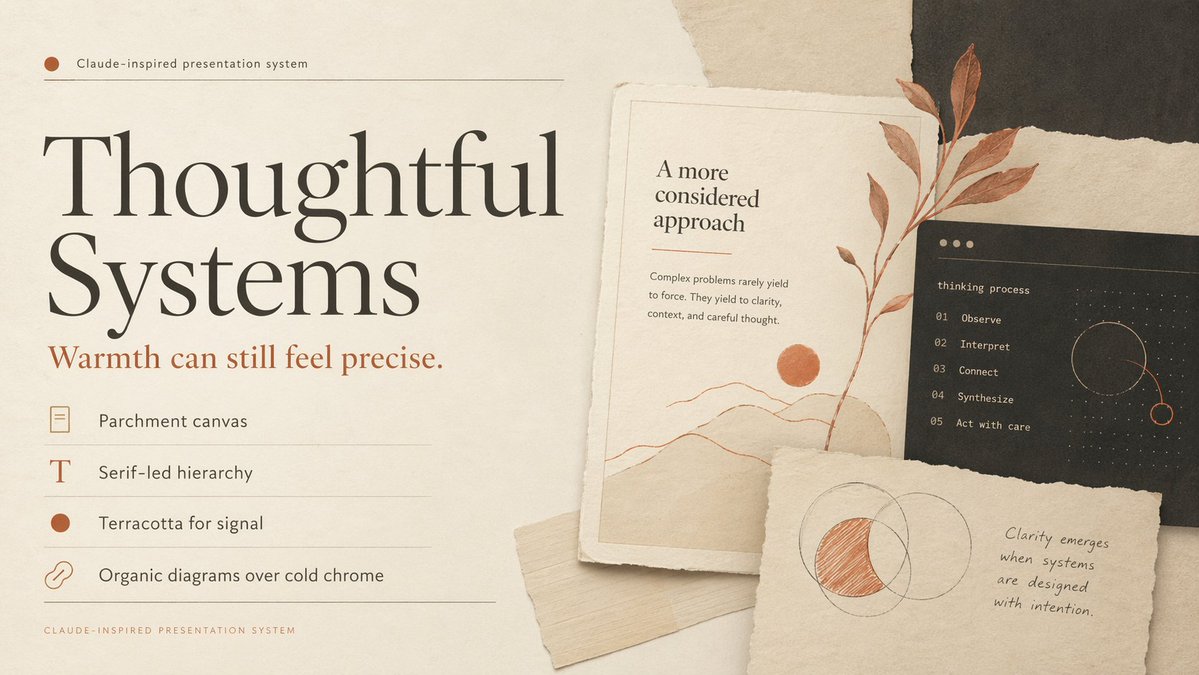
Generate a refined editorial slide cover with parchment textures, terracotta accents, and serif typography, ideal for thoughtful AI presentations.
프롬프트 · EN
创建一个精致的编辑风格演示封面幻灯片,采用温暖的 Claude 风格设计系统。使用 16:9 横向构图,背景为羊皮纸,带有细腻的纸张纹理、柔和的阴影以及分层的撕纸拼贴元素。整体色调应为暖象牙色、奶油色、沙色、炭灰色、柔和黑色以及赤陶色点缀。在左半部分,放置一个小标签,显示“argsystem label: Claude 风格演示系统”,配有一个赤陶色小圆点和一条细水平分割线。在其下方,设置一个超大且优雅的高对比度衬线标题,颜色为黑色,内容为“argmain headline: Thoughtful Systems”,分为两行,占据左侧主要位置。在标题下方,添加一个较小的赤陶色衬线副标题,内容为“argsubheadline: 温暖亦可精准。”。在此之下,创建一个包含 4 个设计原则的垂直列表,每一项占一行,带有细分割线和左侧小图标:1) 一个矩形羊皮纸图标,文字为“羊皮纸画布”;2) 一个衬线大写字母 T 图标,文字为“衬线主导的层级”;3) 一个填充的赤陶色圆形图标,文字为“赤陶色用于信号提示”;4) 一个链条图标,文字为“有机图表胜过冷峻金属感”。在左下角添加一行微小的页脚说明,以间距较大的小写字母显示“CLAUDE-INSPIRED PRESENTATION SYSTEM”。在右半部分,构建一个由 3 张纸质卡片组成的分层拼贴:第一张是带有细边框的米白色高长艺术卡片,包含标题“更深思熟虑的方法”、一段关于复杂问题如何趋于清晰的简短正文、一幅带有赤陶色太阳的极简风景线条画,以及一张覆盖在卡片上的垂直赤陶色植物枝条;第二张是位于其后方的深炭灰色矩形卡片,带有小写标题“thinking process”和一个精确的 5 步编号列表:“01 Observe”、“02 Interpret”、“03 Connect”、“04 Synthesize”、“05 Act with care”,以及一个带有虚线和赤陶色高光的精致圆形轨道图;第三张是靠近底部前方的一张撕边米白色便签卡,上面有一个手绘的重叠圆圈图,其中一个新月形的交叉区域用赤陶色填充,旁边是一句手写引语:“argquote: 当系统被有意设计时,清晰度便会显现。”。在底部卡片下方塞入一条额外的浅米色纸条。强调触感真实性、优雅的留白、印刷编辑的精致感、柔和的自然光影以及冷静、深思熟虑的奢华科技氛围。
프롬프트 소개
Generate a refined editorial slide cover with parchment textures, terracotta accents, and serif typography, ideal for thoughtful AI presentations. Use it as a 컨셉 아트 starting point for GPT Image 2: keep the visual structure and style constraints intact, then swap in your own subject, brand, or scene.
Start by replacing system label, main headline, subheadline, and quote, then keep the camera, composition, and material cues in the same order. This makes the output easier to compare across variations.
이 프롬프트 사용법
- Copy the prompt from the text area above.
- Paste it into a powerful AI model like Claude 3.5 Sonnet or GPT-4o.
- Customize the placeholders (e.g.,
main headline,system label) to match your project. - Generate the detailed design description.
- Use the description to craft your slide in tools like Figma or PowerPoint, or feed it into an image generator.


