
GPT Image 2Prompt de IA
Japanese AI Creator Studio Banner — Soft Gradient Design
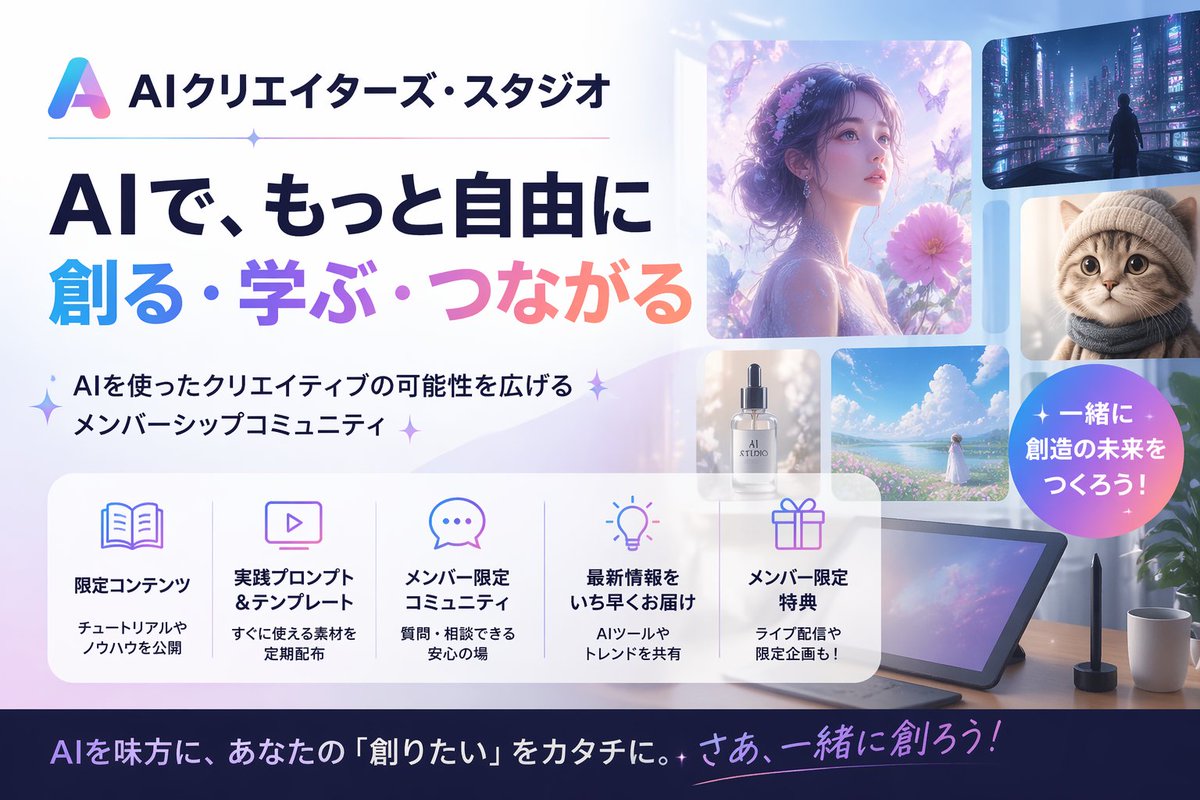
Generate a sleek Japanese AI creator community banner with soft pastel gradients, glassmorphism, and a collage of AI visuals, ideal for website headers and social posts.
PROMPT · EN
制作一款精致的日文 AI 创作者社区网站宣传横幅,采用简洁现代的科技广告风格,配色方案为柔和的淡蓝色、薰衣草紫、粉色和白色。采用 16:9 宽屏构图。左侧上方放置一个渐变三角形抽象 Logo 和日文品牌名称 argbrand name: AIクリエイターズ・スタジオ,下方是一条细横分割线,中间带有一个小闪光点。下方是两行超大加粗的日文标题:第一行使用深海军蓝,文字为「AIで、もっと自由に」;第二行使用从青色到紫色再到粉色的渐变大字,文字为「創る・学ぶ・つながる」。标题下方添加一行带有闪光符号的简短日文副标题:「AIを使ったクリエイティブの可能性を広げるメンバーシップコミュニティ」。右半部分制作一个由 6 张圆角矩形视觉卡片组成的拼贴画,展示 AI 生成的创意示例:1 张大型梦幻侧脸女性肖像,周围环绕着花朵和蝴蝶,沐浴在空灵的紫光中;1 张小型赛博朋克城市夜景,画面中有一个孤独的身影;1 张小型毛茸茸猫咪的特写肖像;1 张标有“AI STUDIO”字样的奢华化妆品瓶;1 张小型明亮的海景或花田风景,画面中有一位身穿白衣的女性;以及 1 张大型平板绘图设备放在桌上,配有手写笔、咖啡杯和植物。在右侧叠加一个圆形渐变徽章,上面印有加粗的白色日文文本 argbadge text: 一緒に創造の未来をつくろう!。在下方中部横向放置一个半透明白色圆角功能面板,包含 5 个等宽列,配有细分割线和柔和的线条图标。每列包含一个图标、一个加粗的日文标题以及一段较小的两行描述。5 个标题分别为:「限定コンテンツ」、「実践プロンプト&テンプレート」、「メンバー限定コミュニティ」、「最新情報をいち早くお届け」、「メンバー限定特典」。使用书籍、显示器、聊天气泡、灯泡和礼物的合适图标。在每个标题下方添加简洁的日文描述。最底部添加一个深海军蓝页脚条,上面写有一句醒目的日文行动号召语,采用白色和粉紫色渐变强调文本,argfooter text: AIを味方に、あなたの『創りたい』をカタチに。さあ、一緒に創ろう!。整体外观:高端初创公司落地页风格,光泽柔和,带有细微闪光,采用玻璃拟态面板,排版清晰,日文文本渲染准确,高度易读,视觉平衡,具备专业的社交媒体缩略图品质。
Sobre este prompt
Generate a sleek Japanese AI creator community banner with soft pastel gradients, glassmorphism, and a collage of AI visuals, ideal for website headers and social posts. Use it as a Arte Conceitual starting point for GPT Image 2: keep the visual structure and style constraints intact, then swap in your own subject, brand, or scene.
Start by replacing brand name, badge text, and footer text, then keep the camera, composition, and material cues in the same order. This makes the output easier to compare across variations.
Como usar este prompt
- Copy the prompt and paste it into your AI image generator (e.g., DALL-E, Midjourney, Stable Diffusion).
- Customize the variables: brand name, badge text, and footer text by replacing the
{argument}placeholders with your own Japanese text. - Choose a model that excels at text rendering and complex layouts, like DALL-E 3, Midjourney v6, or Flux.
- Generate at 16:9 aspect ratio (e.g., 1792x1024 for DALL-E). If text is inaccurate, add “with clear Japanese text” to refine.


